When to Use an Integer Field
An integer field is used when the field in the ERP system contains whole numbers. This could be any number between -2,147,483,648 and 2,147,483,647.
Here are some examples of whole numbers.
- 1986
- -89
- 159863
When the integer field comes to our framework, it will be converted to a .NET integer object. If it cannot be converted because it contains invalid characters like text or decimals, the framework returns an error.
Configure a Numeric Text Box
In this section you will learn how to configure an integer text box. First you will get information about the object field settings. The second part describes the view field settings.
Object Field
If you create a new integer object field or method field, it is possible to change some type specific properties. Of course there are also a lot of generic properties like unique, external name or default value. Refer to common properties for more information about this topic.
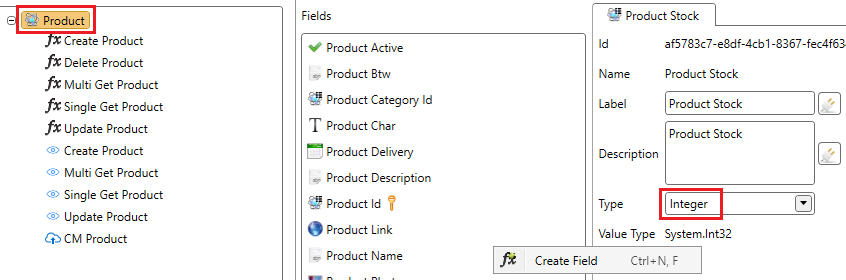
- Click on the object.
- Create a new field.
- Change the type from Text to Integer.
Minimum Value
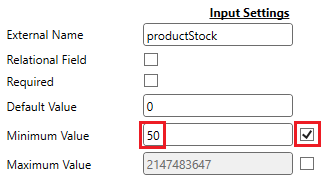
The default minimum value is -2,147,483,648. It is possible to override the default minimum value by checking the checkbox after the text box. In the figure below the value is changed to 50. This means that the value can’t be lower than 50 and this will be checked in the ADM by the browser and by the framework in the back-end.
Maximum Value
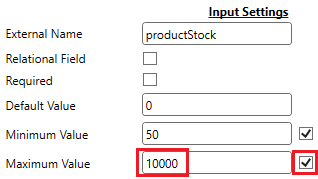
The default maximum value is 2,147,483,647. It is possible to override the default maximum value by checking the checkbox after the text box. In the figure below the value is changed to 10000. This means that the value can’t be higher than 10000 and this will be checked in the ADM by the browser and by the framework in the back-end.
Interface Formatter
Refer to Interface formatter for more information about this topic.
View Field
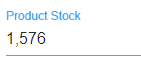
An integer field is displayed in the ADM by a special integer control. Depending on the view type there are different properties. The figure below shows an example of what the control will look like in the ADM.
Multi Record View
| Property | Description |
|---|---|
| Formatter | For more information: View formatter |
Single Record View
| Property | Description |
|---|---|
| Formatter | For more information: View formatter |
| Events | JavaScript events used to interact with the integer text box. |
Create and Update View
| Property | Description |
|---|---|
| Read Only | If checked the control could not be changed by the user. |
| Use Data Source | For more information: Configuring a data source |
| Mask | Refer to rules and literals. When a mask is used, the layout of the control will be changed to a Kendo masked textbox. |
| Minimum Value | The minimum value is inherited from the method field. We advise not to break the inheritance and change the value on object level. In the ADM it is not possible to enter a value smaller than the minimum value. |
| Maximum Value | The maximum value is inherited from the method field. We advise not to break the inheritance and change the value on object level. In the ADM it is not possible to enter a value bigger than the maximum value. |
| Events | JavaScript events used to interact with the integer text box. |
| Formatter | For more information: View formatter. |