Installation requirements
The Baan Connector consists of the following objects:
| Object | Language | Location |
|---|---|---|
| BCSL - Business Connector Slave Listener | Unix: C Windows: C# |
Unix: $BSE/ometa/BCSLWindows: TopDir\BC\Bin\Services |
| BCS_BAAN - Business Connector Slave interface program for Baan | Unix: C Windows: C# |
Unix: $BSE/ometa/BCS_BAANWindows: TopDir\BC\Bin\Interfaces\BCS_BaaN |
| BaanInterface.o | Baan 3GL | $BSE/ometa/BaanInterface |
There are also two configuration files for the Baan Connector in Unix:
| Config file | Configuration | Location |
|---|---|---|
| BCSL-config.txt |
|
$BSE/ometa/BCSL |
BCSL - SQL Server
Important
As both the BaaN connector and the BCSL service are installed on the dedicated BaaN host, separate from the framework host, it will be very important to make sure that the BCSL service can have access to the Case Management database for reading in configuration information.
Consult Minimal System Requirements - Framework Services for more information about the requirements.
Connector Requirements
Baan Connector in Unix
For the Baan Connector in Unix there are a number of scripts used for starting and stopping BCSL:
| Script | Actions | Location |
|---|---|---|
| start_bcsl_scr |
|
$BSE/ometa/BCSL |
| stop_bcsl_scr |
|
$BSE/ometa/BCSL |
| start_BCSL |
|
$BSE/ometa/BCSL |
| stop_BCSL |
|
$BSE/ometa/BCSL |
| bcsl.mnu |
|
$BSE/ometa/BCSL |
Baan Connector in Windows
For the Baan Connector in Windows, the BCSL is already installed during the setup of the Ometa Business Connector Framework. During this installation also the port number must be specified. This port number can be modified via the Server settings of the framework (see Configuration).
BCSL is started as a service. Note that the Baan user and password must be specified on the Log On tab of the Properties of this service:

Multiple package combinations (Unix)
In case of multiple package combinations within one BSE environment, a subdirectory must be created in $BSE/ometa/PackComb for each package combination that will be used in the Ometa Business Connector. This subdirectory for each package combination consists again of the subdirectories BCSL, BCS_BAAN and BaanInterface. When setting up these directories, only the script bcsl.mnu (only for Unix), and the config file for BCSL must be placed in the BCSL-directory. So the objects of the Baan Connector and the actual start and stop scripts (start_bcsl_scr and stop_bcsl_scr) remain in the subdirectories of $BSE/ometa, and are used for each package combination.
Multiple package combinations (Windows)
Multiple package combinations in Windows are not supported within the same Ometa server. However, it is possible to set up a different virtual for each package combination with its own BCSL configuration.
Troubleshooting
Environment Variables
You must add a BSE environment variable when the following occurs:
- Testing a BaaN/ERP LN method in the Ometa Business Connector does not return;
- on the BaaN/ERP LN server, there is a bcs_baan.exe proccess;
- there is no ntbshell.exe running with the account of the service user.
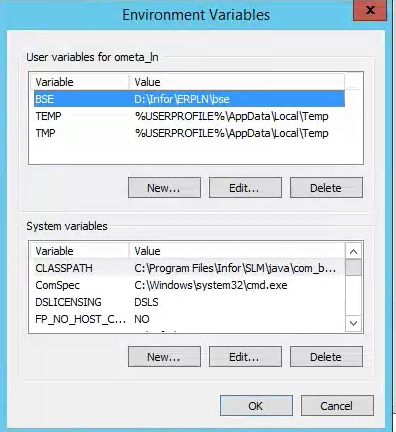
Add the following environment system variable. It is also possible to add this as user environment variable for the same user as the BCSL Service Account.
| Variable | Value |
|---|---|
| BSE | Path to the BSE directory |