Creating New Methods
Methods are the workhorse of a solution. Every action requires a method to read, update or insert data, back and forth between back end systems and portals. They are stored in objects, which behave as a kind of container to group related methods together.
Add a New Method
Follow the steps below to create a new method.
Select the object to add the new method to.
Click on the button New Method (or use the shortcut CTRL+N, M).
Provide a method type and a name for the new method and click Create:
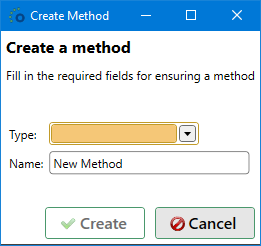
Following method types are available, descriptions of each type can be found in Method Type Descriptions:

Note
Pay attention to the casing of the new name. Creating a new method in which the name only differs in casing, e.g. Get Data vs Get data will result in an error message. This is done to avoid confusion between methods later on.
Adding a pre- or postfix to an existing name is sufficient to make the new name unique.
Click Cancel to cancel the method creation.
The method is added to the object but not yet saved.
Right now the only actions left to complete the new method definition, are:
- Selecting the proper template(s);
- Adding input and/or output fields. For more information about available types, see Field Types;
- Fill in the interface scripts.
Query Options
Query options are the framework's implementation of filtering and/or sorting the data. When filtering and/or sorting an ADM, the framework's query options come into play.
It is also possible to configure query options on a method or a view as shown below. If you have configured options on the method or view, those options are applied together with any options set on an ADM by the user.
Filtering
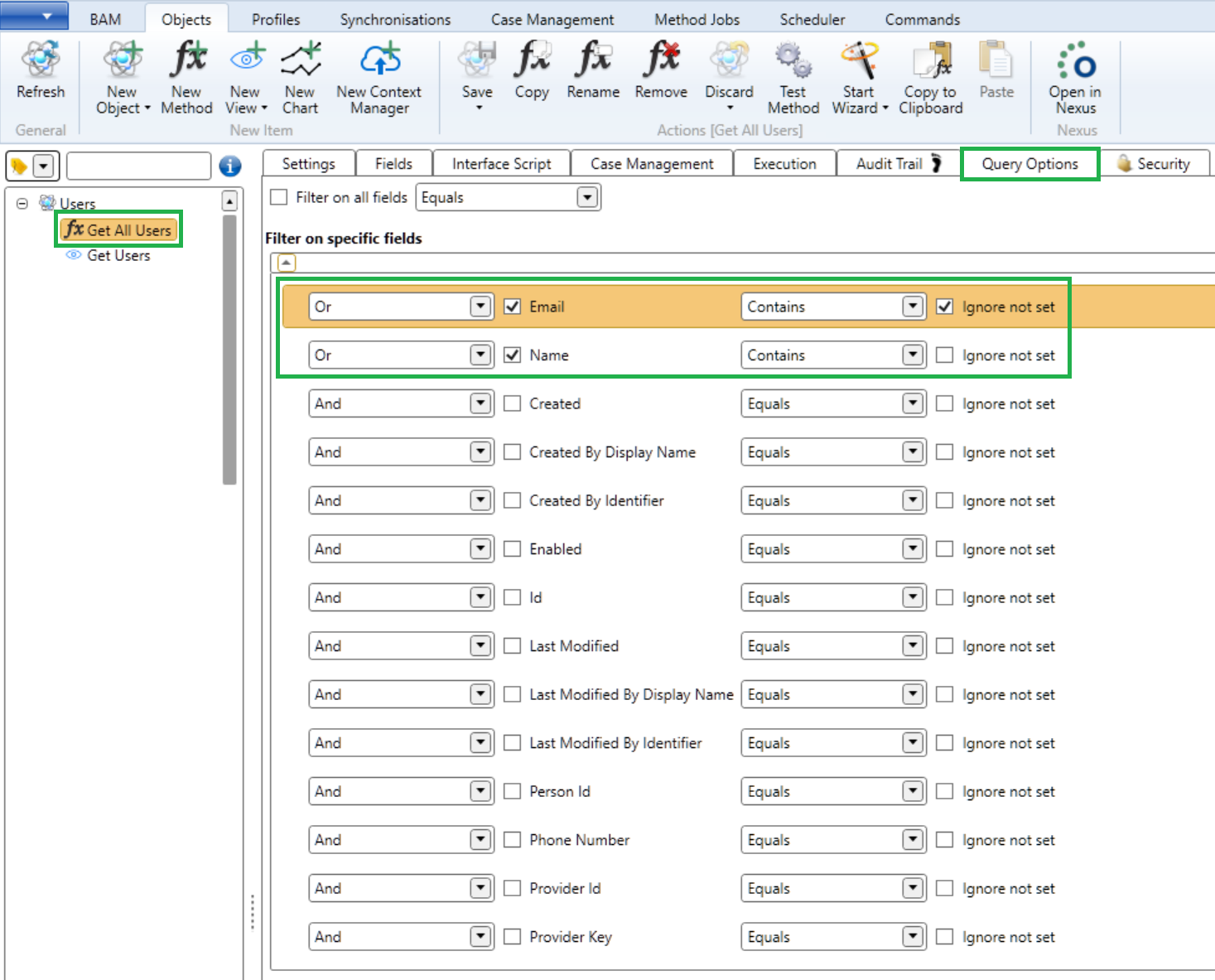
In this example, we have a method which will fetch a collection of users. On the query options we have configured 2 filters:
- A contains filter on the field Email which will be ignored if no filter value is specified upon execution (Ignore not set is enabled)
- A contains filter on the field Name which will always be applied
Those 2 filters are combined with an Or operator meaning at least one of the 2 conditions must be met.
When the method is executed, the framework will search for input context with the name Email and Name and will use those values to apply the filter on the results.
Examples:
| Name | Result | |
|---|---|---|
| Not specified | Ja | All users with 'Ja' (case insensitive) in their name will be returned (e.g.: Jan, Elijah, Gertjan, ...). |
| @ometa.net | Not specified | All users with an email address containing '@ometa.net' will be returned (e.g.: jan@ometa.net, elijah@OMETA.NET, GertJan@devometa.netjes) |
| @ometa.net | Ja | All users with 'Ja' in their name OR with an email address containing '@ometa.net' will be returned (e.g.: jef@ometa.net, elijah@OMETA.NET, GertJan@microsoft.com) |
Sorting

In the example above, the results will be sorted on the Name field in ascending order. When checking multiple fields, the first one takes precedence over the next one.
Warning
If the interface, being used, does not support sorting directly, the framework must take all records into memory for being able to sort them. This will degrade performance and can cause a temporary massive memory footprint if the requested dataset is big.
Some interfaces like OData and ODBC are capable of using the sort action in their data layers so the framework doesn't have to. Learn how these interfaces can do this and take note that performance will degrade on big datasets if the framework must process it.
Distinct

In the example above, only records with a unique email address will be returned. Subsequent records with the same email address will be removed from the results.
If you enable multiple fields, the values of those fields are taken together to create one unique value.
Warning
If the interface, being used, does not support distinction directly, the framework must take all records into memory for being able to distinct them. This will degrade performance and can cause a temporary massive memory footprint if the requested dataset is big.
Some interfaces like OData and ODBC are capable of using the distinct action in their data layers so the framework doesn't have to. Learn how these interfaces can do this and take note that performance will degrade on big datasets if the framework must process it.
Remarks
Important
It is important to know that, by default, these query options are applied after the records have been fetched from the data source. This means that if you request a very large dataset, performance will be degraded depending on the interface's implementation.
The OData and ODBC interfaces have builtin functionality to use these query options directly on the data source to boost performance and prevent the framework from processing these options. Read the interfaces' documentation to learn to which extend the query options are used in their implementations.
Warning
If a method is used as a data extension, the query options configured on that method, will be ignored. Only the query options configured and applied on the main method will be used.
Optional Items
Extra items can also be enabled on the new method if needed for the solution:
- Triggering case management;
- Add data enrichment (Input Extensions, Output Extensions), output caching, retry execution, ...;
- Audit trail, query options and Securing the Method.