⚠️ Security Advisory: Exchange Online SMTP Basic Authentication Deprecation
| Status | Timeline Updated (January 2026) |
| Enforcement Date | December 2026 (Disabled by default) / 2027 (Final Removal) |
| Impact | High (Email sending will fail for legacy SMTP configurations) |
| Microsoft Reference | Deprecation of Basic authentication in Exchange Online |
Summary
Microsoft has refined the timeline for the deprecation of Basic Authentication (username and password) for SMTP AUTH (Client Submission) in Exchange Online. To improve security against credential theft and brute force attacks, Microsoft is moving entirely toward OAuth 2.0 (Modern Authentication).
While the Ometa Framework has supported the Microsoft Graph API in the mail building block since v5.0.0, many legacy implementations could still rely on the SMTP protocol via smtp.office365.com. These configurations will cease to function as Microsoft enforces this change.
Updated Timeline
- Now to December 2026: Basic Auth remains available, but its use is strongly discouraged.
- End of December 2026: Basic Auth will be disabled by default for all existing tenants. Administrators may still manually re-enable it temporarily.
- Second half of 2027: Microsoft will announce the final removal date, after which Basic Auth will be permanently blocked with no option to re-enable.
How this affects your solution
If your Ometa environment sends emails (notifications, reports, or workflow alerts), you are affected if you use any of the following:
- Ometa SMTP Profiles: Profiles based on the SMTP - Mail Building Block template.
- Custom Code/DLLs: Any DLLs referring to these SMTP Profiles.
- Custom Code/DLLs: Any DLLs using
System.Net.Mail.SmtpClientwith hardcoded credentials.
Note
Exceptions:
If your SMTP server is configured as [tenant].mail.protection.outlook.com (Direct Send) and does not use a username/password, you are generally not affected by this specific deprecation.
Identification Plan
Identify SMTP Profiles in the Ometa Framework.
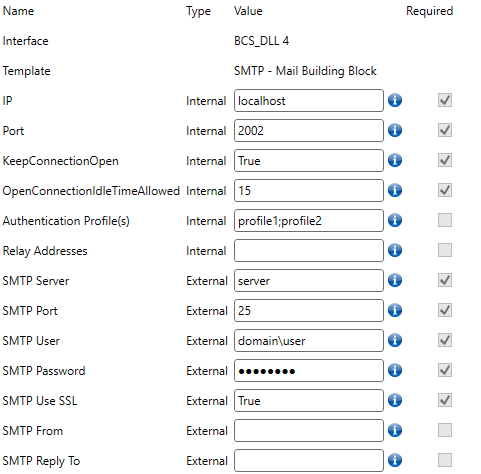
Open the Ometa Business Connector and check the Profiles.
- Look for profiles where the SMTP Server is set to
smtp.office365.comorsmtp-legacy.office365.com - Check if the SMTP User and SMTP Password fields are populated.
Example: A legacy profile using SMTP Basic Auth.
- Look for profiles where the SMTP Server is set to
Locate usage via SQL
Run the following query on the Ometa Framework database to find common places where you might need to alter the profile.
/** Find in Extensions Query **/
SELECT
    o.Name AS ObjectName,
    m.Name AS MainMethodName,
    em.Name AS ExtensionMethodName,
    d.ExtensionMethodId,
    d.OutputHandlingType,
    d.Direction
FROM [ext].[DataExtensionSettings] d
JOIN [rep].[Methods] m ON m.ID = d.MainMethodId
JOIN [rep].[Objects] o ON o.ID = m.ObjectId
LEFT JOIN [rep].[Methods] em ON em.ID = d.ExtensionMethodId
WHERE d.ExtensionMethodId IN (
    SELECT
        m.Id
    FROM [master].MethodSettings ms
    JOIN [rep].[Objects] o ON o.Name = ms.ObjectName
    JOIN [rep].[Methods] m ON m.Name = ms.MethodName
    JOIN [rep].[FrameworkProfiles] p ON ms.ProfileName = p.Name
    JOIN [master].[ProfileTemplates] t ON t.Id = p.TemplateId
    -- Change the profile (p) or template (t) names if you identified other names.
    WHERE t.Name LIKE '%SMTP%'
    OR t.Name LIKE '%Mail%'
    OR p.Name LIKE '%SMTP%'
    OR p.Name LIKE '%Document Approval%'
    OR t.Name LIKE '%Document Approval%'
)

/** Find in DCS Tasks **/

SELECT TOP (1000) [ID]
    ,[Name]
    ,[Description]
    ,[Type]
    ,[IsMailEnabled]
FROM [dbo].[TaskDefinitions]
WHERE IsMailEnabled = 1


/** Find in DCS **/

-- Extend the list with identified profile names.

DECLARE @ProfileList TABLE (ProfileName NVARCHAR(255));
INSERT INTO @ProfileList (ProfileName)
VALUES
    ('Mail Building Block'),
    ('SMTP - Mail Building Block'),
    ('DLL Document Approval'); -- Extend this list

WITH RelevantMethods AS (
    SELECT
        MD.ID,
        MD.Name,
        T.ProfileName AS FoundProfile
    FROM [dbo].[MethodDefinitions] MD
    CROSS APPLY (
        SELECT CAST(MD.Settings AS XML).value('(/ObjectConnectionSettings/@Profile)[1]', 'NVARCHAR(MAX)') AS ProfileName
    ) AS T
    INNER JOIN @ProfileList PL ON T.ProfileName = PL.ProfileName
)

SELECT
    'Method Definition' AS Type,
    RM.Name AS ActionName,
    '' AS ParentContainer,
    RM.FoundProfile AS ProfileName
FROM RelevantMethods RM

UNION ALL

SELECT
    'State Action' AS Type,
    SA.Name AS ActionName,
    L.DisplayName + ' (State: ' + SA.Name + ')' AS ParentContainer,
    RM.FoundProfile
FROM [dbo].[StateActions] SA
JOIN [dbo].[Lifecycle] L ON SA.LifecycleID = L.ID
JOIN RelevantMethods RM ON SA.MethodID = RM.ID

UNION ALL

SELECT
    'Grouped Action' AS Type,
    GAA.Name AS ActionName,
    GA.Name AS ParentContainer,
    RM.FoundProfile
FROM [dbo].[GroupedActionActions] GAA
LEFT JOIN [dbo].[GroupedActions] GA ON GAA.ParentGroupedActionID = GA.ID
JOIN RelevantMethods RM ON GAA.MethodID = RM.ID

ORDER BY Type, ActionName;
Migrate
To migrate, we strongly recommend switching to the Microsoft Graph API template.