Installation
The Ometa Smart Tiles are a web based component which can be used in any web based environment.
SharePoint
The Ometa Smart Tiles has support for SharePoint Online and SharePoint 2019. For the best user experience, you should use Modern Pages.
SharePoint Online
The obiz-suite-apps.sppkg is designed to use in SharePoint Online only. This app requires the User.Read and GroupMember.Read.All permissions for the Microsoft Graph API. These permissions are only used to support Single Sign On flows in the Ometa Framework.
Always upgrade the app with each framework release to support cache bursting. This ensures that the user always get the latest files from the web browser.
Upload the obiz-suite-apps.sppkg in the App Catalog.
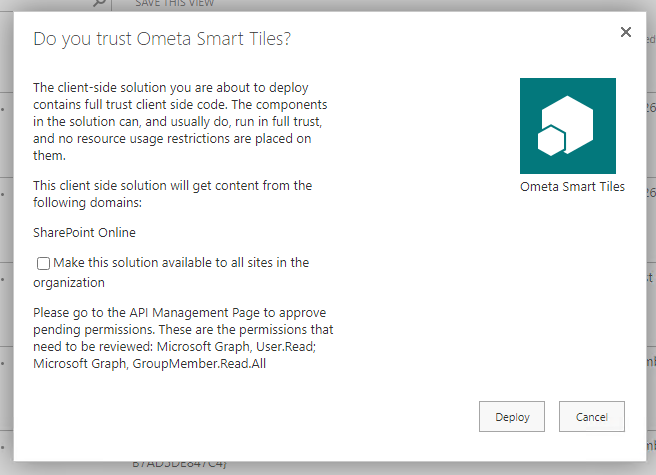
Consider to check the Make this solution available to all sites in the organization checkbox.
Click on Deploy.
Go to API Management Page on the SharePoint Admin Center to approve the permissions for this app.
SharePoint Server
The obiz-suite-apps.sppkg is designed to use in SharePoint Server 2019 and SharePoint Server Subscription Edition only.
Always upgrade the app with each framework release to support cache bursting. This ensures that the user always get the latest files from the web browser.
Upload the obiz-suite-apps.sppkg in the App Catalog.

Consider to check the Make this solution available to all sites in the organization checkbox.
Click on Deploy.
Web Based System
In a web based system you need to load the CSS and JavaScript files from the ADM. Before loading these files you need to instantiate the global obiz.auth variable.
Use the obiz-component-loader HTML tag which will be registered as a custom element and provide the componentType="SmartTiles" and name="" attributes.
The Redirect Url and Silent Redirect Url pages need to be hosted on the same environment as this page. You can copy the redirect.html & silent-redirect.html pages from the core service path: {core service url}/assets/adm/assets/static/auth-pages/silent-redirect.html;
<html>
    <head>
        <script>
            obiz = typeof obiz === "undefined" ? {} : obiz;
            obiz.auth = {
                coreServiceUrl: 'https://coreService.url',
                redirectUrl: 'https://myHostedWebSite/auth-pages/redirect.html',
                silentRedirectUrl: 'https://myHostedWebSite/auth-pages/silent-redirect.html',
                preferredProvider: 'idp:Windows' // Optional: when multiple auth. providers are enabled, Windows will be used. Use idp: Microsoft for Microsoft Online account.
            }
        </script>

        <link rel="stylesheet" type="text/css" href="https://coreService.url/assets/adm/styles.css">
        <script src="https://coreService.url/assets/adm/obiz-adm.js"></script>
    </head>
    <body>
        <obiz-component-loader
            componentType="SmartTiles"
            name="My Smart Tile Configuration"
            hiddenWhenUnauthorized="False"
        ></obiz-component-loader>
    </body>
</html>