Interface Script Context Tokens
Although with the help of the Ometa BAM Portal it is possible to trace the execution of a method job or synchronisation, it is not possible via that route to find out which records have been processed by which particular job.
To facilitate this, the Ometa framework job scheduler (BCJS) offers the context tokens listed below for use in the interface scripts. These can be used to link processed records back to the original job.
Note
These tokens will only be available when a method is run by the framework job scheduler. When a method is executed in the context of a user action on an ADM, there will be no value present and the token will be replaced by an empty value.
Context Tokens
The following context tokens are available for the interface scripts:
| Context Token | Value Description | Example |
|---|---|---|
| jobs.execution.id | an integer, the job execution log Id | 50 |
| jobs.execution.correlationid | a GUID, unique for each job run | 14be03d3-eb89-4c7a-b933-195166e5c9ed |
| jobs.definition.name | text, the name of the job definition | Ometa - Retry Failed Cases |
| jobs.definition.type | fixed text, either Method or Synchronisation | Method |
Interface Script
Adding those tokens in an interface script is very easy to do. Just use the framework context token menu and select the desired token to insert in the script.
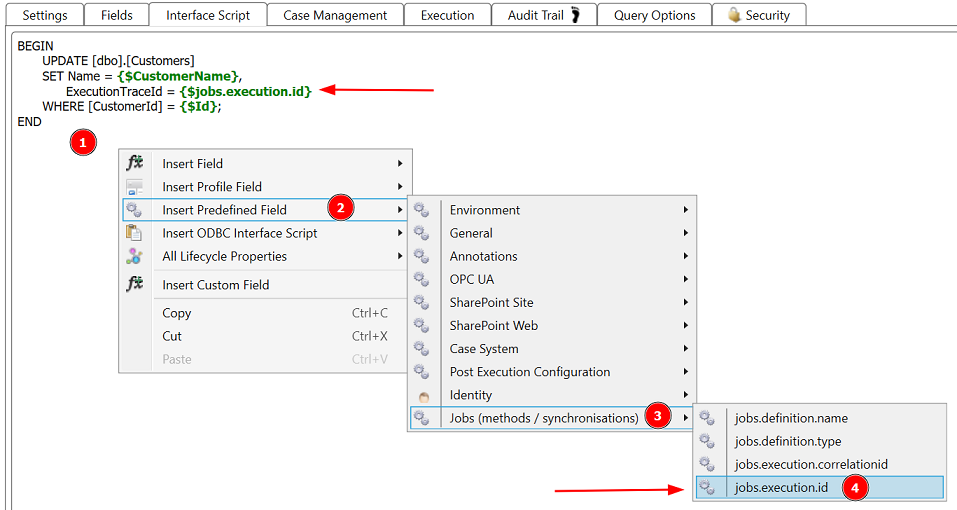
Follow these steps:
- Right-click in the interface script editor on the location where to add the token.
- Select Insert Predefined Field.
- Select Jobs (methods / synchronisations).
- Click on the desired token, in this example: jobs.execution.id.
The token is added to the script.