Query Log Data with OData
As described in the Execution Logs Availability a lot more execution logs are present in the framework. With the help of specific OData endpoints, information about both the job definitions and the execution logs themselves can be retrieved and even be used to build a custom job execution dashboard.
Note
Not all OData endpoints are described in detail. Only those that are needed to retrieve execution log information, will be shown. Other endpoints are just used to read job configuration settings, and therefor will be skipped in this article.
Security
The current version of those endpoints are read-only, meaning data can only be retrieved but not modified or added. To make changes to job definitions it is still required to use the Business Connector application.
Additionally, the endpoints are secured against unauthorized access. Every user must exist in the security configuration and have a valid access token as authorized user.
If this requirement is not met, a call to job endpoints will fail with a "403 Forbidden" response.
Note
When extra security is needed, e.g. in context of only specific users having to a job execution dashboard, it is advised to set up a lifecycle and create a case which will be set in the context of that dashboard.
Enable the security setting Enforce Case Context to run the method with that case in mind and it will check whether the user is a member of the case before even the method is executed.
General Configuration
The endpoints support 2 operations of retrieving the case data: MultiGet and SingleGet.
Via MultiGet multiple records can be retrieved, while SingleGet provides the feature of querying a single
record based on its Id. Consult the paragraphs below for more information on the different capabilities and how
to setup all different options.
Profile
An out-of-the-box profile is installed which you can use to query job information: Ometa Core Service. No fields need to be configured on this profile. It is ready to use.
Method
Objects & methods can be created the usual way. The list of fields/properties available depends on the entity set and is described in the paragraphs below. Every method needs to be configured using the template Ometa Core Service.
The external name of the output fields must match the name of the fields in the metadata document of the Core web service. Please refer to the metadata document for the correct external field names in case of doubt.
When using a SingleGet operation it will be required to provide an input field as well. The OData interface will map those input fields onto the OData URL as a key based on the external name of that field.
Note
It is not required to define the external name of an input field in all lowercase letters but it is strongly advised to do so as that provide the most compatibility towards future releases of the framework and OData standards.
Interface Script
Every interface script follows the OData interface syntax.
Available Entity Sets
There are several entity sets available. Three out of those can be used for retrieving execution log information. The other sets mainly describe additional configuration information about job definitions and schedule details.
The 3 entity sets:
- JobDefinitions
- JobSchedules
- JobExecutionLogs
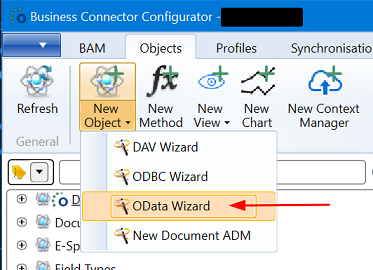
A good starting point is to create proper interface scripts, is creating an object with the help of the OData wizard. That wizard generates some basic scaffolding in the interface scripts and can adapted according the use case of the solution. Of course, the more advanced the solution must be, the more manual adaptations will be required.
Entity JobDefinitions
Available fields:
| Field Name | Type | Description |
|---|---|---|
| Id | Integer | Key, unique identifier for each definition. |
| Name | Text | Name of the job definition. |
| Description | Text | Optional description. Can be null or empty. |
| JobType | Text | Fixed values: Method or Synchronisation. |
Example of getting all definitions:
Entity Set=JobDefinitions
Operation=MultiGet
Entity JobSchedules
Available fields:
| Field Name | Type | Description |
|---|---|---|
| Id | Integer | Key, unique identifier for each schedule. |
| Name | Text | Name of the job schedule. |
| Description | Text | Optional description. Can be null or empty. |
| Enabled | YesNo | Flag stating whether the schedule is active. |
| ScheduleType | Text | Fixed values: OneTime, Minutely, Hourly, Daily, Weekly or Monthly. |
| StopOtherInstancesUponStart | YesNo | Flag stating whether existing jobs are stopped when a new one is started. |
| ExecuteSimultaneously | YesNo | Flag stating whether multiple jobs are allowed to run in parallel. |
| LastRunTime | DateTimeOffset | Last date and time when the job has run, used to calculate the next run date. Can be null. |
| NextRunTime | DateTimeOffset | Next run date and time of the schedule. |
| JobDefinitionId | Integer | Key reference to the parent job definition. |
Example of getting all schedules:
Entity Set=JobSchedules
Operation=MultiGet
Entity JobExecutionLogs
Retrieving the job run logs can be done either directly, or through a job definition or job schedule. All available fields are the same.
Available fields:
| Field Name | Type | Description |
|---|---|---|
| Id | Integer | Key, unique identifier for each execution log. |
| Status | Text | Fixed value: - Success: the job completed without errors.- Failure: the job failed during execution.- Aborted: the job was aborted by the user during execution.- NeverExecuted: a job was being prepared for execution but failed during that preparation.- PartialSuccess: only applicable for synchronisations, this state reports that an error occurred during the execution in one of the synchronisation action methods. |
| StartTime | DateTimeOffset | Start date and time of the execution of the job. |
| EndTime | DateTimeOffset | End date and time of the execution of the job. Can be null while the job is still running. |
| DurationMilliseconds | Number | Difference between StartTime and EndTime in milliseconds. |
| CorrelationId | Text | Unique GUID value for each execution log. |
| Context | Text | JSON structure of all global context set at the beginning of the execution of the job. |
| ErrorMessage | Text | Full error message in case the job was not successfully executed. |
| ExecutionLogText | Text | Execution log as shown in the Business Connector application. |
| JobDefinitionId | Integer | Key reference to the parent job definition. |
| JobScheduleId | Integer | Key reference to the parent job schedule. Is null when OneTime schedule was used to run the job. |
Warning
The data in the fields Context, ErrorMessage and ExecutionLogText can be large. Use with caution when retrieving those values.
Direct Access
Example of getting all schedules:
Entity Set=JobExecutionLogs
Operation=MultiGet
Access Through Job Definitions
Note
To avoid too much data is retrieved at once, expand the execution log information with the job definition and schedule information is not possible for this use case.
Example of getting all logs of a specific job definition:
Entity Set=JobDefinitions('{$Job Definition Id}')
NavigateTo=ExecutionLogs
Operation=MultiGet
The field Job Definition Id, with external name JobDefinitionId, must be selected as an input field.
Access Through Job Schedules
Note
To avoid too much data is retrieved at once, expand the execution log information with the job definition and schedule information is not possible for this use case.
Example of getting all logs of a specific job schedule:
Entity Set=JobSchedules('{$Job Schedule Id}')
NavigateTo=ExecutionLogs
Operation=MultiGet
The field Job Schedule Id, with external name JobScheduleId, must be selected as an input field.