Condition Sets
Condition sets allow defining custom logic to control framework behavior. A condition set by itself does not impact the framework in any way, it needs to be linked to another framework component that can make use of condition sets.
The currently supported uses for condition sets are:
- Activate or deactive providers depending on the incoming connection info: Provider Framework configuration
- Redirect calls to the Ometa framework to different Ometa services depending on the incoming connection info: Routing Multiple Service Instances
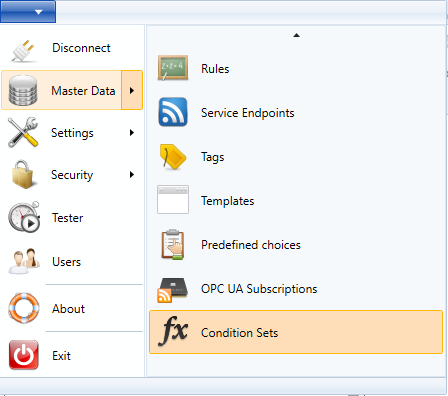
The window to manage condition sets can be found under the application menu:
Creating a New Condition Set
When creating a new condition set, only the name is required. This name can later be changed.

At this point a new unsaved condition set will be created. The following configurations are available:
- Enabled: Determines whether the logic for the condition set should be activated or ignored.
- Conditions: This contains the actual logic of the condition set, refer to Configuring Conditions.
After saving the new condition set, it can be used in the configuration of other framework settings.
Configuring Conditions
After creating the condition set, no conditions are created yet.

To start defining the logic of the new condition set, two options are available:
- Add Condition: This adds a single condition of a single property onto the condition set. Adding multiple conditions onto the condition sets puts the conditions automatically in a combiner, allowing to configure whether both or only one of the conditions must be evaluated successfully.
- Add Combiner: This adds a new combiner onto the condition set, this means that a combination of multiple conditions (either all or one of the conditions) must be evaluated successfully.
Tip
Combiners themselves can contain conditions and combiners as well, allowing configuration of advanced logic trees.
Example configuration
Below is an example of a condition set that can be used to toggle providers based on which user is accessing the data from the framework.
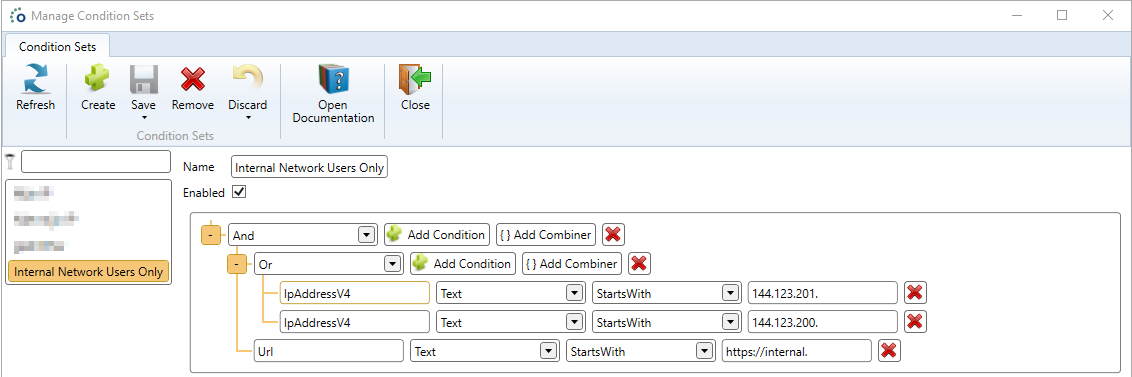
In this case users that retrieve data from the Ometa framework through an url that starts with https://internal and have either an IP adress that starts with 144.123.201. or 144.123.200. will cause the condition set to evaluate successfully. If this condition set was linked to a provider, only those users would be able to use that provider.
Tip
Refer to the articles that allow usage of condition sets in order to find the configurable fields.