Post Execution Configurations
With the help of post execution configurations it is possible to run additional actions (= methods) after the main method, based on specific conditions if needed. For example it is possible to notify users by mail or setting a flag of a record in a database when a particular method failed during execution.
The master data dialog to manage these post execution configurations can be found under the application menu:

The following dialog will be shown:
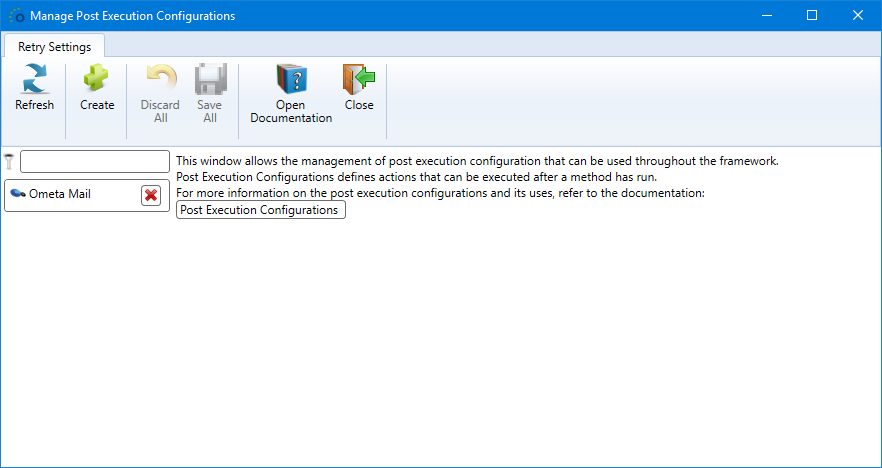
Creating a Configuration
When creating a new post execution configuration, only the name is required. This can be changed later.
Note
Keep in mind: the name must be unique.

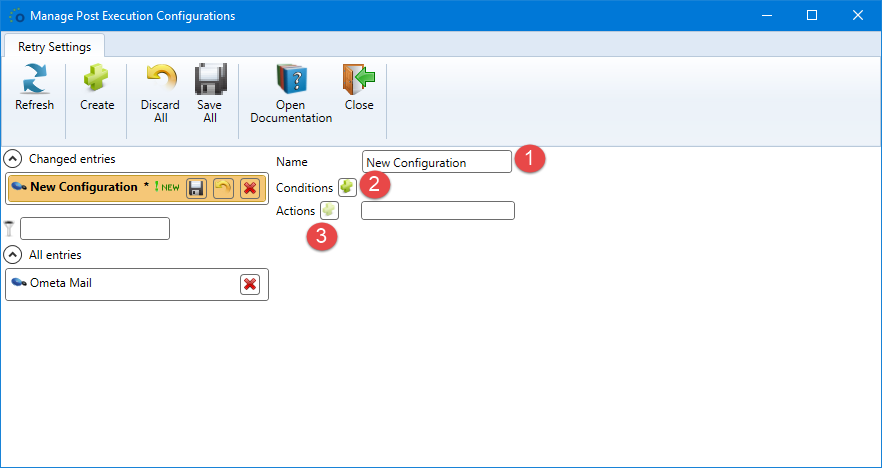
At this point a new unsaved configuration is created for customization. The following fields are available:
- Name: The unique name.
- Conditions: A condition set which will be applied on the result of the main method to determine whether the actions should run or not.
- Actions: One or more methods that will run when the post execution configuration is started.
Adapting Conditions

For adding the condition set, click on the plus sign next to Conditions (see 1 in the screenshot above). A new condition set is created and the plus sign changes to a red cross. Clicking the red cross will mark the condition set for removal. In case of existing conditions, the set will already be displayed and the sign being a red cross.
Do not forget to enable the condition set or the condition checks will be skipped over during configuration execution and all actions will be run as if there were no conditions applicable.
The post execution configuration feature provides several additional condition field values to compare against at run-time whether the main method has succeeded or failed execution.
| Condition Name | Type | Description |
|---|---|---|
| method.error.message | Text | The error message sent back from the main method. |
| method.error.retried | YesNo | Flag stating whether the main method has been retried for execution at least once. |
| method.error.timedout | YesNo | Flag stating whether the main method has been timed out by the Ometa framework. |
| method.failed | YesNo | Flag stating whether the main method failed execution. The error values are set. |
| method.succeeded | YesNo | Flag stating whether the main method succeeded. The error values are obviously empty. |

Adding Actions
To add new actions, just click on the plus sign next to Actions (see 2 in the first screenshot of paragraph Adapting Conditions). An empty object connection settings box is added to the actions list. Fill in all required fields to complete the action. When the selected method has input context fields present, they will be retrieved and shown right below the definition.
Note
The order of the defined actions is unimportant. They will be run sequentially but independently from each other without sharing context. Only the context from the main method is shared with each action method.
Removing existing actions is done by clicking on the red cross icon on the right side of the particular action.
More information about actions can be found here: Action Methods.
Default Configurations
Out of the box some default configurations are provided. Those may be overriden, adapted and changed. Sometimes it is required to modify the given settings or the actions added to the configuration cannot be executed properly.
Keep in mind to leave the names unchanged. Otherwise these configurations will be recreated during an upgrade of the framework or when one of the system service of the framework are restarted.
The following default configurations are available:
Ometa Mail: configuration to send an email after the execution of a method. By default no condition is set and the context fields of the action method must be adapted to be able to sent the emails. For more information, read Building Block Send Mail
