Output Data Extension
When a method is executed, it generates output. This output can be enriched automatically with an Output Data Extension. E.g. when we have a list of orders in our application, but the customer information can be found in a different source, we can fetch the customer information from that source and merge it to the output from the first source.
Use the following steps to configure an Input Data Extension on a method:
Go to the method you want to create the extension on.
Click the Execution tab.
In case no extension is present, just click on the Add New Extension Sequence and a new extension is added alongside a new sequence group.

To add a new extension to a list of existing extensions, clicking on Add New Extension Sequence will add to extension in a new sequence group, clicking on Create Data Extension will add the data extension to the sequence group selected.

The first output extension sequence has an extra option Run Parallel With Main Method. When enabled, the main method execution is started in parallel with the first output extension sequence. This is beneficial in total method duration if the output extension is not reliant on the action of the main method. This option is enabled by default for new methods, methods created in older framework versions (< v5.0.0) will have it turned off.
Note
When the first sequence is running in parallel with the main method, it is guaranteed that the output extension(s) in that sequence will be executed, even if the main method fails during execution of that sequence. However due to the nature of parallel execution, there is no way of telling which error will be returned when the main method and an extension fail together.
Configuring The Data Extension
Settings
In this section you configure the general settings of the selected data extension.

Choose the object and method you want to use for the selected data extension.
Execution Context
This section is used to configure how the context is forwarded to the extension method.

Enable this to only forward context data contained in the fields you configure here. Other context set on other fields on the main method will be ignored and cannot be used in the extension method.
Extension Output Handling
In this section you configure what must be done with the output of the extension method.

Define which handling type you want to use when processing the data of the extension method.
| Handling Type | Description |
|---|---|
| Extend Global Context | Extend the current global context of the main method which will then be used for the next data extension(s). Field relations cannot be used and only the first extension record will be used for extending the global context. |
| Main Join | All main (context) records will be kept. Will match and extend the main (context) records with the extension records based on the defined field relations and mappings. Extension records without a match will be discarded. |
| Inner Join | Only main & extension (context) records which have a match based on the relations will be kept and extended based on the mappings. Main (context) records & extension records without a match will be discarded. |
| Extension Join | All extension records will be kept (can result in the creation of extra (context) records). Will match and extend the extension records with the main (context) records based on the defined field relations and mappings. Main (context) records without a match will be discarded. |
| Outer Join | All main (context) records and extension records will be kept (can result in the creation of extra (context) records). Those records which match based on the relations will be extended based on the mappings. |
Important
When using the extension or outer join, you'll possibly return extension records without main record data. This could result in records without unique key values. Using such records in views and other parts of the framework can lead to unwanted behavior.
Selected Output Fields
It is now possible to automatically create output fields on the main method for output fields in an extension method.
Such fields are called 'Selected Output Fields' and can be identified with a link icon  .
.

When such a field is configured on a data extension and made available in the main method, the field can be configured the same way as a normal method field. It can be used in views, context managers, ...
Note
Besides the fact that these fields are automatically linked to the main method, they also behave in a special way.
If a condition set is active on the data extension and the condition cannot be evaluated successfully, all selected output fields of that extension will not be available in the results and any linked view fields will be invisible in ADM's.
Note
If you already have a method field and you add a selected output field with the same name, nothing happens. The method field will not be linked to that selected output field and it will not be removed upon removing the selected output field.
You can identify that a field is linked to a selected output field if it has a link icon .
Important
If you remove a selected output field from the extension, the linked method field will also be removed.
If you want to keep the field, create it as a normal method field (double-check the link icon).
Handling Type Examples
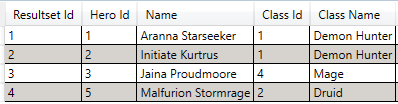
In this section you get a visual representation of each handling type. Suppose you have the following result set where the relation is defined on the Class Id of both tables.

Main Join

Inner Join
Extension Join

Outer Join

Behavior with Context Records
Context records within the Ometa Framework allows a method to be executed multiple times in one 'request'. This can save processing time because there is no need to connect additional framework clients, or start additional interface processes. However, keep in mind that context records, including possible extensions, are currently executed sequentially on the target interface.
Currently context records are only used in:
- Synchronizations
- Sequential item functions
- Custom DLL's
The behavior when using context records with output extensions is as follows:
- The context records are passed to the output extension method. If the interface script of the main method is executed with 5 context records, so is/are the output extension(s).
- The records retrieved from the output extension for one context record, can only be used for that same context record in the main method.
Examples
See the table below for a few examples on how the data is mapped when using context records.
In this example the main method is called with 2 context records. The original output are only the NameID and Amount fields for each context record. No field relation is configured.
Output extensions do not map any data if there is no field relation. Configure a field relation to retrieve and map the output of the extension.


Using Grouped By Fields
With the help of grouped by fields, it is possible to apply output data extensions to specific group values of the main output. This is useful when the output data extension method requires input values to generate the additional data for merging with the main output.
For example:
- The main output contain a list of customers with a country code, like BE, NL, FR and so on.
- The output data extension method takes in the country code and return the full country name.
Previously it was expected that the output extension would return the full list of countries and the outputs of the main and extension methods would be merged at the end. With the example that scenario will not work anymore and this is specific use case where grouped by fields can help.
By selecting the country code field as a grouped by field, all country code values will be grouped after the execution of the main method. Then the output extension is executed for every unique value for each group and the output results are merged immediately therafter.
Note
For the moment, it is necessary to have a input field defined on the output data extension method with the same name for each of the selected grouped by fields. Otherwise the grouped values will not be set correctly in the context of the output data extension method.
To extend the example above, the output field Country Code of the main method will therefor need a corresponding input field Country Code on the output data extension method.
Grouped By Fields Configuration
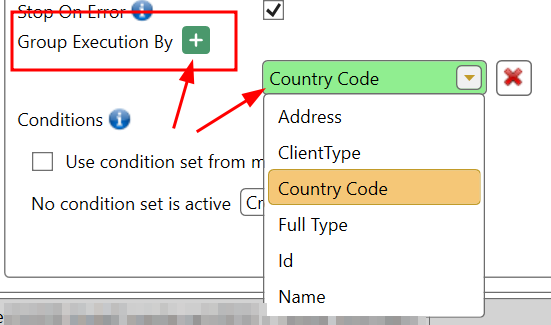
Grouped by fields are configured per extension sequence. Just click on the '+' sign to add a new field and selected the desired field from the main output fields.
Specific Behaviour
As stated in the Configuration, grouped by fields are defined per sequence. This means that multiple output data extensions can use the same grouped value set.
Additionally, it is not possible to define grouped by fields on the first sequence if the Run Parallel With Main Method option is selected.

Trigger Case Management
The 'Trigger Case Management' setting can be used to create cases for a lifecycle based on the output of a method. When combined with extensions the following behavior applies:
When a method that has 'Trigger Case Management' enabled and configured, as well as output extensions configured; the final method output is used to provision cases from. This includes the data fetched from the output extensions.
Cases will be created using the same result data shown in the business connector when using Test Method.
From the Handling Type Examples above: the 'Get All Heroes' method has an output extension pointed towards the 'Get All Hero Classes' method.
Main Join
This data (Main Join) will be used to provision 5 cases from.