Configuring The Data Extension
Settings
In this section you configure the general settings of the selected data extension.

Choose the object and method you want to use for the selected data extension.
Execution Context
This section is used to configure how the context is forwarded to the extension method.

Enable this to only forward context data contained in the fields you configure here. Other context set on other fields on the main method will be ignored and cannot be used in the extension method.
Extension Output Handling
In this section you configure what must be done with the output of the extension method.

Define which handling type you want to use when processing the data of the extension method.
| Handling Type | Description |
|---|---|
| Extend Global Context | Extend the current global context of the main method which will then be used for the next data extension(s). Field relations cannot be used and only the first extension record will be used for extending the global context. |
| Main Join | All main (context) records will be kept. Will match and extend the main (context) records with the extension records based on the defined field relations and mappings. Extension records without a match will be discarded. |
| Inner Join | Only main & extension (context) records which have a match based on the relations will be kept and extended based on the mappings. Main (context) records & extension records without a match will be discarded. |
| Extension Join | All extension records will be kept (can result in the creation of extra (context) records). Will match and extend the extension records with the main (context) records based on the defined field relations and mappings. Main (context) records without a match will be discarded. |
| Outer Join | All main (context) records and extension records will be kept (can result in the creation of extra (context) records). Those records which match based on the relations will be extended based on the mappings. |
Important
When using the extension or outer join, you'll possibly return extension records without main record data. This could result in records without unique key values. Using such records in views and other parts of the framework can lead to unwanted behavior.
Selected Output Fields
It is now possible to automatically create output fields on the main method for output fields in an extension method.
Such fields are called 'Selected Output Fields' and can be identified with a link icon  .
.

When such a field is configured on a data extension and made available in the main method, the field can be configured the same way as a normal method field. It can be used in views, context managers, ...
Note
Besides the fact that these fields are automatically linked to the main method, they also behave in a special way.
If a condition set is active on the data extension and the condition cannot be evaluated successfully, all selected output fields of that extension will not be available in the results and any linked view fields will be invisible in ADM's.
Note
If you already have a method field and you add a selected output field with the same name, nothing happens. The method field will not be linked to that selected output field and it will not be removed upon removing the selected output field.
You can identify that a field is linked to a selected output field if it has a link icon .
Important
If you remove a selected output field from the extension, the linked method field will also be removed.
If you want to keep the field, create it as a normal method field (double-check the link icon).
Handling Type Examples
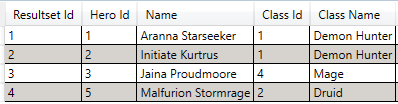
In this section you get a visual representation of each handling type. Suppose you have the following result set where the relation is defined on the Class Id of both tables.

Main Join

Inner Join
Extension Join

Outer Join
