A client is a piece of software or component that will be using the Authority Service to authenticate its users and request access tokens which contain their claims.
To configure clients, startup the WpfGUI application, click on the application menu and click on clients.
At this moment 2 clients are always present in the Ometa Framework which cannot be removed and are partially configurable.
Ometa WPF Gui
This client represents all WPF GUI applications that will be using the Ometa Framework.
Ometa ADM
This client represents all ADM's that will be using this Ometa Framework.
The unique identifier of this client within the Ometa Framework.
The client id which must match the client id known in the Authority Service.
A secret used by the OAuth Client to authenticate to the Authority Service. This secret is only required when the client uses the client credentials grant type.
Note
You can generate the client secret by clicking the button next to it. Make sure that you copy the generated value and store it somewhere safe, because you won't be able to copy the value again after saving the configuration.
The name of the client.
The description of the client.
The grant type that the client should use. This is a flow through which a client can retrieve an access token from the Authority Service and by which you grant limited access to your resources to another entity without exposing credentials.
There are three available grant types where you can choose from:
Implicit
A simplified flow that can be used by public clients, where the access token is returned immediately without an extra authorization code exchange step.
Hybrid
A grant type that enables use cases where your application can immediately use an ID token to access information about the user while obtaining an authorization code that can be exchanged for an Access Token (therefore gaining access to protected resources for an extended period of time).
Client Credentials
A flow used by clients to obtain an access token outside of the context of a user. This is typically used by clients to access resources about themselves rather than to access a user's resources.
If a user authenticates successfully, the Authority Service will generate an access token with their claims.
This access token can then be used to make API calls to the Ometa Framework on behalf of that user.
The access token lifetime is the time in seconds that an access token remains valid.
After that time, the client needs to fetch a new access token (via a refresh token, a silent renew or by letting the user login again).
The maximum value the lifetime can be set to, is 4295027 seconds. If a higher value is set in the database, the framework will still cap the token lifetime value at that maximum value internally.
Specifies if this client is enabled or not. A disabled client will not be able to authenticate its users.
Note
You cannot disable the WPF Gui client as this would cause a lockdown of the Ometa Framework.
Specifies if this client should have administrator rights.
Note
When setting this property to true, the administrator claim 'isometaadministrator' will be automatically provided. It will appear in the claims list after saving the client configuration.
One or more url's which are allowed to invoke the Authority Service.
This is a very important setting on the Ometa ADM client as this defines from which domains the ADM can use the Authority Service.
Tip
You can use a wildcard character at the end of a redirect url for example: https://ometa.sharepoint.com/sites/* to match all urls starting with that value.
A list of claims the client has.
Note
It is possible to set custom claims on a client.
Troubleshooting
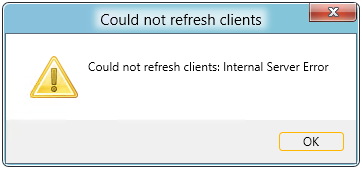
When you receive an internal server error the first time you try to configure the clients, try to recycle the Ometa Core Service.
It is possible that the authorization schemes are not yet discovered by the Ometa Core service after configuring the Ometa Authority service.