In this section you'll get an overview of all framework settings which can be fine-tuned.
In most scenario's the default settings are sufficient. However, take a look at the following settings because they might be relevant:
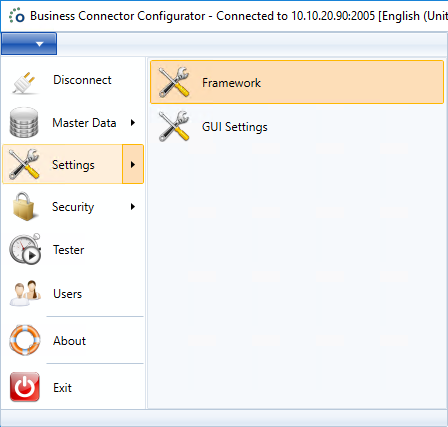
Follow the next steps to see the framework settings in the Ometa Business Connector:
- Start the Ometa Business Connector.
- Click on the blue application menu in the top left corner.
- Click on Settings.
- Click on Framework.
Architecture
The following architecture image gives you a better understanding of the internal working from a framework server.
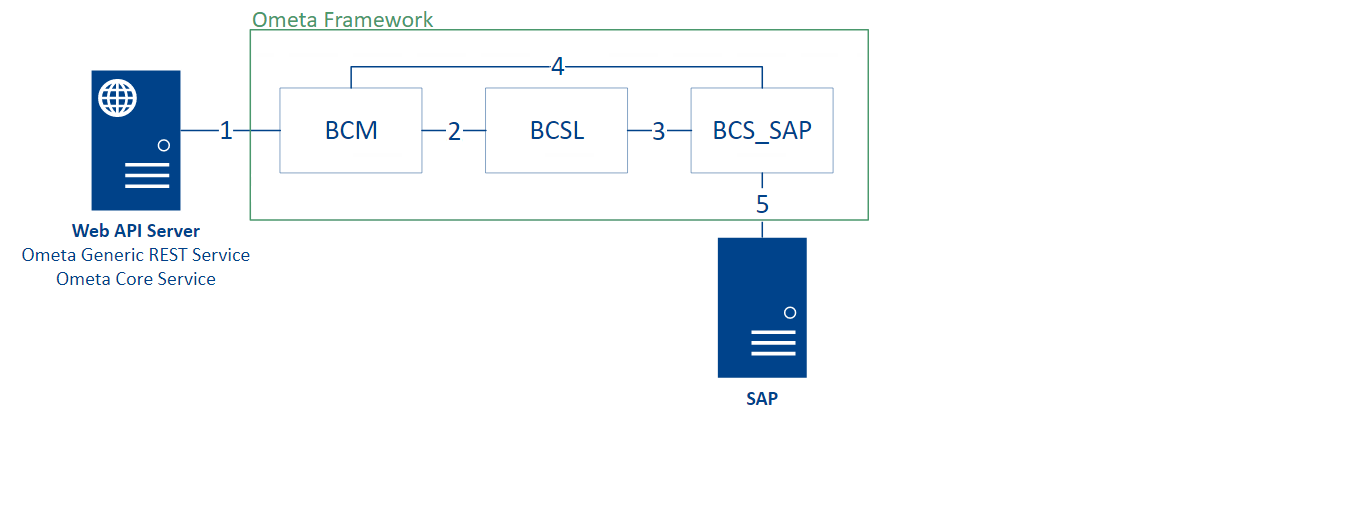
- The Web API Server opens a socket via TCP 2005 to the BCM service.
- The BCM service opens a socket connection on TCP 2002 to the BCSL service.
- The BCSL service opens an internal connection to an interface, e.g.: BCS_SAP to retrieve data from SAP.
- The BCSL passes the connection of the BCM process to BCS_SAP (SAP interface). Communication is now directly between BCM and BCS_SAP.
- BCS_SAP executes the action on the SAP server.
BCA Service
The BCA or Business Connector Administration service is responsible for connection pooling and managing the work directory.
A larger buffer size potentially reduces the number of empty acknowledgements (TCP packets with no data portion), but might also delay the recognition of connection difficulties. Consider increasing the buffer size if you are using a high bandwidth or high latency connection (such as a satellite broadband provider).
In this case the default size is enough because messages sent to the BCA are always rather small. Changing this property requires a restart of the BCA service. The buffer size is expressed in bytes.
BCM Service
The BCM or Business Connector Manager service listens for incoming requests to the Ometa Framework.
- Port
- Buffer Size
- Enable Throttling Percentage
- Same Source Allowed Percentage In Throttling
- One Identical Source Allowed Percentage
- Working Directory
- Maximum Number Of Instances
- Maximum Queue Length
- SSL
- Maximum Cache Size
The port number of the BCM service. Changing this property requires a restart of the BCM service. It is not recommended to change the port number.
Interface Server
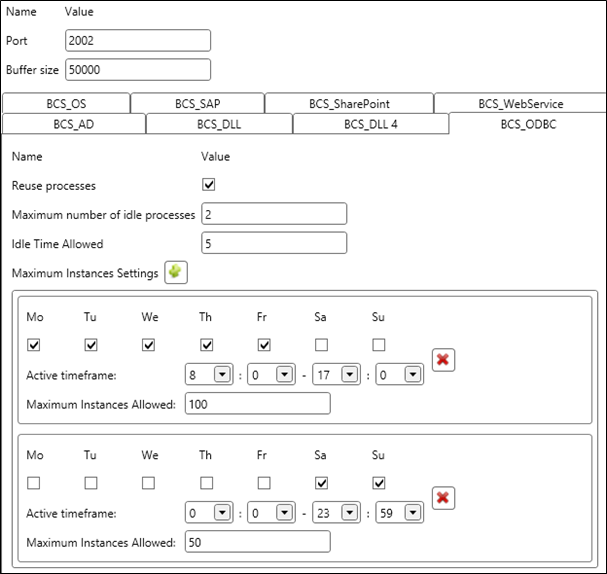
- Maximum Amount Of Interface Memory
- Maximum number of idle processes
- Idle Time Allowed
- Maximum Instances Settings
The maximum amount of memory in megabytes that an interface process may use. If the interface process is above this amount three method executions in a row, it will be terminated despite any other settings. This setting is also applied to already running interfaces within one minute.
Example: if you change this setting to 50 MB, existing interfaces with a memory consumption of 50 MB, will be killed after three method executions. Wait one minute to make sure the setting is applied to all running interfaces. The counter of three is reset when the memory consumption goes below the setting.
BCSP Service
Parallel Workers
The amount of threads the BCSP service can start when multiple actions should be performed by the BCSP service.
Configuration Table
A lot of options are configurable through the GUI, but eventually most of them end up in the configuration table.
This is a list of the most important settings in our configuration table.
| Key | Value Example | Description |
|---|---|---|
| Allowed Collection Fieldnames To Csv | identity.emails,case.roles,originatingcase.roles | Contains the names of the fields which will be serialized to a separate csv field. Names are comma separated. E.g.: identity.emails is a collection of email addresses. With this configuration in place, a new field named identity.emails.csv will be created with the collection values as a csv. Keep in mind that a new csv field will always be created, even if the field doesn't have a collection as value. |
| Authority Service Url | https://authority.ometa.net | The url of the Ometa Authority Service. |
| Core Service Url | https://core.ometa.net | The url of the Ometa Core Service. |
| Environment | Development | The environment of the installation. Valid values are Development, Testing, Acceptance & Production. |
| Generic REST Service Url | https://rest.ometa.net | The url of the Generic REST Service. |
| Repository Server | framework.ometa.net | The hostname of the framework server. |
| Case Manager Batch Size | 4000 | The batch size used for updating case properties via the DCSClient.CaseManager. Consult the DLL4 Article for more information. |