Configuring Audit Trails
What is Audit Trail?
Audit Trail comes in handy when working with important data that changes regularly. It helps you to keep track in how your records are changing by keeping the history of events occuring on those records (Update, Insert, Delete). In the Business Connector, Audit Trail can be configured per method. An Audit Trail contains the values of the fields, modified time and editor. Audit Trails are stored per method and object. The determined change history of records can therefor be retrieved as an easy overview in the Application Data Manager.
Follow these steps to configure audit trail and track events on records such as inserts, updates and deletes.
Open the configuration of a method. (we will refer to this method as the 'main method')
Go to the tab Audit Trail.
Check Audit Trail Enabled.

In the dropdowns you can select a method which is executed before or after the main method. These methods are used to determine the delta (changes) occuring on a record. The before and/or after action method, should be a method that returns the data concerning that particular record. Meaning the unique keys returning should be the same and the fields on which you want to audit trail to run should as well be returned.
Specify a method on the Before Action or After Action.
Click on Save.
When the main method is used in one or more views, the following message appears that a profile needs to be set on the view.
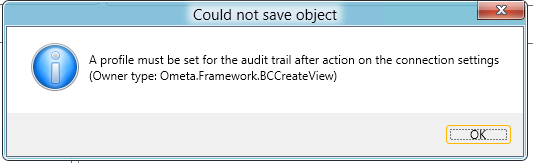
Go to the view(s) of this method and configure a profile for the audit trail actions. Note that this action needs to be done on every view where this method is used.

Click on Save again.
Audit trail is now configured on the method.
Note
To be able to store the name of the user that made the changes on the record, make sure that Process External Context is configured on the view. Otherwise the IIS Application Pool user will be used.
Warning
By default, the job that processes audit trail data, is disabled. If you configure audit trailing, please ensure that the job Ometa - Process Audit Trail Files is enabled.

Different Configurations on Insert, Update and Delete Actions
This overview explains for which situations you want to configure a before and/or after action and what happens depending on the output data returning from these methods.
| Before action | Main method | After action | Result in Audit Trail |
|---|---|---|---|
| No output data | No output data | No output data | Nothing happens – the method is executed without audit trail ever noticing it |
| Data | No output data | No output data | - Key Data of before action is written to audit trail fields as previous values - Data of main method is written to audit trail fields as current values |
| No output data | Data | No output data | - If previous audit trail entry is found in DB, that entry will be used for previous field values (only for the fields returned by the main method) - Data of after action is written to audit trail fields as current values |
| No output data | No output data | Data | - If previous audit trail entry is found in DB, that entry will be used for previous field values (only for the fields returned by the after action) - Data of before action is compared to data of main method. Delta’s and keys are written to audit trail fields using before action as previous values and main method as current values |
| Data | Data | No output data | - If previous audit trail entry is found in DB, that entry will be used for previous field values (only for the fields returned by the main method which were not returned by the before action) - Data of before action is compared to data of after action. Delta’s and keys are written to audit trail fields using before action as previous values and after action as current values |
| Data | No output data | Data | - If previous audit trail entry is found in DB, that entry will be used for previous field values (only for the fields returned by the after action which were not returned by the before action) - Data of before action is compared to data of main method and after action where after action fields have higher priority over main method fields. Delta’s and keys are written to audit trail fields using before action as previous values and main method / after action as current values |
| Data | Data | Data | - If previous audit trail entry is found in DB, that entry will be used for previous field values (only for the fields returned by the main method and/or the after action which were not returned by the before action) - Data of main method and after action is written to audit trail fields as current values where after action fields have higher priority over main method fields |
| No output data | Data | Data | - If previous audit trail entry is found in DB, that entry will be used for previous field values (only for the fields returned by the main method and/or the after action) |