Working With OData
In this article you will learn more on how to expose objects to the outside world with an open communication protocol like OData. Client applications like Microsoft Excel 2016 or higher are able to consume these objects real-time.
OData
The framework supports exposing objects to the outside world with the help of the OData protocol. OData is a REST-based protocol for querying and updating data and is built on standardized technologies such as HTTP, Atom/XML and JSON. It provides a uniform way to describe both the data and the data model so other client tools can take advantage of this. At this moment we only support OData version 4.
Before you can expose an object with the OData protocol, you must configure an object with at least one method.
OData is fully documented, please refer to the following articles:
- https://www.odata.org/getting-started/understand-odata-in-6-steps/
- https://www.odata.org/getting-started/basic-tutorial/
Service Endpoints
A service endpoint is the url where the Ometa OData service can be accessed by a client application like Microsoft Excel. It is required to have at least one service endpoint. It is possible to expose multiple objects in one service endpoint.
Use the following steps to create a service endpoint:
Click the application menu in the upper left corner.
Hover over Master Data.
Click Service Endpoints.
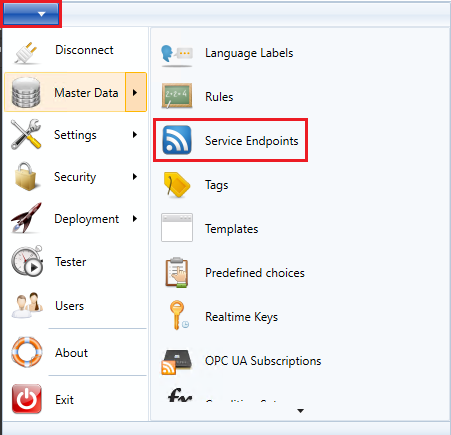
Click Create in the ribbon.
Specify url part of the new service endpoint.
Click Save in the ribbon.

Exposing an Object
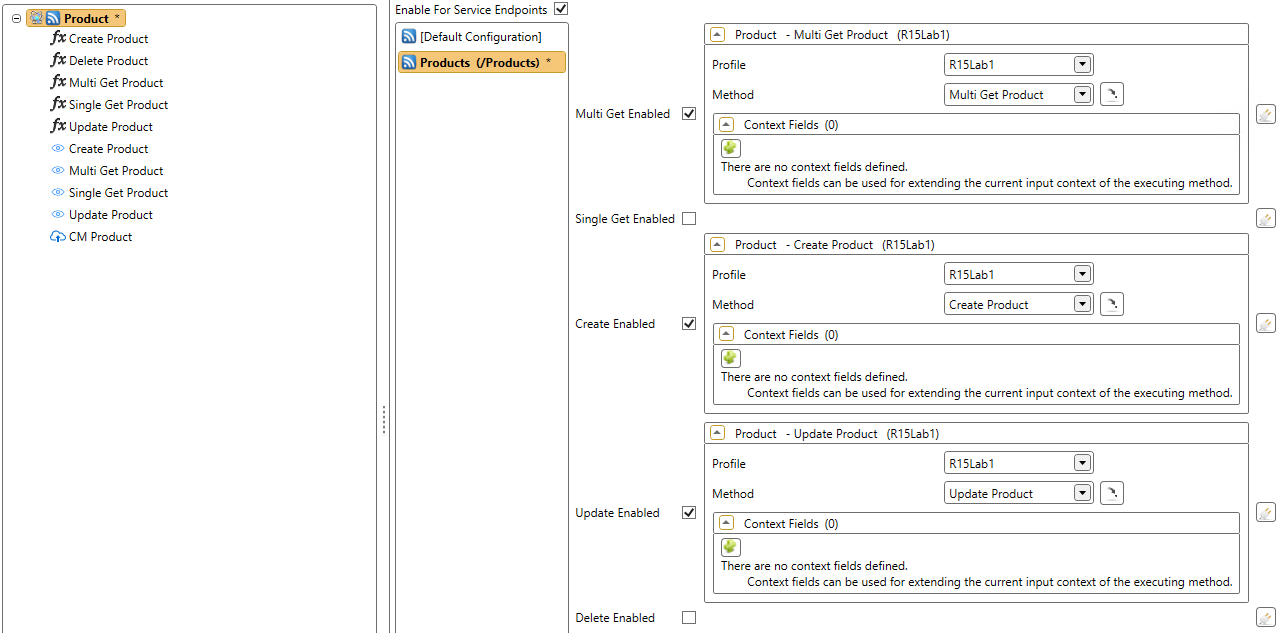
Use the following steps to expose the object:
- Go to the object you want to expose.
- Click the Service Endpoints tab.
- Check the Enable For Service Endpoints checkbox.
- Select the correct service endpoint.
- Configure the methods you want to expose.
- Click Save in the ribbon.
Where to Find the OData URL
When an object is enabled to use the OData protocol, it is possible to navigate to a specific url. The url exists of three dynamic parts:
https://[server name or hostname]:[port]/odata/runtime/[service endpoint]
The server name or hostname is the name of the server where the Generic REST Service is installed. The port is the port number used by the Generic REST Service. The service endpoint is the name of the service endpoint configured earlier above.
This will be the response of a web browser when navigating to the url:
{
  "@odata.context":"https://ometa-rest.example.com/odata/runtime/Products/$metadata",
  "value":[
    {
        "name":"Product",
        "kind":"EntitySet",
        "url":"Product"
    }
  ]
}
Note
Security applies to service endpoints by default. Refer to security best practices article for more information on how to obtain an access token. If you wish to test the endpoint without security, configure the object as anonymous. However, make sure to restore this afterwards.
Use in Microsoft Excel
Some client applications like Microsoft Excel are able to consume OData feeds. The framework generates OData version 4 feeds. This means that the client application must support this version.
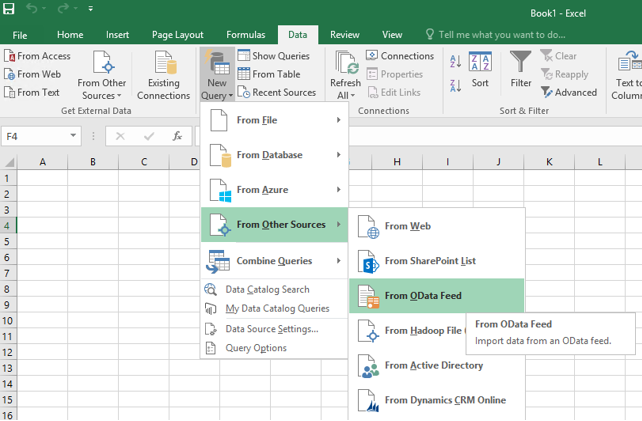
In Excel it is possible to consume the OData feed by following the next steps:
- Open Excel.
- Click the Data tab.
- Click the New Query button.
- Click the From Other Sources menu item.
- Click the From OData Feed menu item.
- Enter the URL, e.g.: http://ometa-rest.example.com/odata/runtime/[service%20endpoint]
Requesting data
If you want to request the data, you must follow the conventions from the OData protocol.
Request all information:
https://[server name or hostname]:[port]/odata/runtime/[service endpoint]/[object name]
Using the equals filter:
https://[server name or hostname]:[port]/odata/runtime/[service endpoint]/[object name]?$filter=[field name] eq '[value]'
Keep in mind that using a filter does not set any input fields which match those filters. Filtering is done after the results have been fetched from the data system.
Supported OData Features
The following OData features are supported. Any other features are currently not implemented.
- Requesting resources (Multi Get - GET)
- An entire entity set can be requested. Any query options (like filtering, sorting, selecting, ...) are applied after the data has been fetched
- Requesting an individual resource (Single Get - GET)
- A single entity can be fetched by specifying the unique identifiers in the url following the OData conventions
- Creating a new resource (Insert - POST).
- An entity can be created by using the url of the entity set and posting the needed data following the OData conventions
- Updating an existing resource (Update - PUT / PATCH).
- An entity can be updated by using the url of that entity (the Single Get url) and posting the needed data following the OData conventions.
- When using the PATCH verb, the single get method will be executed (and therefore must be enabled) and its results will be used to set the current entity data before setting the specified PATCH data on the update method.
- An entity can be updated by using the url of that entity (the Single Get url) and posting the needed data following the OData conventions.
- Removing an existing resource (Delete - DELETE).
- When applicable, the following query options can be used:
- $filter
- $orderby
- $select
- $skip
- $top
- When using the $filter option, the following filters can be used (depending on the field's type):
- StartsWith
- EndsWith
- Contains
- Eq
- Neq
- Gt
- Geq
- Lt
- Leq
- And / Or
- OData normally doesn't support the usage of whitespaces in field names. Our framework however supports fields with whitespaces in their name. To be able to use these fields in query options, replace a whitespace character with 'x0020'.
- Example:
-
https://[server name or hostname]:[port]/odata/runtime/[service endpoint]/[object name]?$filter=Postal_x0020_Code eq 'a value'
-
- Example:
- Custom query option |context.
- When you want to set additional input fields on your methods, you can use the custom query option |context in this format.
-
https://[server name or hostname]:[port]/odata/runtime/[service endpoint]/[object name]?|context=YourInputField eq 'a value' and [Another input field] eq "another value".
- Keep in mind that you have to specify the field values using the invariant culture when the field is a Number, DateTime, Boolean or anything other than a string.
-
- When you want to set additional input fields on your methods, you can use the custom query option |context in this format.
- Batch Requests using $batch.
- Previously mentioned requests can be sent as one batch request. Each call within the batch is processed using the configuration on the service endpoint. Multiple calls to the same configuration within the batch are processed as context records.
- $filter is not supported in batches.
Requests
Below are some examples of requests to the runtime service endpoint for the Product object created earlier. The Products service endpoint is used for all requests.
$metadata
https://[generic rest]/odata/runtime/Products/$metadata
Request
GET https://rest.ometa.net:50601/odata/runtime/Products/$metadata HTTP/1.1
Authorization: Bearer eyJhbGciO....f8z6Ew
User-Agent: PostmanRuntime/7.26.8
Accept: */*
Cache-Control: no-cache
Postman-Token: 0206256d-36a8-4433-a9c2-f31c2dcec1b4
Host: rest.ometa.net:50601
Accept-Encoding: gzip, deflate, br
Connection: keep-alive
Response
HTTP/1.1 200 OK
Content-Type: application/xml
Server: Microsoft-IIS/10.0
OData-Version: 4.0
X-Powered-By: ASP.NET
Access-Control-Allow-Origin: *
Access-Control-Allow-Headers: Ometa-IsExternalUser, Ometa-OriginatingUrl, Ometa-CaseId, Accept, Access-Control-Allow-Origin, Authorization, Content-Type, DELETE, Expires, GET, HEAD, Keep-Alive, MIME-Version, OPTIONS, Origin, POST, PUT, Set-Cookie, Set-Cookie2, SoapAction, URI
Access-Control-Allow-Methods: GET, POST, PATCH, PUT, DELETE, OPTIONS
Date: Mon, 28 Jun 2021 09:52:46 GMT
Content-Length: 797
Response Body
<?xml version="1.0" encoding="utf-8"?>
<edmx:Edmx Version="4.0" xmlns:edmx="http://docs.oasis-open.org/odata/ns/edmx">
    <edmx:DataServices>
        <Schema Namespace="ns" xmlns="http://docs.oasis-open.org/odata/ns/edm">
            <EntityType Name="Product" Abstract="true" OpenType="true">
                <Key>
                    <PropertyRef Name="ID" />
                </Key>
                <Property Name="ID" Type="Edm.Int32" />
                <Property Name="Name" Type="Edm.String" />
                <Property Name="Description" Type="Edm.String" />
                <Property Name="Release Date" Type="Edm.DateTimeOffset" />
                <Property Name="Discontinued Date" Type="Edm.DateTimeOffset" />
                <Property Name="Rating" Type="Edm.Int32" />
                <Property Name="Price" Type="Edm.Double" />
            </EntityType>
            <EntityContainer Name="container">
                <EntitySet Name="Product" EntityType="ns.Product" />
            </EntityContainer>
        </Schema>
    </edmx:DataServices>
</edmx:Edmx>
| Field | Type | Unique | Other configuration |
|---|---|---|---|
| ID | Integer | ✔️ | |
| Name | Text | ❌ | |
| Description | Text | ❌ | |
| ReleaseDate | DateTime | ❌ | - Date Pattern: yyyy-MM-dd - DateTime Separator: T - Time Pattern: hh:mm:sszzz |
| DiscontinuedDate | DateTime | ❌ | - Date Pattern: yyyy-MM-dd - DateTime Separator: T - Time Pattern: hh:mm:sszzz |
| Rating | Integer | ❌ | |
| Price | Integer | ❌ |
Multi Get
The following request will retrieve the first 3 products.
https://[generic rest]/odata/runtime/Products/Product?$top=3
Request
GET https://rest.ometa.net:50601/odata/runtime/Products/Product?$top=3 HTTP/1.1
Authorization: Bearer eyJhbGciO....f8z6Ew
User-Agent: PostmanRuntime/7.26.8
Accept: */*
Cache-Control: no-cache
Postman-Token: 62538fc1-5f71-4c81-a5d5-ebd17e84e0e0
Host: rest.ometa.net:50601
Accept-Encoding: gzip, deflate, br
Connection: keep-alive
Response
HTTP/1.1 200 OK
Content-Type: application/json; odata.metadata=minimal
Server: Microsoft-IIS/10.0
OData-Version: 4.0
X-Powered-By: ASP.NET
Access-Control-Allow-Origin: *
Access-Control-Allow-Headers: Ometa-IsExternalUser, Ometa-OriginatingUrl, Ometa-CaseId, Accept, Access-Control-Allow-Origin, Authorization, Content-Type, DELETE, Expires, GET, HEAD, Keep-Alive, MIME-Version, OPTIONS, Origin, POST, PUT, Set-Cookie, Set-Cookie2, SoapAction, URI
Access-Control-Allow-Methods: GET, POST, PATCH, PUT, DELETE, OPTIONS
Date: Mon, 28 Jun 2021 09:59:13 GMT
Content-Length: 494
Response Body
{
    "@odata.context": "https://rest.ometa.net:50601/odata/runtime/Products/$metadata#Product",
    "value": [
        {
            "ID": 0,
            "Name": "Bread",
            "Description": "Whole grain bread",
            "Release Date": "1992-01-01T00:00:00+01:00",
            "Rating": 4,
            "Price": 2.5
        },
        {
            "ID": 1,
            "Name": "Milk",
            "Description": "Low fat milk",
            "Release Date": "1995-10-01T00:00:00+02:00",
            "Rating": 3,
            "Price": 3.5
        },
        {
            "ID": 2,
            "Name": "Vint soda",
            "Description": "Americana Variety - Mix of 6 flavors",
            "Release Date": "2000-10-01T00:00:00+02:00",
            "Rating": 3,
            "Price": 20.9
        }
    ]
}
| Field | Type | Direction |
|---|---|---|
| ID | Integer | Out |
| Name | Text | Out |
| Description | Text | Out |
| ReleaseDate | DateTime | Out |
| DiscontinuedDate | DateTime | Out |
| Rating | Integer | Out |
| Price | Integer | Out |
The sample below uses Simple OData Client to form its request. It will retrieve the first 3 Product of the Products service endpoint.
Creating A OData Client With An Access Token
This snippet will be shared among the Simple OData Client snippets of other requests.
private static string s_accessToken;

/// <summary>
/// Retrieves an access token from the Ometa authority service using the Ometa.dll client.
/// </summary>
/// <returns>A valid access token.</returns>
private async Task<string> RequestAccessTokenAsync()
{
    // Define your variables or pass them via parameters.
    // Client id and secret are configured in the ometa framework.
    var authorityServiceUri = new Uri("https://ometa-authority.example.com");

    const string clientId = "Ometa.dll";
    const string clientSecret = ""**************************************"";

    TokenRequest tokenRequest = new ClientCredentialsTokenRequest
    {
        RequestUri = new Uri(authorityServiceUri, "connect/token"),
        Scope = "ometa-rest-api",
        GrantType = OidcConstants.GrantTypes.ClientCredentials
    };

    tokenRequest.ClientId = clientId;
    tokenRequest.ClientSecret = clientSecret;

    var httpClient = new HttpClient();
    var tokenResponse = await httpClient.RequestTokenAsync(tokenRequest);

    // Handle error if any.
    if (tokenResponse.IsError)
        throw tokenResponse.Exception;

    // Return fetched access token. This token can then be used for OData requests to the Ometa Generic REST service.
    return tokenResponse.AccessToken;
}

/// <summary>
/// Creates an instance of <see cref="ODataClient"/> using an Ometa access token for its requests.
/// The client will throw exceptions upon encountering unsuccessful responses.
/// </summary>
/// <returns>A new instance of the <see cref="ODataClient"/>.</returns>
internal async Task<ODataClient> CreateODataClientAsync()
{
    if (string.IsNullOrWhiteSpace(s_accessToken))
        s_accessToken = AsyncHelper.RunSync(async () => await RequestAccessTokenAsync());

    var settings = new ODataClientSettings(new Uri("https://rest.ometa.net:50601/odata/runtime/Products/"))
    {
        BeforeRequest = message => message.SetBearerToken(s_accessToken),
        AfterResponse = r =>
        {
            if (r.IsSuccessStatusCode)
                return;

            throw new Exception($"Response not successful. Reason Phrase: {r.ReasonPhrase}; Status Code: {r.StatusCode}");
        }
    };

    return new ODataClient(settings);
}
The AccessTokenResolver, Token and TokenRequestParameters are available by referencing Ometa.CommLib.dll in namespace BC.AccessTokens.
Warning
Be sure to change the ClientId (here Ometa.dll), ClientSecret (here ****), authority uri (here https://rest.ometa.net:50100/connect/token) and service endpoint uri (here https://rest.ometa.net:50601/odata/runtime/Products/).
public async Task GetAllAsync()
{
    var client = await CreateODataClientAsync();
    var firstThreeProducts = await client
        .For("Product")
        .Top(3)
        .FindEntriesAsync();
}
This snippet will use a tool to generate proxy classes for the Products endpoint into .NET, the Microsoft docs have a guide on how to get started:
https://docs.microsoft.com/en-gb/odata/client/getting-started.
Note
If you have object fields with names that contain spaces, these will need to be removed manually in the generated Reference.cs file.
(E.g. Release Date -> ReleaseDate)
The abstract keyword from the generated file can be removed for the entity (public abstract partial class Product -> public partial class Product).
Warning
The Microsoft OData Client is not very liberal with date formats. In order to be able to parse it properly, specify the following formats for the method fields:
- Date Pattern: yyyy-MM-dd
- DateTime Separator: T
- Time Pattern: hh:mm:sszzz
Creating A Container With An Access Token
This snippet will be shared among the Microsoft OData Client snippets of other requests.
private static string s_accessToken;

/// <summary>
/// Retrieves an access token from the Ometa authority service using the Ometa.dll client.
/// </summary>
/// <returns>A valid access token.</returns>
private async Task<string> RequestAccessTokenAsync()
{
    // Define your variables or pass them via parameters.
    // Client id and secret are configured in the ometa framework.
    var authorityServiceUri = new Uri("https://ometa-authority.example.com");

    const string clientId = "Ometa.dll";
    const string clientSecret = ""**************************************"";

    TokenRequest tokenRequest = new ClientCredentialsTokenRequest
    {
        RequestUri = new Uri(authorityServiceUri, "connect/token"),
        Scope = "ometa-rest-api",
        GrantType = OidcConstants.GrantTypes.ClientCredentials
    };

    tokenRequest.ClientId = clientId;
    tokenRequest.ClientSecret = clientSecret;

    var httpClient = new HttpClient();
    var tokenResponse = await httpClient.RequestTokenAsync(tokenRequest);

    // Handle error if any.
    if (tokenResponse.IsError)
        throw tokenResponse.Exception;

    // Return fetched access token. This token can then be used for OData requests to the Ometa Generic REST service.
    return tokenResponse.AccessToken;
}

/// <summary>
/// Creates an instance of the service container using an Ometa access token for its requests.
/// </summary>
/// <returns>A new instance of the proxy container.</returns>
internal async Task<Container> GetContainerAsync()
{
    if (string.IsNullOrWhiteSpace(s_accessToken))
        s_accessToken = AsyncHelper.RunSync(async () => await RequestAccessTokenAsync());

    var serviceRoot = "https://rest.ometa.net:50601/odata/runtime/Products/";
    var context = new Container(new Uri(serviceRoot));

    var token = await GetAccessTokenAsync();

    context.SendingRequest2 += (sender, args) => args.RequestMessage.SetHeader("Authorization", $"Bearer {s_accessToken}");
    return context;
}
The AccessTokenResolver, Token and TokenRequestParameters are available by referencing Ometa.CommLib.dll in namespace BC.AccessTokens.
Warning
Be sure to change the ClientId (here Ometa.dll), ClientSecret (here ****), authority uri (here https://rest.ometa.net:50100/connect/token) and service endpoint uri (here https://rest.ometa.net:50601/odata/runtime/Products/).
public async Task GetAllAsync()
{
    var container = await GetContainerAsync();
    var firstThreeProducts = await container.Product
        .AddQueryOption("$top", 3)
        .ExecuteAsync();
}
Multi Get With Query Options
The following request will retrieve all products with a rating greater than 3, ordered by the price.
https://rest.ometa.net:50601/odata/runtime/Products/Product?$filter=Rating gt 3&$orderby=Price
Request
GET https://rest.ometa.net:50601/odata/runtime/Products/Product?$filter=Rating%20gt%203&$orderby=Price HTTP/1.1
Authorization: Bearer eyJhbGciO....f8z6Ew
User-Agent: PostmanRuntime/7.26.8
Accept: */*
Cache-Control: no-cache
Postman-Token: 4b0b397d-1b29-44e6-ab86-d4222699221d
Host: rest.ometa.net:50601
Accept-Encoding: gzip, deflate, br
Connection: keep-alive
Response
HTTP/1.1 200 OK
Content-Type: application/json; odata.metadata=minimal
Server: Microsoft-IIS/10.0
OData-Version: 4.0
X-Powered-By: ASP.NET
Access-Control-Allow-Origin: *
Access-Control-Allow-Headers: Ometa-IsExternalUser, Ometa-OriginatingUrl, Ometa-CaseId, Accept, Access-Control-Allow-Origin, Authorization, Content-Type, DELETE, Expires, GET, HEAD, Keep-Alive, MIME-Version, OPTIONS, Origin, POST, PUT, Set-Cookie, Set-Cookie2, SoapAction, URI
Access-Control-Allow-Methods: GET, POST, PATCH, PUT, DELETE, OPTIONS
Date: Mon, 28 Jun 2021 10:04:10 GMT
Content-Length: 526
Response Body
{
    "@odata.context": "https://rest.ometa.net:50601/odata/runtime/Products/$metadata#Product",
    "value": [{
        "ID": 9,
        "Name": "Lemonade",
        "Description": "Classic, refreshing lemonade (Single bottle)",
        "Release Date": "1970-01-01T00:00:00+01:00",
        "Rating": 7,
        "Price": 1.01
    }, {
        "ID": 0,
        "Name": "Bread",
        "Description": "Whole grain bread",
        "Release Date": "1992-01-01T00:00:00+01:00",
        "Rating": 4,
        "Price": 2.5
    }, {
        "ID": 7,
        "Name": "DVD Player",
        "Description": "1080P Upconversion DVD Player",
        "Release Date": "2006-11-15T00:00:00+01:00",
        "Rating": 5,
        "Price": 35.88
    }
    ]
}
| Field | Type | Direction |
|---|---|---|
| ID | Integer | Out |
| Name | Text | Out |
| Description | Text | Out |
| ReleaseDate | DateTime | Out |
| DiscontinuedDate | DateTime | Out |
| Rating | Integer | Out |
| Price | Integer | Out |
The sample below uses Simple OData Client to form its request. It will retrieve the products with a rating greater than 3, ordered by price.
Creating A OData Client With An Access Token
This snippet will be shared among the Simple OData Client snippets of other requests.
private static string s_accessToken;

/// <summary>
/// Retrieves an access token from the Ometa authority service using the Ometa.dll client.
/// </summary>
/// <returns>A valid access token.</returns>
private async Task<string> RequestAccessTokenAsync()
{
    // Define your variables or pass them via parameters.
    // Client id and secret are configured in the ometa framework.
    var authorityServiceUri = new Uri("https://ometa-authority.example.com");

    const string clientId = "Ometa.dll";
    const string clientSecret = ""**************************************"";

    TokenRequest tokenRequest = new ClientCredentialsTokenRequest
    {
        RequestUri = new Uri(authorityServiceUri, "connect/token"),
        Scope = "ometa-rest-api",
        GrantType = OidcConstants.GrantTypes.ClientCredentials
    };

    tokenRequest.ClientId = clientId;
    tokenRequest.ClientSecret = clientSecret;

    var httpClient = new HttpClient();
    var tokenResponse = await httpClient.RequestTokenAsync(tokenRequest);

    // Handle error if any.
    if (tokenResponse.IsError)
        throw tokenResponse.Exception;

    // Return fetched access token. This token can then be used for OData requests to the Ometa Generic REST service.
    return tokenResponse.AccessToken;
}

/// <summary>
/// Creates an instance of <see cref="ODataClient"/> using an Ometa access token for its requests.
/// The client will throw exceptions upon encountering unsuccessful responses.
/// </summary>
/// <returns>A new instance of the <see cref="ODataClient"/>.</returns>
internal async Task<ODataClient> CreateODataClientAsync()
{
    if (string.IsNullOrWhiteSpace(s_accessToken))
        s_accessToken = AsyncHelper.RunSync(async () => await RequestAccessTokenAsync());

    var settings = new ODataClientSettings(new Uri("https://rest.ometa.net:50601/odata/runtime/Products/"))
    {
        BeforeRequest = message => message.SetBearerToken(s_accessToken),
        AfterResponse = r =>
        {
            if (r.IsSuccessStatusCode)
                return;

            throw new Exception($"Response not successful. Reason Phrase: {r.ReasonPhrase}; Status Code: {r.StatusCode}");
        }
    };

    return new ODataClient(settings);
}
The AccessTokenResolver, Token and TokenRequestParameters are available by referencing Ometa.CommLib.dll in namespace BC.AccessTokens.
Warning
Be sure to change the ClientId (here Ometa.dll), ClientSecret (here ****), authority uri (here https://rest.ometa.net:50100/connect/token) and service endpoint uri (here https://rest.ometa.net:50601/odata/runtime/Products/).
public async Task GetAllQueriedAsync()
{
    var client = await CreateODataClientAsync();
    var queriedProducts = await client
        .For("Product")
        .Filter("Rating gt 3")
        .OrderBy("Price")
        .FindEntriesAsync();
}
This snippet will use a tool to generate proxy classes for the Products endpoint into .NET, the Microsoft docs have a guide on how to get started:
https://docs.microsoft.com/en-gb/odata/client/getting-started.
Note
If you have object fields with names that contain spaces, these will need to be removed manually in the generated Reference.cs file.
(E.g. Release Date -> ReleaseDate)
The abstract keyword from the generated file can be removed for the entity (public abstract partial class Product -> public partial class Product).
Warning
The Microsoft OData Client is not very liberal with date formats. In order to be able to parse it properly, specify the following formats for the method fields:
- Date Pattern: yyyy-MM-dd
- DateTime Separator: T
- Time Pattern: hh:mm:sszzz
Creating A Container With An Access Token
This snippet will be shared among the Microsoft OData Client snippets of other requests.
private static string s_accessToken;

/// <summary>
/// Retrieves an access token from the Ometa authority service using the Ometa.dll client.
/// </summary>
/// <returns>A valid access token.</returns>
private async Task<string> RequestAccessTokenAsync()
{
    // Define your variables or pass them via parameters.
    // Client id and secret are configured in the ometa framework.
    var authorityServiceUri = new Uri("https://ometa-authority.example.com");

    const string clientId = "Ometa.dll";
    const string clientSecret = ""**************************************"";

    TokenRequest tokenRequest = new ClientCredentialsTokenRequest
    {
        RequestUri = new Uri(authorityServiceUri, "connect/token"),
        Scope = "ometa-rest-api",
        GrantType = OidcConstants.GrantTypes.ClientCredentials
    };

    tokenRequest.ClientId = clientId;
    tokenRequest.ClientSecret = clientSecret;

    var httpClient = new HttpClient();
    var tokenResponse = await httpClient.RequestTokenAsync(tokenRequest);

    // Handle error if any.
    if (tokenResponse.IsError)
        throw tokenResponse.Exception;

    // Return fetched access token. This token can then be used for OData requests to the Ometa Generic REST service.
    return tokenResponse.AccessToken;
}

/// <summary>
/// Creates an instance of the service container using an Ometa access token for its requests.
/// </summary>
/// <returns>A new instance of the proxy container.</returns>
internal async Task<Container> GetContainerAsync()
{
    if (string.IsNullOrWhiteSpace(s_accessToken))
        s_accessToken = AsyncHelper.RunSync(async () => await RequestAccessTokenAsync());

    var serviceRoot = "https://rest.ometa.net:50601/odata/runtime/Products/";
    var context = new Container(new Uri(serviceRoot));

    var token = await GetAccessTokenAsync();

    context.SendingRequest2 += (sender, args) => args.RequestMessage.SetHeader("Authorization", $"Bearer {s_accessToken}");
    return context;
}
The AccessTokenResolver, Token and TokenRequestParameters are available by referencing Ometa.CommLib.dll in namespace BC.AccessTokens.
Warning
Be sure to change the ClientId (here Ometa.dll), ClientSecret (here ****), authority uri (here https://rest.ometa.net:50100/connect/token) and service endpoint uri (here https://rest.ometa.net:50601/odata/runtime/Products/).
 public async Task GetAllQueriedAsync()
 {
     var container = await GetContainerAsync();
     var queriedProducts = await container.Product
         .AddQueryOption("$filter", "Rating gt 3")
         .AddQueryOption("$orderby", "Price")
         .ExecuteAsync();
 }
Single Get
The following request will retrieve the Product with ID 1.
https://[generic rest]/odata/runtime/Products/Product(1)
Request
GET https://rest.ometa.net:50601/odata/runtime/Products/Product(4) HTTP/1.1
Authorization: Bearer eyJhbGciO....f8z6Ew
User-Agent: PostmanRuntime/7.26.8
Accept: */*
Cache-Control: no-cache
Postman-Token: b8cdbeaa-d274-49f7-853f-ceaf5e6b8f96
Host: rest.ometa.net:50601
Accept-Encoding: gzip, deflate, br
Connection: keep-alive
Response
HTTP/1.1 200 OK
Content-Type: application/json; odata.metadata=minimal
Server: Microsoft-IIS/10.0
OData-Version: 4.0
X-Powered-By: ASP.NET
Access-Control-Allow-Origin: *
Access-Control-Allow-Headers: Ometa-IsExternalUser, Ometa-OriginatingUrl, Ometa-CaseId, Accept, Access-Control-Allow-Origin, Authorization, Content-Type, DELETE, Expires, GET, HEAD, Keep-Alive, MIME-Version, OPTIONS, Origin, POST, PUT, Set-Cookie, Set-Cookie2, SoapAction, URI
Access-Control-Allow-Methods: GET, POST, PATCH, PUT, DELETE, OPTIONS
Date: Mon, 28 Jun 2021 10:41:45 GMT
Content-Length: 256
Response Body
{
    "@odata.context": "https://rest.ometa.net:50601/odata/runtime/Products/$metadata#Product/$entity",
    "ID": 4,
    "Name": "Fruit Punch",
    "Description": "Mango flavor, 8.3 Ounce Cans (Pack of 24)",
    "Release Date": "2003-01-05T00:00:00+01:00",
    "Rating": 3,
    "Price": 22.99
}
| Field | Type | Direction |
|---|---|---|
| ID | Integer | In |
| ID | Integer | Out |
| Name | Text | Out |
| Description | Text | Out |
| ReleaseDate | DateTime | Out |
| DiscontinuedDate | DateTime | Out |
| Rating | Integer | Out |
| Price | Integer | Out |
The sample below uses Simple OData Client to form its request. It will retrieve the products with ID 1.
Creating A OData Client With An Access Token
This snippet will be shared among the Simple OData Client snippets of other requests.
private static string s_accessToken;

/// <summary>
/// Retrieves an access token from the Ometa authority service using the Ometa.dll client.
/// </summary>
/// <returns>A valid access token.</returns>
private async Task<string> RequestAccessTokenAsync()
{
    // Define your variables or pass them via parameters.
    // Client id and secret are configured in the ometa framework.
    var authorityServiceUri = new Uri("https://ometa-authority.example.com");

    const string clientId = "Ometa.dll";
    const string clientSecret = ""**************************************"";

    TokenRequest tokenRequest = new ClientCredentialsTokenRequest
    {
        RequestUri = new Uri(authorityServiceUri, "connect/token"),
        Scope = "ometa-rest-api",
        GrantType = OidcConstants.GrantTypes.ClientCredentials
    };

    tokenRequest.ClientId = clientId;
    tokenRequest.ClientSecret = clientSecret;

    var httpClient = new HttpClient();
    var tokenResponse = await httpClient.RequestTokenAsync(tokenRequest);

    // Handle error if any.
    if (tokenResponse.IsError)
        throw tokenResponse.Exception;

    // Return fetched access token. This token can then be used for OData requests to the Ometa Generic REST service.
    return tokenResponse.AccessToken;
}

/// <summary>
/// Creates an instance of <see cref="ODataClient"/> using an Ometa access token for its requests.
/// The client will throw exceptions upon encountering unsuccessful responses.
/// </summary>
/// <returns>A new instance of the <see cref="ODataClient"/>.</returns>
internal async Task<ODataClient> CreateODataClientAsync()
{
    if (string.IsNullOrWhiteSpace(s_accessToken))
        s_accessToken = AsyncHelper.RunSync(async () => await RequestAccessTokenAsync());

    var settings = new ODataClientSettings(new Uri("https://rest.ometa.net:50601/odata/runtime/Products/"))
    {
        BeforeRequest = message => message.SetBearerToken(s_accessToken),
        AfterResponse = r =>
        {
            if (r.IsSuccessStatusCode)
                return;

            throw new Exception($"Response not successful. Reason Phrase: {r.ReasonPhrase}; Status Code: {r.StatusCode}");
        }
    };

    return new ODataClient(settings);
}
The AccessTokenResolver, Token and TokenRequestParameters are available by referencing Ometa.CommLib.dll in namespace BC.AccessTokens.
Warning
Be sure to change the ClientId (here Ometa.dll), ClientSecret (here ****), authority uri (here https://rest.ometa.net:50100/connect/token) and service endpoint uri (here https://rest.ometa.net:50601/odata/runtime/Products/).
public async Task GetSingleAsync()
{
    var client = await CreateODataClientAsync();
    var queriedProducts = await client
        .For("Product")
        .Key(1)
        .FindEntryAsync();
}
This snippet will use a tool to generate proxy classes for the Products endpoint into .NET, the Microsoft docs have a guide on how to get started:
https://docs.microsoft.com/en-gb/odata/client/getting-started.
Note
If you have object fields with names that contain spaces, these will need to be removed manually in the generated Reference.cs file.
(E.g. Release Date -> ReleaseDate)
The abstract keyword from the generated file can be removed for the entity (public abstract partial class Product -> public partial class Product).
Warning
The Microsoft OData Client is not very liberal with date formats. In order to be able to parse it properly, specify the following formats for the method fields:
- Date Pattern: yyyy-MM-dd
- DateTime Separator: T
- Time Pattern: hh:mm:sszzz
Creating A Container With An Access Token
This snippet will be shared among the Microsoft OData Client snippets of other requests.
private static string s_accessToken;

/// <summary>
/// Retrieves an access token from the Ometa authority service using the Ometa.dll client.
/// </summary>
/// <returns>A valid access token.</returns>
private async Task<string> RequestAccessTokenAsync()
{
    // Define your variables or pass them via parameters.
    // Client id and secret are configured in the ometa framework.
    var authorityServiceUri = new Uri("https://ometa-authority.example.com");

    const string clientId = "Ometa.dll";
    const string clientSecret = ""**************************************"";

    TokenRequest tokenRequest = new ClientCredentialsTokenRequest
    {
        RequestUri = new Uri(authorityServiceUri, "connect/token"),
        Scope = "ometa-rest-api",
        GrantType = OidcConstants.GrantTypes.ClientCredentials
    };

    tokenRequest.ClientId = clientId;
    tokenRequest.ClientSecret = clientSecret;

    var httpClient = new HttpClient();
    var tokenResponse = await httpClient.RequestTokenAsync(tokenRequest);

    // Handle error if any.
    if (tokenResponse.IsError)
        throw tokenResponse.Exception;

    // Return fetched access token. This token can then be used for OData requests to the Ometa Generic REST service.
    return tokenResponse.AccessToken;
}

/// <summary>
/// Creates an instance of the service container using an Ometa access token for its requests.
/// </summary>
/// <returns>A new instance of the proxy container.</returns>
internal async Task<Container> GetContainerAsync()
{
    if (string.IsNullOrWhiteSpace(s_accessToken))
        s_accessToken = AsyncHelper.RunSync(async () => await RequestAccessTokenAsync());

    var serviceRoot = "https://rest.ometa.net:50601/odata/runtime/Products/";
    var context = new Container(new Uri(serviceRoot));

    var token = await GetAccessTokenAsync();

    context.SendingRequest2 += (sender, args) => args.RequestMessage.SetHeader("Authorization", $"Bearer {s_accessToken}");
    return context;
}
The AccessTokenResolver, Token and TokenRequestParameters are available by referencing Ometa.CommLib.dll in namespace BC.AccessTokens.
Warning
Be sure to change the ClientId (here Ometa.dll), ClientSecret (here ****), authority uri (here https://rest.ometa.net:50100/connect/token) and service endpoint uri (here https://rest.ometa.net:50601/odata/runtime/Products/).
public async Task GetSingleAsync()
{
    var container = await GetContainerAsync();
    var queriedProduct = await container.Product.ByKey(1).GetValueAsync();
}
Insert
The following request will create a new Product.
https://[generic rest]/odata/runtime/Products/Product
Request
POST https://rest.ometa.net:50601/odata/runtime/Products/Product HTTP/1.1
Authorization: Bearer eyJhbGciO....f8z6Ew
Content-Type: application/json
User-Agent: PostmanRuntime/7.26.8
Accept: */*
Cache-Control: no-cache
Postman-Token: 7cae38f7-cc09-4cb2-9c59-914a40640edd
Host: rest.ometa.net:50601
Accept-Encoding: gzip, deflate, br
Connection: keep-alive
Content-Length: 184
Request Body
{
	"ID": 1000,
	"Name": "Apple",
	"Description": "A pack of six apples.",
	"ReleaseDate": "2021-02-12T00:00:00+01:00",
	"DiscontinuedDate": "2021-06-25T12:24:05.4317717+02:00",
	"Rating": 4,
	"Price": 3.0
}
Response
HTTP/1.1 201 Created
Content-Type: application/json; odata.metadata=minimal
Location: https://rest.ometa.net:50601/odata/runtime/Product(1000)
Server: Microsoft-IIS/10.0
OData-Version: 4.0
X-Powered-By: ASP.NET
Access-Control-Allow-Origin: *
Access-Control-Allow-Headers: Ometa-IsExternalUser, Ometa-OriginatingUrl, Ometa-CaseId, Accept, Access-Control-Allow-Origin, Authorization, Content-Type, DELETE, Expires, GET, HEAD, Keep-Alive, MIME-Version, OPTIONS, Origin, POST, PUT, Set-Cookie, Set-Cookie2, SoapAction, URI
Access-Control-Allow-Methods: GET, POST, PATCH, PUT, DELETE, OPTIONS
Date: Mon, 28 Jun 2021 10:45:36 GMT
Content-Length: 285
Response Body
{
    "@odata.context": "https://rest.ometa.net:50601/odata/runtime/Products/$metadata#Product/$entity",
    "ID": 1000,
    "Name": "Apple",
    "Description": "A pack of six apples.",
    "Rating": 4,
    "Price": 3.0,
    "ReleaseDate": "2021-02-12T00:00:00+01:00",
    "DiscontinuedDate": "2021-06-25T12:24:05.4317717+02:00"
}
| Field | Type | Direction |
|---|---|---|
| ID | Integer | In |
| Name | Text | In |
| Description | Text | In |
| ReleaseDate | DateTime | In |
| DiscontinuedDate | DateTime | In |
| Rating | Integer | In |
| Price | Integer | In |
| ID | Integer | Out |
| Name | Text | Out |
| Description | Text | Out |
| ReleaseDate | DateTime | Out |
| DiscontinuedDate | DateTime | Out |
| Rating | Integer | Out |
| Price | Integer | Out |
The sample below uses Simple OData Client to form its request. It will insert a new product.
Creating A OData Client With An Access Token
This snippet will be shared among the Simple OData Client snippets of other requests.
private static string s_accessToken;

/// <summary>
/// Retrieves an access token from the Ometa authority service using the Ometa.dll client.
/// </summary>
/// <returns>A valid access token.</returns>
private async Task<string> RequestAccessTokenAsync()
{
    // Define your variables or pass them via parameters.
    // Client id and secret are configured in the ometa framework.
    var authorityServiceUri = new Uri("https://ometa-authority.example.com");

    const string clientId = "Ometa.dll";
    const string clientSecret = ""**************************************"";

    TokenRequest tokenRequest = new ClientCredentialsTokenRequest
    {
        RequestUri = new Uri(authorityServiceUri, "connect/token"),
        Scope = "ometa-rest-api",
        GrantType = OidcConstants.GrantTypes.ClientCredentials
    };

    tokenRequest.ClientId = clientId;
    tokenRequest.ClientSecret = clientSecret;

    var httpClient = new HttpClient();
    var tokenResponse = await httpClient.RequestTokenAsync(tokenRequest);

    // Handle error if any.
    if (tokenResponse.IsError)
        throw tokenResponse.Exception;

    // Return fetched access token. This token can then be used for OData requests to the Ometa Generic REST service.
    return tokenResponse.AccessToken;
}

/// <summary>
/// Creates an instance of <see cref="ODataClient"/> using an Ometa access token for its requests.
/// The client will throw exceptions upon encountering unsuccessful responses.
/// </summary>
/// <returns>A new instance of the <see cref="ODataClient"/>.</returns>
internal async Task<ODataClient> CreateODataClientAsync()
{
    if (string.IsNullOrWhiteSpace(s_accessToken))
        s_accessToken = AsyncHelper.RunSync(async () => await RequestAccessTokenAsync());

    var settings = new ODataClientSettings(new Uri("https://rest.ometa.net:50601/odata/runtime/Products/"))
    {
        BeforeRequest = message => message.SetBearerToken(s_accessToken),
        AfterResponse = r =>
        {
            if (r.IsSuccessStatusCode)
                return;

            throw new Exception($"Response not successful. Reason Phrase: {r.ReasonPhrase}; Status Code: {r.StatusCode}");
        }
    };

    return new ODataClient(settings);
}
The AccessTokenResolver, Token and TokenRequestParameters are available by referencing Ometa.CommLib.dll in namespace BC.AccessTokens.
Warning
Be sure to change the ClientId (here Ometa.dll), ClientSecret (here ****), authority uri (here https://rest.ometa.net:50100/connect/token) and service endpoint uri (here https://rest.ometa.net:50601/odata/runtime/Products/).
public async Task InsertAsync()
{
    var client = await CreateODataClientAsync();
    var insertedEntry = await client
        .For("Product")
        .Set(new Dictionary<string, object>
        {
            { "ID", 30 },
            { "Name", "Pears" },
            { "Description", "A pack of six pears." },
            { "Release Date", DateTimeOffset.Now },
            { "Rating", 3 },
            { "Price", 2.8 }
        })
        .InsertEntryAsync();
}
This snippet will use a tool to generate proxy classes for the Products endpoint into .NET, the Microsoft docs have a guide on how to get started:
https://docs.microsoft.com/en-gb/odata/client/getting-started.
Note
If you have object fields with names that contain spaces, these will need to be removed manually in the generated Reference.cs file.
(E.g. Release Date -> ReleaseDate)
The abstract keyword from the generated file can be removed for the entity (public abstract partial class Product -> public partial class Product).
Warning
The Microsoft OData Client is not very liberal with date formats. In order to be able to parse it properly, specify the following formats for the method fields:
- Date Pattern: yyyy-MM-dd
- DateTime Separator: T
- Time Pattern: hh:mm:sszzz
Creating A Container With An Access Token
This snippet will be shared among the Microsoft OData Client snippets of other requests.
private static string s_accessToken;

/// <summary>
/// Retrieves an access token from the Ometa authority service using the Ometa.dll client.
/// </summary>
/// <returns>A valid access token.</returns>
private async Task<string> RequestAccessTokenAsync()
{
    // Define your variables or pass them via parameters.
    // Client id and secret are configured in the ometa framework.
    var authorityServiceUri = new Uri("https://ometa-authority.example.com");

    const string clientId = "Ometa.dll";
    const string clientSecret = ""**************************************"";

    TokenRequest tokenRequest = new ClientCredentialsTokenRequest
    {
        RequestUri = new Uri(authorityServiceUri, "connect/token"),
        Scope = "ometa-rest-api",
        GrantType = OidcConstants.GrantTypes.ClientCredentials
    };

    tokenRequest.ClientId = clientId;
    tokenRequest.ClientSecret = clientSecret;

    var httpClient = new HttpClient();
    var tokenResponse = await httpClient.RequestTokenAsync(tokenRequest);

    // Handle error if any.
    if (tokenResponse.IsError)
        throw tokenResponse.Exception;

    // Return fetched access token. This token can then be used for OData requests to the Ometa Generic REST service.
    return tokenResponse.AccessToken;
}

/// <summary>
/// Creates an instance of the service container using an Ometa access token for its requests.
/// </summary>
/// <returns>A new instance of the proxy container.</returns>
internal async Task<Container> GetContainerAsync()
{
    if (string.IsNullOrWhiteSpace(s_accessToken))
        s_accessToken = AsyncHelper.RunSync(async () => await RequestAccessTokenAsync());

    var serviceRoot = "https://rest.ometa.net:50601/odata/runtime/Products/";
    var context = new Container(new Uri(serviceRoot));

    var token = await GetAccessTokenAsync();

    context.SendingRequest2 += (sender, args) => args.RequestMessage.SetHeader("Authorization", $"Bearer {s_accessToken}");
    return context;
}
The AccessTokenResolver, Token and TokenRequestParameters are available by referencing Ometa.CommLib.dll in namespace BC.AccessTokens.
Warning
Be sure to change the ClientId (here Ometa.dll), ClientSecret (here ****), authority uri (here https://rest.ometa.net:50100/connect/token) and service endpoint uri (here https://rest.ometa.net:50601/odata/runtime/Products/).
public async Task InsertAsync()
{
    var container = await GetContainerAsync();
    container.AddToProduct(new Product
    {
        ID = 40,
        Name = "Apple",
        Description = "A pack of six apples.",
        ReleaseDate = DateTimeOffset.Now,
        Rating = 4,
        Price = 3.0
    });

    await container.SaveChangesAsync();
}
Update (Patch)
The following request will replace fields passed in the body for Product with ID 5.
https://[generic rest]/odata/runtime/Products/Product(5)
Request
PATCH https://rest.ometa.net:50601/odata/runtime/Products/Product(5) HTTP/1.1
Authorization: Bearer eyJhbGciO....f8z6Ew
Content-Type: application/json
User-Agent: PostmanRuntime/7.26.8
Accept: */*
Cache-Control: no-cache
Postman-Token: 170b8354-ae04-4c00-af9d-d3ebfef055f3
Host: rest.ometa.net:50601
Accept-Encoding: gzip, deflate, br
Connection: keep-alive
Content-Length: 71
Request Body
{
	"Description": "16-Ounce Plastic Bottles (Pack of 6).",
	"Price": 11.4
}
Response
HTTP/1.1 204 No Content
Server: Microsoft-IIS/10.0
OData-Version: 4.0
X-Powered-By: ASP.NET
Access-Control-Allow-Origin: *
Access-Control-Allow-Headers: Ometa-IsExternalUser, Ometa-OriginatingUrl, Ometa-CaseId, Accept, Access-Control-Allow-Origin, Authorization, Content-Type, DELETE, Expires, GET, HEAD, Keep-Alive, MIME-Version, OPTIONS, Origin, POST, PUT, Set-Cookie, Set-Cookie2, SoapAction, URI
Access-Control-Allow-Methods: GET, POST, PATCH, PUT, DELETE, OPTIONS
Date: Mon, 28 Jun 2021 10:50:40 GMT
Note
The default success response for PATCH/PUT requests is 204 No Content. To include the method output in the response, add the header Prefer: return=representation to the request.
| Field | Type | Direction |
|---|---|---|
| ID | Integer | In |
| Name | Text | In |
| Description | Text | In |
| ReleaseDate | DateTime | In |
| DiscontinuedDate | DateTime | In |
| Rating | Integer | In |
| Price | Integer | In |
The sample below uses Simple OData Client to form its request. It will update the description and price on the Product with ID 5.
Creating A OData Client With An Access Token
This snippet will be shared among the Simple OData Client snippets of other requests.
private static string s_accessToken;

/// <summary>
/// Retrieves an access token from the Ometa authority service using the Ometa.dll client.
/// </summary>
/// <returns>A valid access token.</returns>
private async Task<string> RequestAccessTokenAsync()
{
    // Define your variables or pass them via parameters.
    // Client id and secret are configured in the ometa framework.
    var authorityServiceUri = new Uri("https://ometa-authority.example.com");

    const string clientId = "Ometa.dll";
    const string clientSecret = ""**************************************"";

    TokenRequest tokenRequest = new ClientCredentialsTokenRequest
    {
        RequestUri = new Uri(authorityServiceUri, "connect/token"),
        Scope = "ometa-rest-api",
        GrantType = OidcConstants.GrantTypes.ClientCredentials
    };

    tokenRequest.ClientId = clientId;
    tokenRequest.ClientSecret = clientSecret;

    var httpClient = new HttpClient();
    var tokenResponse = await httpClient.RequestTokenAsync(tokenRequest);

    // Handle error if any.
    if (tokenResponse.IsError)
        throw tokenResponse.Exception;

    // Return fetched access token. This token can then be used for OData requests to the Ometa Generic REST service.
    return tokenResponse.AccessToken;
}

/// <summary>
/// Creates an instance of <see cref="ODataClient"/> using an Ometa access token for its requests.
/// The client will throw exceptions upon encountering unsuccessful responses.
/// </summary>
/// <returns>A new instance of the <see cref="ODataClient"/>.</returns>
internal async Task<ODataClient> CreateODataClientAsync()
{
    if (string.IsNullOrWhiteSpace(s_accessToken))
        s_accessToken = AsyncHelper.RunSync(async () => await RequestAccessTokenAsync());

    var settings = new ODataClientSettings(new Uri("https://rest.ometa.net:50601/odata/runtime/Products/"))
    {
        BeforeRequest = message => message.SetBearerToken(s_accessToken),
        AfterResponse = r =>
        {
            if (r.IsSuccessStatusCode)
                return;

            throw new Exception($"Response not successful. Reason Phrase: {r.ReasonPhrase}; Status Code: {r.StatusCode}");
        }
    };

    return new ODataClient(settings);
}
The AccessTokenResolver, Token and TokenRequestParameters are available by referencing Ometa.CommLib.dll in namespace BC.AccessTokens.
Warning
Be sure to change the ClientId (here Ometa.dll), ClientSecret (here ****), authority uri (here https://rest.ometa.net:50100/connect/token) and service endpoint uri (here https://rest.ometa.net:50601/odata/runtime/Products/).
public async Task PatchAsync()
{
    var client = await CreateODataClientAsync();
    var updatedProduct = await client
        .For("Product")
        .Key(5)
        .Set(new Dictionary<string, object>
        {
            { "Description", "16-Ounce Plastic Bottles (Pack of 6)." },
            { "Price", 11.4 }
        })
        .UpdateEntryAsync();
}
This snippet will use a tool to generate proxy classes for the Products endpoint into .NET, the Microsoft docs have a guide on how to get started:
https://docs.microsoft.com/en-gb/odata/client/getting-started.
Note
If you have object fields with names that contain spaces, these will need to be removed manually in the generated Reference.cs file.
(E.g. Release Date -> ReleaseDate)
The abstract keyword from the generated file can be removed for the entity (public abstract partial class Product -> public partial class Product).
Warning
The Microsoft OData Client is not very liberal with date formats. In order to be able to parse it properly, specify the following formats for the method fields:
- Date Pattern: yyyy-MM-dd
- DateTime Separator: T
- Time Pattern: hh:mm:sszzz
Creating A Container With An Access Token
This snippet will be shared among the Microsoft OData Client snippets of other requests.
private static string s_accessToken;

/// <summary>
/// Retrieves an access token from the Ometa authority service using the Ometa.dll client.
/// </summary>
/// <returns>A valid access token.</returns>
private async Task<string> RequestAccessTokenAsync()
{
    // Define your variables or pass them via parameters.
    // Client id and secret are configured in the ometa framework.
    var authorityServiceUri = new Uri("https://ometa-authority.example.com");

    const string clientId = "Ometa.dll";
    const string clientSecret = ""**************************************"";

    TokenRequest tokenRequest = new ClientCredentialsTokenRequest
    {
        RequestUri = new Uri(authorityServiceUri, "connect/token"),
        Scope = "ometa-rest-api",
        GrantType = OidcConstants.GrantTypes.ClientCredentials
    };

    tokenRequest.ClientId = clientId;
    tokenRequest.ClientSecret = clientSecret;

    var httpClient = new HttpClient();
    var tokenResponse = await httpClient.RequestTokenAsync(tokenRequest);

    // Handle error if any.
    if (tokenResponse.IsError)
        throw tokenResponse.Exception;

    // Return fetched access token. This token can then be used for OData requests to the Ometa Generic REST service.
    return tokenResponse.AccessToken;
}

/// <summary>
/// Creates an instance of the service container using an Ometa access token for its requests.
/// </summary>
/// <returns>A new instance of the proxy container.</returns>
internal async Task<Container> GetContainerAsync()
{
    if (string.IsNullOrWhiteSpace(s_accessToken))
        s_accessToken = AsyncHelper.RunSync(async () => await RequestAccessTokenAsync());

    var serviceRoot = "https://rest.ometa.net:50601/odata/runtime/Products/";
    var context = new Container(new Uri(serviceRoot));

    var token = await GetAccessTokenAsync();

    context.SendingRequest2 += (sender, args) => args.RequestMessage.SetHeader("Authorization", $"Bearer {s_accessToken}");
    return context;
}
The AccessTokenResolver, Token and TokenRequestParameters are available by referencing Ometa.CommLib.dll in namespace BC.AccessTokens.
Warning
Be sure to change the ClientId (here Ometa.dll), ClientSecret (here ****), authority uri (here https://rest.ometa.net:50100/connect/token) and service endpoint uri (here https://rest.ometa.net:50601/odata/runtime/Products/).
public async Task PatchAsync()
{
    var container = await GetContainerAsync();
    var product = await container.Product.ByKey(5).GetValueAsync();
    product.Description = "16-Ounce Plastic Bottles (Pack of 6).";
    product.Price = 11.4;
    container.UpdateObject(product);

    await container.SaveChangesAsync();
}
Update (Put)
The following request will replace the contents of the Product with ID 7, with the passed body.
https://[generic rest]/odata/runtime/Products/Product(6)
Request
PUT https://rest.ometa.net:50601/odata/runtime/Products/Product(6) HTTP/1.1
Authorization: Bearer eyJhbGciO....f8z6Ew
Content-Type: application/json
User-Agent: PostmanRuntime/7.26.8
Accept: */*
Cache-Control: no-cache
Postman-Token: b0c6cbf6-b6a6-4343-96dc-5920bba79ab7
Host: rest.ometa.net:50601
Accept-Encoding: gzip, deflate, br
Connection: keep-alive
Content-Length: 146
Request Body
{
	"Name": "Yellow Lemonade",
	"Description": "36 Ounce Cans (Pack of 3)",
	"ReleaseDate": "2006-11-05T00:00:00Z",
	"Rating": 3,
	"Price": 18.8
}
Response
HTTP/1.1 204 No Content
Server: Microsoft-IIS/10.0
OData-Version: 4.0
X-Powered-By: ASP.NET
Access-Control-Allow-Origin: *
Access-Control-Allow-Headers: Ometa-IsExternalUser, Ometa-OriginatingUrl, Ometa-CaseId, Accept, Access-Control-Allow-Origin, Authorization, Content-Type, DELETE, Expires, GET, HEAD, Keep-Alive, MIME-Version, OPTIONS, Origin, POST, PUT, Set-Cookie, Set-Cookie2, SoapAction, URI
Access-Control-Allow-Methods: GET, POST, PATCH, PUT, DELETE, OPTIONS
Date: Mon, 28 Jun 2021 10:56:35 GMT
Note
The default success response for PATCH/PUT requests is 204 No Content. To include the method output in the response, add the header Prefer: return=representation to the request.
| Field | Type | Direction |
|---|---|---|
| ID | Integer | In |
| Name | Text | In |
| Description | Text | In |
| ReleaseDate | DateTime | In |
| DiscontinuedDate | DateTime | In |
| Rating | Integer | In |
| Price | Integer | In |
The sample below uses Simple OData Client to form its request. It will update all fields on the Product with ID 7.
Creating A OData Client With An Access Token
This snippet will be shared among the Simple OData Client snippets of other requests.
private static string s_accessToken;

/// <summary>
/// Retrieves an access token from the Ometa authority service using the Ometa.dll client.
/// </summary>
/// <returns>A valid access token.</returns>
private async Task<string> RequestAccessTokenAsync()
{
    // Define your variables or pass them via parameters.
    // Client id and secret are configured in the ometa framework.
    var authorityServiceUri = new Uri("https://ometa-authority.example.com");

    const string clientId = "Ometa.dll";
    const string clientSecret = ""**************************************"";

    TokenRequest tokenRequest = new ClientCredentialsTokenRequest
    {
        RequestUri = new Uri(authorityServiceUri, "connect/token"),
        Scope = "ometa-rest-api",
        GrantType = OidcConstants.GrantTypes.ClientCredentials
    };

    tokenRequest.ClientId = clientId;
    tokenRequest.ClientSecret = clientSecret;

    var httpClient = new HttpClient();
    var tokenResponse = await httpClient.RequestTokenAsync(tokenRequest);

    // Handle error if any.
    if (tokenResponse.IsError)
        throw tokenResponse.Exception;

    // Return fetched access token. This token can then be used for OData requests to the Ometa Generic REST service.
    return tokenResponse.AccessToken;
}

/// <summary>
/// Creates an instance of <see cref="ODataClient"/> using an Ometa access token for its requests.
/// The client will throw exceptions upon encountering unsuccessful responses.
/// </summary>
/// <returns>A new instance of the <see cref="ODataClient"/>.</returns>
internal async Task<ODataClient> CreateODataClientAsync()
{
    if (string.IsNullOrWhiteSpace(s_accessToken))
        s_accessToken = AsyncHelper.RunSync(async () => await RequestAccessTokenAsync());

    var settings = new ODataClientSettings(new Uri("https://rest.ometa.net:50601/odata/runtime/Products/"))
    {
        BeforeRequest = message => message.SetBearerToken(s_accessToken),
        AfterResponse = r =>
        {
            if (r.IsSuccessStatusCode)
                return;

            throw new Exception($"Response not successful. Reason Phrase: {r.ReasonPhrase}; Status Code: {r.StatusCode}");
        }
    };

    return new ODataClient(settings);
}
The AccessTokenResolver, Token and TokenRequestParameters are available by referencing Ometa.CommLib.dll in namespace BC.AccessTokens.
Warning
Be sure to change the ClientId (here Ometa.dll), ClientSecret (here ****), authority uri (here https://rest.ometa.net:50100/connect/token) and service endpoint uri (here https://rest.ometa.net:50601/odata/runtime/Products/).
public async Task PutAsync()
{
    var client = await CreateODataClientAsync();
    var updatedProduct = await client
        .For("Product")
        .Key(7)
        .Set(new Dictionary<string, object>
        {
            { "Name", "Yellow Lemonade" },
            { "Description", "36 Ounce Cans (Pack of 3)" },
            { "ReleaseDate", "2006-11-05T00:00:00Z" },
            { "Rating", 3 },
            { "Price", 18.8 },
        })
        .UpdateEntryAsync();
}
Tip
Simple OData Client will use PATCH by default. This can be changed in ODataClientSettings.PreferredUpdateMethod.
Tip
Microsoft OData Client doesn't generate PUT requests. Refer to the Microsoft OData Client Sample of Patch, and set each property.
Delete
The following request will delete the Product with ID 7.
https://[generic rest]/odata/runtime/Products/Product(7)
Request
DELETE https://rest.ometa.net:50601/odata/runtime/Products/Product(7) HTTP/1.1
Authorization: Bearer eyJhbGciO....f8z6Ew
Content-Type: application/json
User-Agent: PostmanRuntime/7.26.8
Accept: */*
Cache-Control: no-cache
Postman-Token: 7e9854d3-f5ad-4a19-939b-8f3ddaa4c857
Host: rest.ometa.net:50601
Accept-Encoding: gzip, deflate, br
Connection: keep-alive
Content-Length: 146
Response
HTTP/1.1 204 No Content
Server: Microsoft-IIS/10.0
X-Powered-By: ASP.NET
Access-Control-Allow-Origin: *
Access-Control-Allow-Headers: Ometa-IsExternalUser, Ometa-OriginatingUrl, Ometa-CaseId, Accept, Access-Control-Allow-Origin, Authorization, Content-Type, DELETE, Expires, GET, HEAD, Keep-Alive, MIME-Version, OPTIONS, Origin, POST, PUT, Set-Cookie, Set-Cookie2, SoapAction, URI
Access-Control-Allow-Methods: GET, POST, PATCH, PUT, DELETE, OPTIONS
Date: Mon, 28 Jun 2021 10:58:19 GMT
| Field | Type | Direction |
|---|---|---|
| ID | Integer | In |
The sample below uses Simple OData Client to form its request. It will delete the Product with ID 7.
Creating A OData Client With An Access Token
This snippet will be shared among the Simple OData Client snippets of other requests.
private static string s_accessToken;

/// <summary>
/// Retrieves an access token from the Ometa authority service using the Ometa.dll client.
/// </summary>
/// <returns>A valid access token.</returns>
private async Task<string> RequestAccessTokenAsync()
{
    // Define your variables or pass them via parameters.
    // Client id and secret are configured in the ometa framework.
    var authorityServiceUri = new Uri("https://ometa-authority.example.com");

    const string clientId = "Ometa.dll";
    const string clientSecret = ""**************************************"";

    TokenRequest tokenRequest = new ClientCredentialsTokenRequest
    {
        RequestUri = new Uri(authorityServiceUri, "connect/token"),
        Scope = "ometa-rest-api",
        GrantType = OidcConstants.GrantTypes.ClientCredentials
    };

    tokenRequest.ClientId = clientId;
    tokenRequest.ClientSecret = clientSecret;

    var httpClient = new HttpClient();
    var tokenResponse = await httpClient.RequestTokenAsync(tokenRequest);

    // Handle error if any.
    if (tokenResponse.IsError)
        throw tokenResponse.Exception;

    // Return fetched access token. This token can then be used for OData requests to the Ometa Generic REST service.
    return tokenResponse.AccessToken;
}

/// <summary>
/// Creates an instance of <see cref="ODataClient"/> using an Ometa access token for its requests.
/// The client will throw exceptions upon encountering unsuccessful responses.
/// </summary>
/// <returns>A new instance of the <see cref="ODataClient"/>.</returns>
internal async Task<ODataClient> CreateODataClientAsync()
{
    if (string.IsNullOrWhiteSpace(s_accessToken))
        s_accessToken = AsyncHelper.RunSync(async () => await RequestAccessTokenAsync());

    var settings = new ODataClientSettings(new Uri("https://rest.ometa.net:50601/odata/runtime/Products/"))
    {
        BeforeRequest = message => message.SetBearerToken(s_accessToken),
        AfterResponse = r =>
        {
            if (r.IsSuccessStatusCode)
                return;

            throw new Exception($"Response not successful. Reason Phrase: {r.ReasonPhrase}; Status Code: {r.StatusCode}");
        }
    };

    return new ODataClient(settings);
}
The AccessTokenResolver, Token and TokenRequestParameters are available by referencing Ometa.CommLib.dll in namespace BC.AccessTokens.
Warning
Be sure to change the ClientId (here Ometa.dll), ClientSecret (here ****), authority uri (here https://rest.ometa.net:50100/connect/token) and service endpoint uri (here https://rest.ometa.net:50601/odata/runtime/Products/).
public async Task DeleteAsync()
{
    var client = await CreateODataClientAsync();
    await client
        .For("Product")
        .Key(7)
        .DeleteEntryAsync();
}
This snippet will use a tool to generate proxy classes for the Products endpoint into .NET, the Microsoft docs have a guide on how to get started:
https://docs.microsoft.com/en-gb/odata/client/getting-started.
Note
If you have object fields with names that contain spaces, these will need to be removed manually in the generated Reference.cs file.
(E.g. Release Date -> ReleaseDate)
The abstract keyword from the generated file can be removed for the entity (public abstract partial class Product -> public partial class Product).
Warning
The Microsoft OData Client is not very liberal with date formats. In order to be able to parse it properly, specify the following formats for the method fields:
- Date Pattern: yyyy-MM-dd
- DateTime Separator: T
- Time Pattern: hh:mm:sszzz
Creating A Container With An Access Token
This snippet will be shared among the Microsoft OData Client snippets of other requests.
private static string s_accessToken;

/// <summary>
/// Retrieves an access token from the Ometa authority service using the Ometa.dll client.
/// </summary>
/// <returns>A valid access token.</returns>
private async Task<string> RequestAccessTokenAsync()
{
    // Define your variables or pass them via parameters.
    // Client id and secret are configured in the ometa framework.
    var authorityServiceUri = new Uri("https://ometa-authority.example.com");

    const string clientId = "Ometa.dll";
    const string clientSecret = ""**************************************"";

    TokenRequest tokenRequest = new ClientCredentialsTokenRequest
    {
        RequestUri = new Uri(authorityServiceUri, "connect/token"),
        Scope = "ometa-rest-api",
        GrantType = OidcConstants.GrantTypes.ClientCredentials
    };

    tokenRequest.ClientId = clientId;
    tokenRequest.ClientSecret = clientSecret;

    var httpClient = new HttpClient();
    var tokenResponse = await httpClient.RequestTokenAsync(tokenRequest);

    // Handle error if any.
    if (tokenResponse.IsError)
        throw tokenResponse.Exception;

    // Return fetched access token. This token can then be used for OData requests to the Ometa Generic REST service.
    return tokenResponse.AccessToken;
}

/// <summary>
/// Creates an instance of the service container using an Ometa access token for its requests.
/// </summary>
/// <returns>A new instance of the proxy container.</returns>
internal async Task<Container> GetContainerAsync()
{
    if (string.IsNullOrWhiteSpace(s_accessToken))
        s_accessToken = AsyncHelper.RunSync(async () => await RequestAccessTokenAsync());

    var serviceRoot = "https://rest.ometa.net:50601/odata/runtime/Products/";
    var context = new Container(new Uri(serviceRoot));

    var token = await GetAccessTokenAsync();

    context.SendingRequest2 += (sender, args) => args.RequestMessage.SetHeader("Authorization", $"Bearer {s_accessToken}");
    return context;
}
The AccessTokenResolver, Token and TokenRequestParameters are available by referencing Ometa.CommLib.dll in namespace BC.AccessTokens.
Warning
Be sure to change the ClientId (here Ometa.dll), ClientSecret (here ****), authority uri (here https://rest.ometa.net:50100/connect/token) and service endpoint uri (here https://rest.ometa.net:50601/odata/runtime/Products/).
public async Task DeleteAsync()
{
    var container = await GetContainerAsync();
    var product = await container.Product.ByKey(5).GetValueAsync();
    container.DeleteObject(product);

    await container.SaveChangesAsync();
}
Batch
Below are a few examples of batch requests towards the generic REST service endpoint. All batch requests should approach the service through the $batch endpoint (https://[generic rest]/odata/runtime/Products/Product/$batch) with a POST request. The body of the request must then contain the individual requests.
Insert In Batch
The following request will create 2 new products within the same batch.
Request
POST https://rest.ometa.net:50601/odata/runtime/Products/$batch HTTP/1.1
Authorization: Bearer eyJhbGciO....f8z6Ew
Content-Type: multipart/mixed; boundary=batch_eeee3814-617f-4e06-a094-81e30bdd6ccf
Host: rest.ometa.net:50601
Content-Length: 1357
Request Body
--batch_eeee3814-617f-4e06-a094-81e30bdd6ccf
Content-Type: multipart/mixed; boundary=changeset_3542b1d1-ad9f-4d8e-a625-1b121c4b28c7

--changeset_3542b1d1-ad9f-4d8e-a625-1b121c4b28c7
Content-Type: application/http
Content-Transfer-Encoding: binary
Content-ID: 1

POST https://rest.ometa.net:50601/odata/runtime/Products/Product HTTP/1.1
Content-ID: 1
Prefer: return=representation
OData-Version: 4.0
Content-Type: application/json;odata.metadata=minimal;odata.streaming=true;IEEE754Compatible=false;charset=utf-8

{"@odata.type":"#ns.Product","ID":40,"Name":"Apple","Description":"A pack of six apples.","Release Date":"2021-06-28T16:12:37.5987104+02:00","Rating":4,"Price":3.0}
--changeset_3542b1d1-ad9f-4d8e-a625-1b121c4b28c7
Content-Type: application/http
Content-Transfer-Encoding: binary
Content-ID: 2

POST https://rest.ometa.net:50601/odata/runtime/Products/Product HTTP/1.1
Content-ID: 2
Prefer: return=representation
OData-Version: 4.0
Content-Type: application/json;odata.metadata=minimal;odata.streaming=true;IEEE754Compatible=false;charset=utf-8

{"@odata.type":"#ns.Product","ID":41,"Name":"Banana","Description":"ProductDescription2","Release Date":"2021-06-28T16:12:37.8967242+02:00","Rating":2,"Price":2.0}
--changeset_3542b1d1-ad9f-4d8e-a625-1b121c4b28c7--
--batch_eeee3814-617f-4e06-a094-81e30bdd6ccf--
Response
HTTP/1.1 200 OK
Content-Type: multipart/mixed; boundary=batchresponse_5346bfc9-e0d9-47ba-b07d-a6b84a4d6c6d
Server: Microsoft-IIS/10.0
OData-Version: 4.0
X-Powered-By: ASP.NET
Access-Control-Allow-Origin: *
Access-Control-Allow-Headers: Ometa-IsExternalUser, Ometa-OriginatingUrl, Ometa-CaseId, Accept, Access-Control-Allow-Origin, Authorization, Content-Type, DELETE, Expires, GET, HEAD, Keep-Alive, MIME-Version, OPTIONS, Origin, POST, PUT, Set-Cookie, Set-Cookie2, SoapAction, URI
Access-Control-Allow-Methods: GET, POST, PATCH, PUT, DELETE, OPTIONS
Date: Mon, 28 Jun 2021 14:12:42 GMT
Content-Length: 1193
Response Body
--batchresponse_97382830-7db4-4fc4-ba17-1b6f6e0bd341
Content-Type: multipart/mixed; boundary=changesetresponse_41522a58-9e81-46ae-a83b-5c7d8e9d48f3

--changesetresponse_41522a58-9e81-46ae-a83b-5c7d8e9d48f3
Content-Type: application/http
Content-Transfer-Encoding: binary
Content-ID: 1

HTTP/1.1 201 Created
Content-ID: 1
Location: https://rest.ometa.net:50601/odata/runtime/ServiceEndpointSampleDocsTest(40)
Content-Type: application/json; charset=utf-8

{"@odata.context":"https://rest.ometa.net:50601/odata/runtime/Products/$metadata#Product","value":[{"ID":40,"Name":"Apple","Description":"A pack of six apples.","Release Date":"2021-06-30T13:53:23.4992158+02:00","Discontinued Date":"2021-06-30T13:53:24.3782601+02:00","Rating":4,"Price":3.0}]}
--changesetresponse_41522a58-9e81-46ae-a83b-5c7d8e9d48f3
Content-Type: application/http
Content-Transfer-Encoding: binary
Content-ID: 2

HTTP/1.1 201 Created
Content-ID: 2
Location: https://rest.ometa.net:50601/odata/runtime/ServiceEndpointSampleDocsTest(41)
Content-Type: application/json; charset=utf-8

{"@odata.context":"https://rest.ometa.net:50601/odata/runtime/Products/$metadata#Product","value":[{"ID":41,"Name":"Banana","Description":"ProductDescription2","Release Date":"2021-07-30T13:53:23.5412186+02:00","Discontinued Date":"2021-06-30T13:53:24.3782601+02:00","Rating":2,"Price":2.0}]}
--changesetresponse_41522a58-9e81-46ae-a83b-5c7d8e9d48f3--
--batchresponse_97382830-7db4-4fc4-ba17-1b6f6e0bd341--
| Field | Type | Direction |
|---|---|---|
| ID | Integer | In |
| Name | Text | In |
| Description | Text | In |
| ReleaseDate | DateTime | In |
| DiscontinuedDate | DateTime | In |
| Rating | Integer | In |
| Price | Integer | In |
| ID | Integer | Out |
| Name | Text | Out |
| Description | Text | Out |
| ReleaseDate | DateTime | Out |
| DiscontinuedDate | DateTime | Out |
| Rating | Integer | Out |
| Price | Integer | Out |
The sample below uses Simple OData Client to form its request. It will insert 2 new products in a batch.
Creating A OData Client With An Access Token
This snippet will be shared among the Simple OData Client snippets of other requests.
private static string s_accessToken;

/// <summary>
/// Retrieves an access token from the Ometa authority service using the Ometa.dll client.
/// </summary>
/// <returns>A valid access token.</returns>
private async Task<string> RequestAccessTokenAsync()
{
    // Define your variables or pass them via parameters.
    // Client id and secret are configured in the ometa framework.
    var authorityServiceUri = new Uri("https://ometa-authority.example.com");

    const string clientId = "Ometa.dll";
    const string clientSecret = ""**************************************"";

    TokenRequest tokenRequest = new ClientCredentialsTokenRequest
    {
        RequestUri = new Uri(authorityServiceUri, "connect/token"),
        Scope = "ometa-rest-api",
        GrantType = OidcConstants.GrantTypes.ClientCredentials
    };

    tokenRequest.ClientId = clientId;
    tokenRequest.ClientSecret = clientSecret;

    var httpClient = new HttpClient();
    var tokenResponse = await httpClient.RequestTokenAsync(tokenRequest);

    // Handle error if any.
    if (tokenResponse.IsError)
        throw tokenResponse.Exception;

    // Return fetched access token. This token can then be used for OData requests to the Ometa Generic REST service.
    return tokenResponse.AccessToken;
}

/// <summary>
/// Creates an instance of <see cref="ODataClient"/> using an Ometa access token for its requests.
/// The client will throw exceptions upon encountering unsuccessful responses.
/// </summary>
/// <returns>A new instance of the <see cref="ODataClient"/>.</returns>
internal async Task<ODataClient> CreateODataClientAsync()
{
    if (string.IsNullOrWhiteSpace(s_accessToken))
        s_accessToken = AsyncHelper.RunSync(async () => await RequestAccessTokenAsync());

    var settings = new ODataClientSettings(new Uri("https://rest.ometa.net:50601/odata/runtime/Products/"))
    {
        BeforeRequest = message => message.SetBearerToken(s_accessToken),
        AfterResponse = r =>
        {
            if (r.IsSuccessStatusCode)
                return;

            throw new Exception($"Response not successful. Reason Phrase: {r.ReasonPhrase}; Status Code: {r.StatusCode}");
        }
    };

    return new ODataClient(settings);
}
The AccessTokenResolver, Token and TokenRequestParameters are available by referencing Ometa.CommLib.dll in namespace BC.AccessTokens.
Warning
Be sure to change the ClientId (here Ometa.dll), ClientSecret (here ****), authority uri (here https://rest.ometa.net:50100/connect/token) and service endpoint uri (here https://rest.ometa.net:50601/odata/runtime/Products/).
public async Task InsertBatchAsync()
{
    var client = await CreateODataClientAsync();

    var batch = new ODataBatch(client);

    IDictionary<string, object> firstResult = null;
    IDictionary<string, object> secondResult = null;

    batch += async c => firstResult = await c
        .For("Product")
        .Set(new Dictionary<string, object>
        {
            { "ID", 40 },
            { "Name", "Apple" },
            { "Description", "A pack of six apples." },
            { "Release Date", "2021-06-28T16:12:37.5987104+02:00" },
            { "Rating", 4 },
            { "Price", 3.0 }
        })
        .InsertEntryAsync();

    batch += async c => secondResult = await c
        .For("Product")
        .Set(new Dictionary<string, object>
        {
            { "ID", 41 },
            { "Name", "Banana" },
            { "Description", "ProductDescription2" },
            { "Release Date", "2021-06-28T16:12:37.8967242+02:00" },
            { "Rating", 2 },
            { "Price", 2.0 }
        }).InsertEntryAsync();

    await batch.ExecuteAsync();
}
This snippet will use a tool to generate proxy classes for the Products endpoint into .NET, the Microsoft docs have a guide on how to get started:
https://docs.microsoft.com/en-gb/odata/client/getting-started.
Note
If you have object fields with names that contain spaces, these will need to be removed manually in the generated Reference.cs file.
(E.g. Release Date -> ReleaseDate)
The abstract keyword from the generated file can be removed for the entity (public abstract partial class Product -> public partial class Product).
Warning
The Microsoft OData Client is not very liberal with date formats. In order to be able to parse it properly, specify the following formats for the method fields:
- Date Pattern: yyyy-MM-dd
- DateTime Separator: T
- Time Pattern: hh:mm:sszzz
Creating A Container With An Access Token
This snippet will be shared among the Microsoft OData Client snippets of other requests.
private static string s_accessToken;

/// <summary>
/// Retrieves an access token from the Ometa authority service using the Ometa.dll client.
/// </summary>
/// <returns>A valid access token.</returns>
private async Task<string> RequestAccessTokenAsync()
{
    // Define your variables or pass them via parameters.
    // Client id and secret are configured in the ometa framework.
    var authorityServiceUri = new Uri("https://ometa-authority.example.com");

    const string clientId = "Ometa.dll";
    const string clientSecret = ""**************************************"";

    TokenRequest tokenRequest = new ClientCredentialsTokenRequest
    {
        RequestUri = new Uri(authorityServiceUri, "connect/token"),
        Scope = "ometa-rest-api",
        GrantType = OidcConstants.GrantTypes.ClientCredentials
    };

    tokenRequest.ClientId = clientId;
    tokenRequest.ClientSecret = clientSecret;

    var httpClient = new HttpClient();
    var tokenResponse = await httpClient.RequestTokenAsync(tokenRequest);

    // Handle error if any.
    if (tokenResponse.IsError)
        throw tokenResponse.Exception;

    // Return fetched access token. This token can then be used for OData requests to the Ometa Generic REST service.
    return tokenResponse.AccessToken;
}

/// <summary>
/// Creates an instance of the service container using an Ometa access token for its requests.
/// </summary>
/// <returns>A new instance of the proxy container.</returns>
internal async Task<Container> GetContainerAsync()
{
    if (string.IsNullOrWhiteSpace(s_accessToken))
        s_accessToken = AsyncHelper.RunSync(async () => await RequestAccessTokenAsync());

    var serviceRoot = "https://rest.ometa.net:50601/odata/runtime/Products/";
    var context = new Container(new Uri(serviceRoot));

    var token = await GetAccessTokenAsync();

    context.SendingRequest2 += (sender, args) => args.RequestMessage.SetHeader("Authorization", $"Bearer {s_accessToken}");
    return context;
}
The AccessTokenResolver, Token and TokenRequestParameters are available by referencing Ometa.CommLib.dll in namespace BC.AccessTokens.
Warning
Be sure to change the ClientId (here Ometa.dll), ClientSecret (here ****), authority uri (here https://rest.ometa.net:50100/connect/token) and service endpoint uri (here https://rest.ometa.net:50601/odata/runtime/Products/).
public async Task InsertBatchAsync()
{
    var container = await GetContainerAsync();

    container.AddToProduct(new Product
    {
        ID = 40,
        Name = "Apple",
        Description = "A pack of six apples.",
        ReleaseDate = DateTimeOffset.Now,
        Rating = 4,
        Price = 3.0
    });

    container.AddToProduct(new Product
    {
        ID = 41,
        Name = "Banana",
        Description = "ProductDescription2",
        ReleaseDate = DateTimeOffset.Now.AddMonths(1),
        Rating = 2,
        Price = 2.0
    });

    await container.SaveChangesAsync(SaveChangesOptions.BatchWithSingleChangeset);
}
Update In Batch
The following request will update the price of 2 products within 1 batch.
Request
POST https://rest.ometa.net:50601/odata/runtime/Products/$batch HTTP/1.1
Authorization: Bearer eyJhbGciO....f8z6Ew
Content-Type: multipart/mixed; boundary=batch_1609d7ba-93b9-48ad-abb9-37ba978ff192
Host: rest.ometa.net:50601
Content-Length: 1120
Request Body
--batch_1609d7ba-93b9-48ad-abb9-37ba978ff192
Content-Type: multipart/mixed; boundary=changeset_411776bc-36c2-44f2-82e1-422a01d7dfcb

--changeset_411776bc-36c2-44f2-82e1-422a01d7dfcb
Content-Type: application/http
Content-Transfer-Encoding: binary
Content-ID: 1

PATCH https://rest.ometa.net:50601/odata/runtime/Products/Product(1) HTTP/1.1
Content-ID: 1
Prefer: return=representation
OData-Version: 4.0
Content-Type: application/json;odata.metadata=minimal;odata.streaming=true;IEEE754Compatible=false;charset=utf-8

{"@odata.type":"#ns.Product","Price":3.2}
--changeset_411776bc-36c2-44f2-82e1-422a01d7dfcb
Content-Type: application/http
Content-Transfer-Encoding: binary
Content-ID: 2

PATCH https://rest.ometa.net:50601/odata/runtime/Products/Product(2) HTTP/1.1
Content-ID: 2
Prefer: return=representation
OData-Version: 4.0
Content-Type: application/json;odata.metadata=minimal;odata.streaming=true;IEEE754Compatible=false;charset=utf-8

{"@odata.type":"#ns.Product","Price":2.2}
--changeset_411776bc-36c2-44f2-82e1-422a01d7dfcb--
--batch_1609d7ba-93b9-48ad-abb9-37ba978ff192--
Response
HTTP/1.1 200 OK
Content-Type: multipart/mixed; boundary=batchresponse_b326f837-7e56-47d8-9474-32fd6a047b65
Server: Microsoft-IIS/10.0
OData-Version: 4.0
X-Powered-By: ASP.NET
Access-Control-Allow-Origin: *
Access-Control-Allow-Headers: Ometa-IsExternalUser, Ometa-OriginatingUrl, Ometa-CaseId, Accept, Access-Control-Allow-Origin, Authorization, Content-Type, DELETE, Expires, GET, HEAD, Keep-Alive, MIME-Version, OPTIONS, Origin, POST, PUT, Set-Cookie, Set-Cookie2, SoapAction, URI
Access-Control-Allow-Methods: GET, POST, PATCH, PUT, DELETE, OPTIONS
Date: Mon, 28 Jun 2021 14:43:44 GMT
Content-Length: 965
Response Body
HTTP/1.1 200 OK
Content-Type: multipart/mixed; boundary=batchresponse_0b25f4ed-20c8-4d1b-9637-b5c4991622c1
Server: Microsoft-IIS/10.0
OData-Version: 4.0
X-Powered-By: ASP.NET
Access-Control-Allow-Origin: *
Access-Control-Allow-Headers: Ometa-IsExternalUser, Ometa-OriginatingUrl, Ometa-CaseId, Accept, Access-Control-Allow-Origin, Authorization, Content-Type, DELETE, Expires, GET, HEAD, Keep-Alive, MIME-Version, OPTIONS, Origin, POST, PUT, Set-Cookie, Set-Cookie2, SoapAction, URI
Access-Control-Allow-Methods: GET, POST, PATCH, PUT, DELETE, OPTIONS
Date: Wed, 30 Jun 2021 11:53:28 GMT
Content-Length: 1277

--batchresponse_0b25f4ed-20c8-4d1b-9637-b5c4991622c1
Content-Type: multipart/mixed; boundary=changesetresponse_be149278-0107-42a4-8f32-af61591f763d

--changesetresponse_be149278-0107-42a4-8f32-af61591f763d
Content-Type: application/http
Content-Transfer-Encoding: binary
Content-ID: 1

HTTP/1.1 200 OK
Content-ID: 1
Content-Type: application/json; charset=utf-8

{"@odata.context":"https://rest.ometa.net:50601/odata/runtime/Products/$metadata#Product/$entity","ID":1,"Name":"Milk","Description":"Low fat milk","Release Date":"1995-10-01T00:00:00+02:00","Discontinued Date":null,"Rating":3,"Price":3.2}
--changesetresponse_be149278-0107-42a4-8f32-af61591f763d
Content-Type: application/http
Content-Transfer-Encoding: binary
Content-ID: 2

HTTP/1.1 200 OK
Content-ID: 2
Content-Type: application/json; charset=utf-8

{"@odata.context":"https://rest.ometa.net:50601/odata/runtime/Products/$metadata#Product/$entity","ID":2,"Name":"Vint soda","Description":"Americana Variety - Mix of 6 flavors","Release Date":"2000-10-01T00:00:00+02:00","Discontinued Date":null,"Rating":3,"Price":2.2}
--changesetresponse_be149278-0107-42a4-8f32-af61591f763d--
--batchresponse_0b25f4ed-20c8-4d1b-9637-b5c4991622c1--
Tip
If you receive no output from the update, verify the method fields.
| Field | Type | Direction |
|---|---|---|
| ID | Integer | In |
| Name | Text | In |
| Description | Text | In |
| ReleaseDate | DateTime | In |
| DiscontinuedDate | DateTime | In |
| Rating | Integer | In |
| Price | Integer | In |
| ID | Integer | Out |
| Name | Text | Out |
| Description | Text | Out |
| ReleaseDate | DateTime | Out |
| DiscontinuedDate | DateTime | Out |
| Rating | Integer | Out |
| Price | Integer | Out |
The sample below uses Simple OData Client to form its request. It will update the price of 2 products in a batch.
Creating A OData Client With An Access Token
This snippet will be shared among the Simple OData Client snippets of other requests.
private static string s_accessToken;

/// <summary>
/// Retrieves an access token from the Ometa authority service using the Ometa.dll client.
/// </summary>
/// <returns>A valid access token.</returns>
private async Task<string> RequestAccessTokenAsync()
{
    // Define your variables or pass them via parameters.
    // Client id and secret are configured in the ometa framework.
    var authorityServiceUri = new Uri("https://ometa-authority.example.com");

    const string clientId = "Ometa.dll";
    const string clientSecret = ""**************************************"";

    TokenRequest tokenRequest = new ClientCredentialsTokenRequest
    {
        RequestUri = new Uri(authorityServiceUri, "connect/token"),
        Scope = "ometa-rest-api",
        GrantType = OidcConstants.GrantTypes.ClientCredentials
    };

    tokenRequest.ClientId = clientId;
    tokenRequest.ClientSecret = clientSecret;

    var httpClient = new HttpClient();
    var tokenResponse = await httpClient.RequestTokenAsync(tokenRequest);

    // Handle error if any.
    if (tokenResponse.IsError)
        throw tokenResponse.Exception;

    // Return fetched access token. This token can then be used for OData requests to the Ometa Generic REST service.
    return tokenResponse.AccessToken;
}

/// <summary>
/// Creates an instance of <see cref="ODataClient"/> using an Ometa access token for its requests.
/// The client will throw exceptions upon encountering unsuccessful responses.
/// </summary>
/// <returns>A new instance of the <see cref="ODataClient"/>.</returns>
internal async Task<ODataClient> CreateODataClientAsync()
{
    if (string.IsNullOrWhiteSpace(s_accessToken))
        s_accessToken = AsyncHelper.RunSync(async () => await RequestAccessTokenAsync());

    var settings = new ODataClientSettings(new Uri("https://rest.ometa.net:50601/odata/runtime/Products/"))
    {
        BeforeRequest = message => message.SetBearerToken(s_accessToken),
        AfterResponse = r =>
        {
            if (r.IsSuccessStatusCode)
                return;

            throw new Exception($"Response not successful. Reason Phrase: {r.ReasonPhrase}; Status Code: {r.StatusCode}");
        }
    };

    return new ODataClient(settings);
}
The AccessTokenResolver, Token and TokenRequestParameters are available by referencing Ometa.CommLib.dll in namespace BC.AccessTokens.
Warning
Be sure to change the ClientId (here Ometa.dll), ClientSecret (here ****), authority uri (here https://rest.ometa.net:50100/connect/token) and service endpoint uri (here https://rest.ometa.net:50601/odata/runtime/Products/).
public async Task UpdateBatchAsync()
{
    var client = await CreateODataClientAsync();

    var batch = new ODataBatch(client);

    IDictionary<string, object> firstResult = null;
    IDictionary<string, object> secondResult = null;

    batch += async c => firstResult = await c
        .For("Product")
        .Key(1)
        .Set(new Dictionary<string, object> { { "Price", 3.2 }, })
        .UpdateEntryAsync();

    batch += async c => secondResult = await c
        .For("Product")
        .Key(2)
        .Set(new Dictionary<string, object> { { "Price", 2.2 }, })
        .UpdateEntryAsync();

    await batch.ExecuteAsync();
}
This snippet will use a tool to generate proxy classes for the Products endpoint into .NET, the Microsoft docs have a guide on how to get started:
https://docs.microsoft.com/en-gb/odata/client/getting-started.
Note
If you have object fields with names that contain spaces, these will need to be removed manually in the generated Reference.cs file.
(E.g. Release Date -> ReleaseDate)
The abstract keyword from the generated file can be removed for the entity (public abstract partial class Product -> public partial class Product).
Warning
The Microsoft OData Client is not very liberal with date formats. In order to be able to parse it properly, specify the following formats for the method fields:
- Date Pattern: yyyy-MM-dd
- DateTime Separator: T
- Time Pattern: hh:mm:sszzz
Creating A Container With An Access Token
This snippet will be shared among the Microsoft OData Client snippets of other requests.
private static string s_accessToken;

/// <summary>
/// Retrieves an access token from the Ometa authority service using the Ometa.dll client.
/// </summary>
/// <returns>A valid access token.</returns>
private async Task<string> RequestAccessTokenAsync()
{
    // Define your variables or pass them via parameters.
    // Client id and secret are configured in the ometa framework.
    var authorityServiceUri = new Uri("https://ometa-authority.example.com");

    const string clientId = "Ometa.dll";
    const string clientSecret = ""**************************************"";

    TokenRequest tokenRequest = new ClientCredentialsTokenRequest
    {
        RequestUri = new Uri(authorityServiceUri, "connect/token"),
        Scope = "ometa-rest-api",
        GrantType = OidcConstants.GrantTypes.ClientCredentials
    };

    tokenRequest.ClientId = clientId;
    tokenRequest.ClientSecret = clientSecret;

    var httpClient = new HttpClient();
    var tokenResponse = await httpClient.RequestTokenAsync(tokenRequest);

    // Handle error if any.
    if (tokenResponse.IsError)
        throw tokenResponse.Exception;

    // Return fetched access token. This token can then be used for OData requests to the Ometa Generic REST service.
    return tokenResponse.AccessToken;
}

/// <summary>
/// Creates an instance of the service container using an Ometa access token for its requests.
/// </summary>
/// <returns>A new instance of the proxy container.</returns>
internal async Task<Container> GetContainerAsync()
{
    if (string.IsNullOrWhiteSpace(s_accessToken))
        s_accessToken = AsyncHelper.RunSync(async () => await RequestAccessTokenAsync());

    var serviceRoot = "https://rest.ometa.net:50601/odata/runtime/Products/";
    var context = new Container(new Uri(serviceRoot));

    var token = await GetAccessTokenAsync();

    context.SendingRequest2 += (sender, args) => args.RequestMessage.SetHeader("Authorization", $"Bearer {s_accessToken}");
    return context;
}
The AccessTokenResolver, Token and TokenRequestParameters are available by referencing Ometa.CommLib.dll in namespace BC.AccessTokens.
Warning
Be sure to change the ClientId (here Ometa.dll), ClientSecret (here ****), authority uri (here https://rest.ometa.net:50100/connect/token) and service endpoint uri (here https://rest.ometa.net:50601/odata/runtime/Products/).
public async Task UpdateBatchAsync()
{
    var container = await GetContainerAsync();

    var product1 = await container.Product.ByKey(1).GetValueAsync();
    product1.Price = 3.2;
    container.UpdateObject(product1);

    var product2 = await container.Product.ByKey(2).GetValueAsync();
    product2.Price = 2.2;
    container.UpdateObject(product2);

    await container.SaveChangesAsync(SaveChangesOptions.BatchWithSingleChangeset);
}
Delete In Batch
The following request will delete 2 products within 1 batch.
Request
POST https://rest.ometa.net:50601/odata/runtime/Products/$batch HTTP/1.1
Authorization: Bearer eyJhbGciO....f8z6Ew
Content-Type: multipart/mixed; boundary=batch_339280e5-22ab-4dff-8205-39a7d9d67486
Host: rest.ometa.net:50601
Content-Length: 680
Request Body
--batch_339280e5-22ab-4dff-8205-39a7d9d67486
Content-Type: multipart/mixed; boundary=changeset_0d93910f-8eea-4e32-bc5e-d065771cfe18

--changeset_0d93910f-8eea-4e32-bc5e-d065771cfe18
Content-Type: application/http
Content-Transfer-Encoding: binary
Content-ID: 1

DELETE https://rest.ometa.net:50601/odata/runtime/Products/Product(1) HTTP/1.1


--changeset_0d93910f-8eea-4e32-bc5e-d065771cfe18
Content-Type: application/http
Content-Transfer-Encoding: binary
Content-ID: 2

DELETE https://rest.ometa.net:50601/odata/runtime/Products/Product(2) HTTP/1.1


--changeset_0d93910f-8eea-4e32-bc5e-d065771cfe18--
--batch_339280e5-22ab-4dff-8205-39a7d9d67486--
Response
HTTP/1.1 200 OK
Content-Type: multipart/mixed; boundary=batchresponse_c9563369-8808-4523-94c1-3e20a462496d
Server: Microsoft-IIS/10.0
OData-Version: 4.0
X-Powered-By: ASP.NET
Access-Control-Allow-Origin: *
Access-Control-Allow-Headers: Ometa-IsExternalUser, Ometa-OriginatingUrl, Ometa-CaseId, Accept, Access-Control-Allow-Origin, Authorization, Content-Type, DELETE, Expires, GET, HEAD, Keep-Alive, MIME-Version, OPTIONS, Origin, POST, PUT, Set-Cookie, Set-Cookie2, SoapAction, URI
Access-Control-Allow-Methods: GET, POST, PATCH, PUT, DELETE, OPTIONS
Date: Mon, 28 Jun 2021 14:50:02 GMT
Content-Length: 360
Response Body
--batchresponse_7aa55665-a159-4b53-b9c6-903a8ba2f0e8
Content-Type: multipart/mixed; boundary=changesetresponse_3a3ad3db-9c49-44b3-a8f3-db43bb42f7cc

--changesetresponse_3a3ad3db-9c49-44b3-a8f3-db43bb42f7cc
Content-Type: application/http
Content-Transfer-Encoding: binary
Content-ID: 1

HTTP/1.1 204 No Content


--changesetresponse_3a3ad3db-9c49-44b3-a8f3-db43bb42f7cc
Content-Type: application/http
Content-Transfer-Encoding: binary
Content-ID: 2

HTTP/1.1 204 No Content


--changesetresponse_3a3ad3db-9c49-44b3-a8f3-db43bb42f7cc--
--batchresponse_7aa55665-a159-4b53-b9c6-903a8ba2f0e8--
| Field | Type | Direction |
|---|---|---|
| ID | Integer | In |
The sample below uses Simple OData Client to form its request. It will delete 2 products in a batch.
Creating A OData Client With An Access Token
This snippet will be shared among the Simple OData Client snippets of other requests.
private static string s_accessToken;

/// <summary>
/// Retrieves an access token from the Ometa authority service using the Ometa.dll client.
/// </summary>
/// <returns>A valid access token.</returns>
private async Task<string> RequestAccessTokenAsync()
{
    // Define your variables or pass them via parameters.
    // Client id and secret are configured in the ometa framework.
    var authorityServiceUri = new Uri("https://ometa-authority.example.com");

    const string clientId = "Ometa.dll";
    const string clientSecret = ""**************************************"";

    TokenRequest tokenRequest = new ClientCredentialsTokenRequest
    {
        RequestUri = new Uri(authorityServiceUri, "connect/token"),
        Scope = "ometa-rest-api",
        GrantType = OidcConstants.GrantTypes.ClientCredentials
    };

    tokenRequest.ClientId = clientId;
    tokenRequest.ClientSecret = clientSecret;

    var httpClient = new HttpClient();
    var tokenResponse = await httpClient.RequestTokenAsync(tokenRequest);

    // Handle error if any.
    if (tokenResponse.IsError)
        throw tokenResponse.Exception;

    // Return fetched access token. This token can then be used for OData requests to the Ometa Generic REST service.
    return tokenResponse.AccessToken;
}

/// <summary>
/// Creates an instance of <see cref="ODataClient"/> using an Ometa access token for its requests.
/// The client will throw exceptions upon encountering unsuccessful responses.
/// </summary>
/// <returns>A new instance of the <see cref="ODataClient"/>.</returns>
internal async Task<ODataClient> CreateODataClientAsync()
{
    if (string.IsNullOrWhiteSpace(s_accessToken))
        s_accessToken = AsyncHelper.RunSync(async () => await RequestAccessTokenAsync());

    var settings = new ODataClientSettings(new Uri("https://rest.ometa.net:50601/odata/runtime/Products/"))
    {
        BeforeRequest = message => message.SetBearerToken(s_accessToken),
        AfterResponse = r =>
        {
            if (r.IsSuccessStatusCode)
                return;

            throw new Exception($"Response not successful. Reason Phrase: {r.ReasonPhrase}; Status Code: {r.StatusCode}");
        }
    };

    return new ODataClient(settings);
}
The AccessTokenResolver, Token and TokenRequestParameters are available by referencing Ometa.CommLib.dll in namespace BC.AccessTokens.
Warning
Be sure to change the ClientId (here Ometa.dll), ClientSecret (here ****), authority uri (here https://rest.ometa.net:50100/connect/token) and service endpoint uri (here https://rest.ometa.net:50601/odata/runtime/Products/).
public async Task DeleteBatchAsync()
{
    var client = await CreateODataClientAsync();

    var batch = new ODataBatch(client);

    batch += async c => await c
        .For("Product")
        .Key(1)
        .DeleteEntryAsync();

    batch += async c => await c
        .For("Product")
        .Key(2)
        .DeleteEntryAsync();

    await batch.ExecuteAsync();
}
This snippet will use a tool to generate proxy classes for the Products endpoint into .NET, the Microsoft docs have a guide on how to get started:
https://docs.microsoft.com/en-gb/odata/client/getting-started.
Note
If you have object fields with names that contain spaces, these will need to be removed manually in the generated Reference.cs file.
(E.g. Release Date -> ReleaseDate)
The abstract keyword from the generated file can be removed for the entity (public abstract partial class Product -> public partial class Product).
Warning
The Microsoft OData Client is not very liberal with date formats. In order to be able to parse it properly, specify the following formats for the method fields:
- Date Pattern: yyyy-MM-dd
- DateTime Separator: T
- Time Pattern: hh:mm:sszzz
Creating A Container With An Access Token
This snippet will be shared among the Microsoft OData Client snippets of other requests.
private static string s_accessToken;

/// <summary>
/// Retrieves an access token from the Ometa authority service using the Ometa.dll client.
/// </summary>
/// <returns>A valid access token.</returns>
private async Task<string> RequestAccessTokenAsync()
{
    // Define your variables or pass them via parameters.
    // Client id and secret are configured in the ometa framework.
    var authorityServiceUri = new Uri("https://ometa-authority.example.com");

    const string clientId = "Ometa.dll";
    const string clientSecret = ""**************************************"";

    TokenRequest tokenRequest = new ClientCredentialsTokenRequest
    {
        RequestUri = new Uri(authorityServiceUri, "connect/token"),
        Scope = "ometa-rest-api",
        GrantType = OidcConstants.GrantTypes.ClientCredentials
    };

    tokenRequest.ClientId = clientId;
    tokenRequest.ClientSecret = clientSecret;

    var httpClient = new HttpClient();
    var tokenResponse = await httpClient.RequestTokenAsync(tokenRequest);

    // Handle error if any.
    if (tokenResponse.IsError)
        throw tokenResponse.Exception;

    // Return fetched access token. This token can then be used for OData requests to the Ometa Generic REST service.
    return tokenResponse.AccessToken;
}

/// <summary>
/// Creates an instance of the service container using an Ometa access token for its requests.
/// </summary>
/// <returns>A new instance of the proxy container.</returns>
internal async Task<Container> GetContainerAsync()
{
    if (string.IsNullOrWhiteSpace(s_accessToken))
        s_accessToken = AsyncHelper.RunSync(async () => await RequestAccessTokenAsync());

    var serviceRoot = "https://rest.ometa.net:50601/odata/runtime/Products/";
    var context = new Container(new Uri(serviceRoot));

    var token = await GetAccessTokenAsync();

    context.SendingRequest2 += (sender, args) => args.RequestMessage.SetHeader("Authorization", $"Bearer {s_accessToken}");
    return context;
}
The AccessTokenResolver, Token and TokenRequestParameters are available by referencing Ometa.CommLib.dll in namespace BC.AccessTokens.
Warning
Be sure to change the ClientId (here Ometa.dll), ClientSecret (here ****), authority uri (here https://rest.ometa.net:50100/connect/token) and service endpoint uri (here https://rest.ometa.net:50601/odata/runtime/Products/).
public async Task DeleteBatchAsync()
{
    var container = await GetContainerAsync();

    var product1 = await container.Product.ByKey(1).GetValueAsync();
    container.DeleteObject(product1);

    var product2 = await container.Product.ByKey(2).GetValueAsync();
    container.DeleteObject(product2);

    container.SaveChanges(SaveChangesOptions.BatchWithSingleChangeset);
}