Manage Permissions
After the configuration is done on the lifecycle, we can start setting permissions or memberships for users. If a case is set in a specific state, memberships will be created according to the configuration of the permissions of that state. The creation or removal of these memberships go through the permission queue.
Those memberships can be managed using the standard views delivered by the framework or the case management dashboard.
Using the Case Management Dashboard
Memberships can be managed from the Permission management page of the Case Management Dashboard. On that page it is possible to manually add or remove memberships.
Check the case management dashboard documentation for more information.
Using the Standard Views
By default the system object Ometa DCS - Membership is installed on the framework:
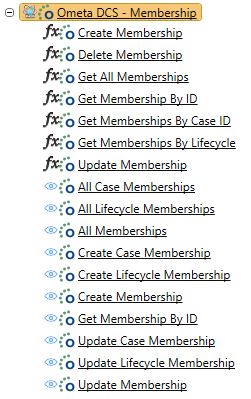
The following multi record views can be used to manage the permissions. Use the new, update and delete buttons to modify the permissions in the overview. Use these views on an ADM to manage the permissions.
Note
When using these views on a SharePoint page, make sure the access to those pages are strictly restricted to administrators!
All Case Memberships
This view can be used on a specific case / site to manage the permissions for that case only. When adding or updating a membership, no case or lifecycle selection will be shown as this membership will be added for the current case.
The best place for this view is on each specific site to manage the permissions for that site / case.
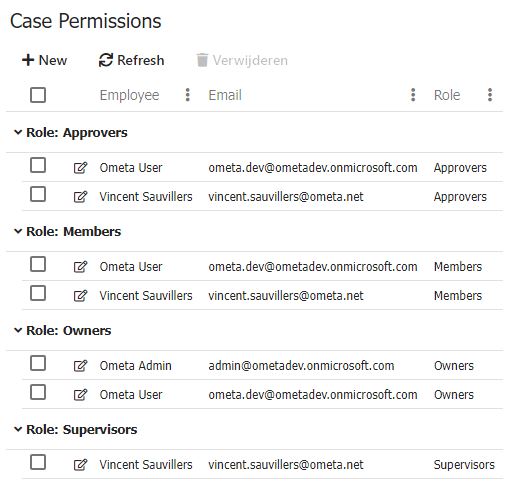
All Lifecycle Memberships
This view can be used to manage permissions for all cases of the current lifecycle. If the case property Lifecycle or Sublifecycle (multiple lifecycle names can be separated by a semicolon), the cases of those lifecycle will also be shown in the overview.
When adding or updating a membership, only the cases from those lifecycle will be shown in the picker.
The best place for this view is on a dashboard which contains an overview of all cases of other (sub)lifecycles.

All Memberships
This view can be used to manage permissions for all cases and lifecycles. Global permissions or lifecycle-wide permissions can be added by leaving the case and / or lifecycle field empty when adding or updating a permission.
The best place for this view is on a global administrator page on a dashboard. The access to this page or dashboard should be strictly restricted to administrators as global permissions can be added for every case!
