Checklist Common Issues
Configuration Check
As an initial check, make sure all configuration information is present. Especially, the appsettings.json must be present.
The file can be found at (default location): %OMETA_INSTALL_ROOT%\Ometa Software Suite\appsettings.json
For more information about OPC UA configuration, consult the following articles/paragraphs:
Note
Do not forget to restart the OPC UA Windows service or interface processes after changing any configuration.
Network Connectivity
First, verify that the OPC UA service started correctly by looking in the BAM portal or Windows Event Viewer, and make sure that no issues occured when starting the service.
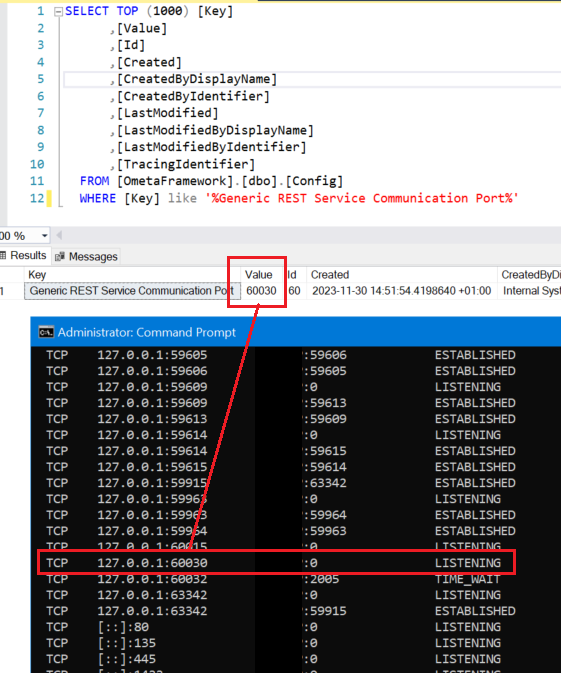
Also, the Generic REST service must be running. This is required when using subscriptions with method handling.
The easiest way to verify this is to run netstat -a on the server the Generic REST service is hosted on, and verify
that the configured port is listening:
Tip
Make sure that all settings in the article Generic REST - Application Pool and IIS Site are applied properly to make sure that the Generic REST service remains available at all times.
Especially the Advanced Settings, Preload Enabled are important.
And lastly, verify that the server hosting the OPC UA Windows service can access the Generic REST service.
Certificates
Verify that the certificates are placed in the correct certificate store:
- The certificate generated by the Ometa OPC UA interface must be placed under the Transport Certificate Store Path of the profile.
- The certificate retrieved from the OPC UA server must be placed under the Trusted Peers Store Path of the profile. If this is the first time connecting to this OPC UA server, it will be placed under the Rejected Certificate Store Path by default and must be moved to the Trusted Peers Store Path.
- For some OPC UA servers, it may also be necessary to accept the Ometa OPC UA certificate on the OPC UA server itself.

Warning
Make sure a proper certificate is selected, see OPC UA Template for specific advise regarding which certificates to use.