OPC UA Service
This service is responsible for monitoring sensor data on an OPC UA server and either writing the incoming data straight to a corresponding case in the Case Management system or calling a predefined method in the Framework itself.
Minimum Requirements
Login to the server where you installed the OPC UA Service and ensure that this server meets the Minimal System Requirements of an Ometa Framework server.
Important
Specifically make sure the IIS module Application Initialization is installed. Also, properly setup the Generic REST service. See Generic REST IIS configuration for more information.
Operation
Internally, the OPC UA service uses pipelines to process any incoming data from the monitoring activities. Depending on the subscription definition configuration, data is pushed through different pipelines: one for lifecycle handling and another one for method call handling. Structurally, each pipeline consists of an input buffer to temporarily store the data in case the processing speed of the pipeline is lower than the speed of which the data items are received, and one to several more steps to process that data itself and either call a method in the framework or update any case properties in the DCS database directly.
Method Handling
The method handling pipeline input buffer is important to prevent data loss in case of pipeline stalls due to blocked method calls. The method handling pipeline calls the Generic REST service as an intermediate agent to execute the defined method in the framework. However, to avoid BCM queueing only a predefined limited number of methods can be executed at the same time. When that maximum is reached by the Generic REST, it will block any requests from the OPC UA service and the method handling pipeline stalls. Only when the number of executing methods decreases again, execution requests will be granted again by the Generic REST. Any backlog in the input buffer will be processed and even be eliminated when the processing speed is higher than the speed of incoming data. Important for now, that the size of the input buffer is limited and when its maximum usage is reached, the method handling pipeline will start shedding any incoming data by not adding it to the buffer until the pipeline has processed enough items to make room for new data.
Consult the Generic REST configuration paragraph Database Config Table on how to adapt the Generic REST configuration settings.
Lifecycle Handling
Storing data directly in case properties involves more work and as such the pipeline requires more steps to process the data.
To speed up writing data to the DCS database, the lifecycle handling pipeline will group several data items together in a single batch. This way a large set can be pushed to the database in a single go, which is more performant than writing small data chunks with lots of calls. Additionally, for gaining as much performance as possible with the batch writing, the pipeline will wait with pushing a batch of data to the next stage until a full batch is collected. When the monitoring slows down, it may happen that an incomplete batch is waiting for a very long time in the grouping stage new data to arrive. Therefore a timing feature is present to force the incomplete batch through the pipeline when incoming data is slowing down.
As the last steps, a full batch of data is added to the historical data set of the case properties and the latest value within the batch is stored in the case properties themselves as the last up-to-date value.
Configuration
The OPC UA service doesn't require its own appsettings.json. By default it will use the general appsettings.json file in the %OMETA_INSTALL_ROOT%\Ometa Software Suite directory.
Other settings are defined in the dbo.Config table within the Ometa Framework database.
Configure Database Connection strings
If this isn't done already, read the Check Database Connection Configuration article for more information.
Pipelines Configuration
Pipeline configuration is important, as providing settings not in line with the needed solution can have a serious impact on the performance of the data processing activities. It is important to change the settings of the pipeline configuration depending on the expected monitoring activities of the OPC UA server.
Note
These settings used to be defined in an appsettings.json file but are moved to the Config table. Any pipeline setting still present in a configuration file will be ignored.
Use the framework settings dialog for modifying the values:
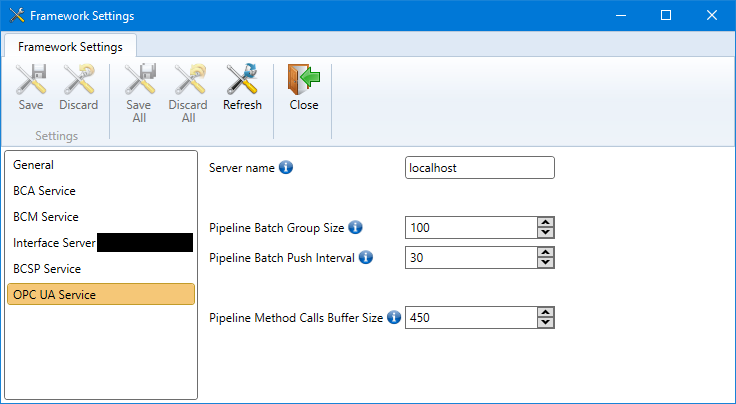
Details information about the settings:
| Setting | Description | Default Value |
|---|---|---|
| Server name | hostname where the OPC UA Service is installed | localhost |
| Pipeline Batch Group Size | Size of measured sensor data that will be grouped together in a single batch for improved data writing to the DCS database | 100 |
| Pipeline Batch Push Interval | Total number of seconds which the service waits before pushing any remaining sensor values to the next stages of the pipeline | 30 |
| Pipeline Method Calls Buffer Size | The buffer size used by the pipeline to temporarily store incoming data intended for method call processing | 500 |
Beware that these settings are ultimately stored in the dbo.Config table.
- Server name
- Pipeline Batch Group Size
- Pipeline Batch Push Interval
- Pipeline Method Calls Buffer Size
This is needed so that the OPC UA interface can know which host to connect to when sending commands to the service.
Warning
When to use 'localhost'
It is mandatory to set the value to localhost if both the OPC UA interface and OPC UA service are installed on the same host machine. This way the interface can connect properly to the service. Only if the service is installed on a different machine, the real host name of that machine can be used.
Database Config Table
The OPC UA Service needs some additional internal communication endpoints that other components and the service itself rely on. Following entries should be set in the dbo.Config table.
OPC UA Service Server: hostname where the OPC UA service is installed (defaults to localhost). This value can also be managed by the OPC UA Framework Settings dialog window as described above, see the item Server name.Generic REST Service Communication Server: hostname where the Generic REST Service is installed (defaults to localhost).Generic REST Service Blocked Method Limit: maximum number of methods that the Generic REST Service will execute on the framework at the same time at any given moment. Default value is 15. Minimum is 5 and maximum is 200.
Example:
| Name | Value |
|---|---|
| OPC UA Service Server | localhost |
| Generic REST Service Communication Server | localhost |
| Generic REST Service Blocked Method Limit | 15 |
A couple more entries are present. But those are updated dynamically by the OPC UA components (OPC UA service and parts in the Generic REST service):
OPC UA Service Port: port on which the OPC UA Service is listening for incoming command requests;Generic REST Service Communication Port: port on which the Generic REST Service is listening for incoming command requests;
Note
Dynamic port assignment
During startup of the OPC UA and the Generic REST services, both get their communication port numbers assigned dynamically. At that moment both services will update the port number values in the fields OPC UA Service Port and Generic REST Service Communication Port respectively in the dbo.Config table. Therefore the only settings to adapt, if needed, are the hostname values.
The Generic REST service will try a couple of times to get a port assigned, and even if it fails the service itself will not stop and keep serving the normal HTTP(S) requests. The OPC UA service however, needs that port to function properly. When that dynamic assignment fails, the OPC UA service will stop working. Fix the issue and attempt to restart the service.
Also the OPC UA interface needs access to the OPC UA service. When the port number of the OPC UA service is not present in the entry OPC UA Service Port, the interface will start returning error messages that it cannot connect to the OPC UA service.
Warning
Generic REST availability
There are 2 ways the OPC UA service saves data to the Ometa Framework, either via direct database writing or via Framework method calls. For the method calls to work, the Generic REST Service must be running.
The OPC UA service contains built-in logic to handle the case the Generic REST Service is down for a short period of time.
Delayed Startup
As the OPC UA service has several external dependencies, like SQL Server and the Generic REST service, it is mandatory that those dependencies are available and running when the OPC UA service is started by Windows.
But sometimes it can happen that some of those service dependencies themselves may take a bit more time to get in a running state and when the OPC UA service tries to connect, it will fail.
Therefor an extra delay of 30 seconds is added before the service starts its initialisation phase. This way Windows gets some extra resources it may need to get the entire host up and running, and the dependency services are more likely being available at the moment the OPC UA service continues its startup process.
Troubleshooting
Reporting Health Status
As it is very difficult to know what exactly is happening during the pipeline operations, the service will regularly (every minute) report a health status to BAM. This contains a list of all buffer usages of all pipeline blocks.
In the BAM portal, filter on the service name (Ometa.Framework.Services.OpcUa), component name (IoTDataProcessor) and severity as Information, and all records with the internal pipeline information will be shown.
Startup Issues
All service startup issues are bundled in the single article Troubleshooting OPC UA Windows Service Startup Issues. In that document all information is described in case the service doesn't want to start up or it starts but appears doing nothing at all.