Ometa Framework Release v6.4.0
Version 6.4.0 of the Ometa Framework has been released with the following new features and changes.
Before Upgrade
After Upgrade
Update SharePoint App Catalog
To activate the new caching strategies and performance fixes, the SharePoint Framework packages must be updated.
- Locate the latest
ometa-suite-apps.sppkgfiles in the Ometa Installation ZIP Folder. - Upload them to the Tenant or Site Collection App Catalog.
Refer to the upgrade guide for SharePoint Online
Refer to the upgrade guide for SharePoint On Premise
Update Profiles
REST - Graph Beta - On Behalf Of
If you're using the Graph Document ADM, make sure to fill in this new profile. This profile is used for the recycle bin functionality of the Graph API as this is not available in the v1.0 version yet.
Changed Functionality
Security Update: CORS & CSP Hardening
Good news: in almost all installations, no manual action is required. Starting from this version, all redirect URIs configured on your clients are automatically trusted and included in the AllowedOrigins list.
Why are we making these changes?
To align with modern browser security standards and protect the Ometa framework against vulnerabilities like Cross-Site Scripting (XSS) and clickjacking:
- CORS: Modern browsers actively block credentialed cross-origin requests when wildcard origins (
*) are used. Explicit origins are now required. - CSP (Content Security Policy): We introduced stricter policies to ensure only explicitly defined external domains are allowed to interact with the application.
What changed?
- Wildcards (
*) are removed: They are no longer supported inAllowedOriginsand will be automatically removed/ignored by the patcher. - CSP runs in Report-Only mode: The application now generates a CSP that defaults to logging violations in your browser console, without blocking resources yet.
Do I need to do anything?
You only need to take action if you use custom frontend applications or external services that bypasses the Ometa Authority Service to make cross-origin requests to Ometa, AND these domains are not configured as a redirect URI on a client.
If this applies to you (probably not), simply add the specific domains to the AllowedOrigins array in your appsettings.json file:
{
  "AllowedOrigins": [
    "https://custom.application.net"
  ],
  "EnableCsp": false
}
| Key | Type | Default | Description |
|---|---|---|---|
EnableCsp |
boolean |
false |
If false (or missing), CSP runs in Report-Only mode (logs violations). If true, the browser blocks non-compliant resources. |
AllowedOrigins |
string[] |
[] |
List of additional trusted domains. You do not need to add your client redirect URIs here; they are included automatically. |
Tip
Implementation Strategy
Keep EnableCsp on false for now. We highly recommend monitoring your browser console logs for any CSP violations caused by external integrations. Add these missing origins to the AllowedOrigins list now, so your environment is fully prepared for future updates where strict enforcement (EnableCsp: true) might become the default standard. Read more.
BAM Portal Security
Starting from this version, the BAM Portal is secured by the Authority Service of the Ometa framework to avoid that potential sensitive and internal working information is available for all to see. So only users with administrator rights, defined in the Business Connector, will be able to see the log information generated by the framework.
For the authorization procedure to work correctly, some additional configuration is required to set up. First, make sure the new 'Bam Portal Url' in the [dbo].[Config] table must be set to the main BAM Portal URL. See step 11 of the install process, BAM Portal for more information on how to do this.
Secondly, the related security client needs some adaptation by adding a proper redirect URL. Follow step 16, Redirect URLs for BAM Portal for additional information if needed.
And at last, use the security dialog window Persons and Users to enable the specific administrator rights on the necessary person accounts.
Multiple Record Icons
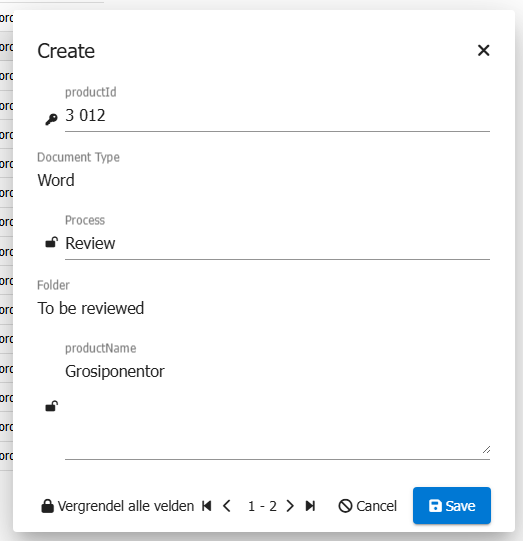
Previously, when opening a write view (create or update) with multiple records, the form displayed a key icon for primary key fields and a lock icon at the start of editable fields. This caused inconsistent label indentation and a cluttered appearance.
To improve clarity and visual consistency:
- The key icon for primary fields has been removed, as it did not provide meaningful information to end users.
- The lock icon, which indicates an editable field, has been moved to the end of the field. This change makes the form cleaner and ensures all labels are aligned properly.
Old
New

Same Source Allowed Percentage In Throttling
The Same Source Allowed Percentage In Throttling setting now applies to the Maximum Number of Instances instead of the number of currently active BCM slots. This means the allowed number of slots per source remains constant regardless of how many slots are currently in use, making throttling behavior more predictable.
For example, with a maximum of 100 instances and the setting at 20%, a single source can now always use up to 20 slots before being throttled — previously this limit fluctuated based on how many slots were active at that moment. This was most visible in item functions running in parallel (Setting 'Run sequential' disabled) as it lead to throttling if the server has a low number of active workers.
New Features
.NET 10 Platform Upgrade
The Ometa Framework has been upgraded to Microsoft .NET 10. This brings improved runtime performance, security patches, and long-term support. Ensure that .NET 10 is installed on all servers before upgrading (see Before Upgrade).
SharePoint Apps
- Unified Wrappers & Enhanced Performance: The wrappers for ADM, Smart Tiles, and Gantt (
ometa-suite-apps.sppkg) now share a unified codebase. This includes a new Discovery Service that executes only one network call per page load (instead of per component) and caches the result in SessionStorage to improve loading times. - Smart Caching Strategy (Ctrl + F5 Fix): Implemented a new versioning mechanism using a
version.jsonfile. The wrappers now automatically detect backend updates and force a refresh when necessary. This resolves the issue where users had to manually clear their browser cache (Ctrl + F5) after an upgrade. - Navigation Lifecycle Hooks: Introduced the
window.obiz.cslEvents.onBeforeNavigateAPI. This allows Custom Scripting Logic (CSL) to register cleanup functions that execute when a user navigates away from a page.- Supports: ADM and Smart Tiles web parts.
JSON Transformation
- JSONata Transformation: Introduced support for JSONata expressions in Ometa Nexus, allowing for advanced data manipulation and transformation of the results returned by methods.

Cards
The Cards and Modern Forms components have received major functional updates:
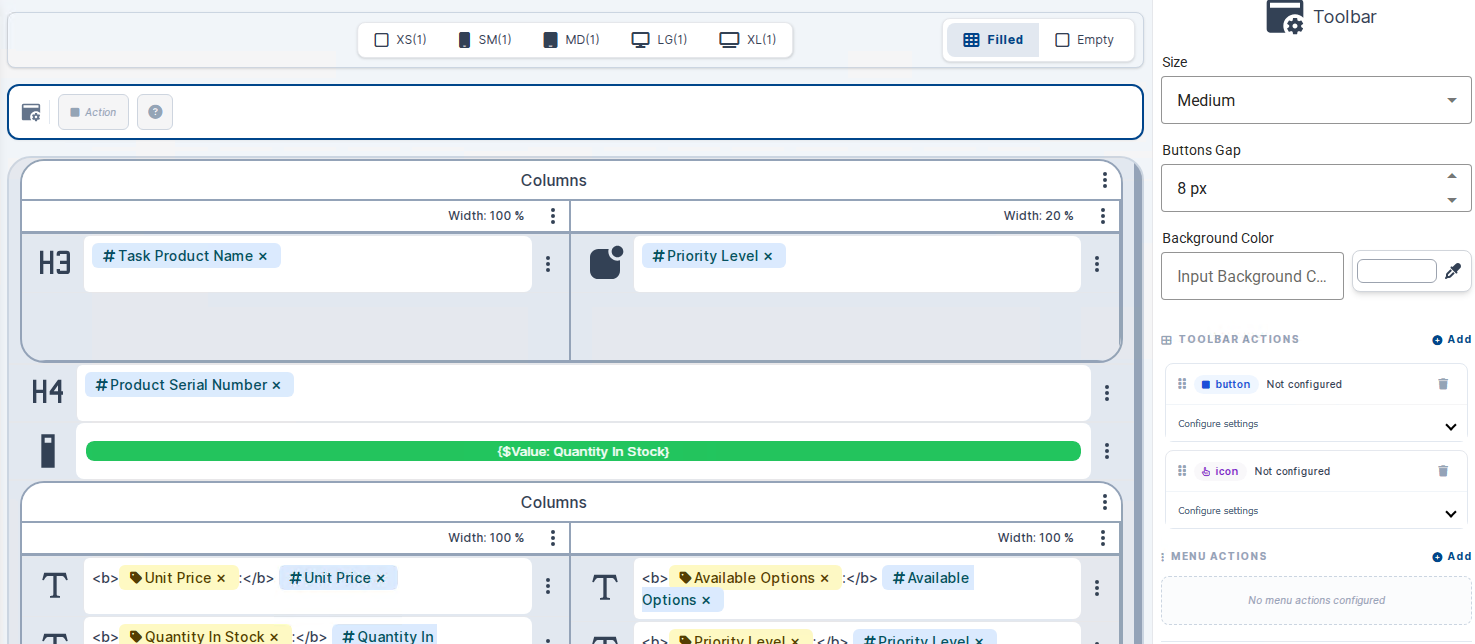
Toolbar:
Added support for configurable toolbars with header and icon buttons.

Pager:
Cards now support built-in pagination for larger data sets, this becomes automatically available when paging is enabled on a multi record view.
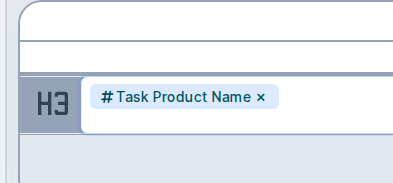
Chips:
Visualize labels, values and language labels using a modern "chip" UI component.
Empty Template:
An empty cards template is now available, allowing you to build a fully custom card layout for when no records are returned resulting normally in a boring no results message.

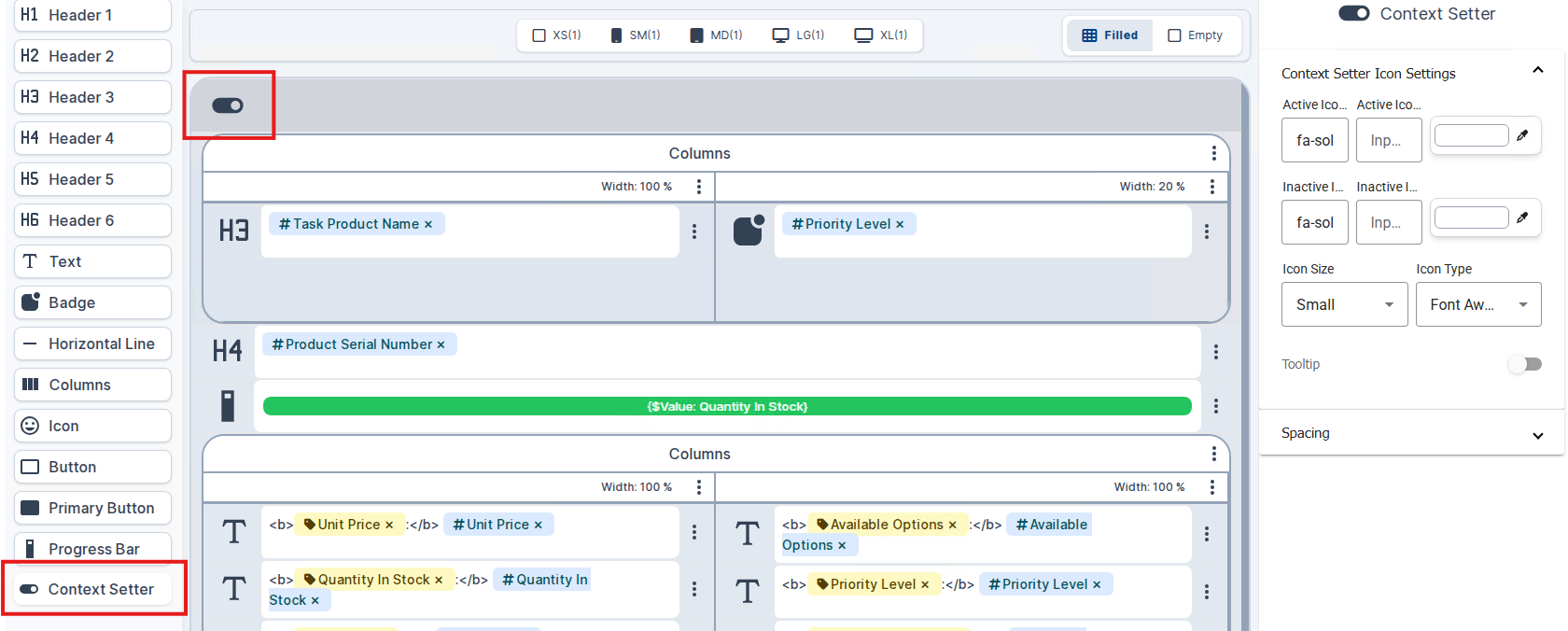
Context Setter:
Cards now support a context setter element, enabling cards to set context values that can be consumed by other components on the page.
Breakpoints:
The breakpoints for the different media queries have been moved to the top.

Timeline
Collapsed Groups: You can now set groups to be closed by default. This significantly improves performance when dealing with large datasets (1000+ groups).
Refer to the docs for more information
Building Blocks
SharePoint.BuildingBlocks.Fields:
- Added option to add a default formula to a field.
- Added option to add a validation formula with a message to a field.
Ensure ItemandEnsure Filewill now process taxonomy / metadata field values. The labels or IDs can be used.- Resolved an issue where the required property of a content type field on a list was not property set.
- Added a new building block to ensure a managed metadata field to a site or list.
- Added functionality to SharePoint interface to update a managed metadata field.
Refer to the API for more information
Providers
You can now configure generic OpenID Connect provider with custom claim mappings. This is fully backwards compatible with existing ADFS setups.
More information about OpenID Connect
More information about Framework Configuration
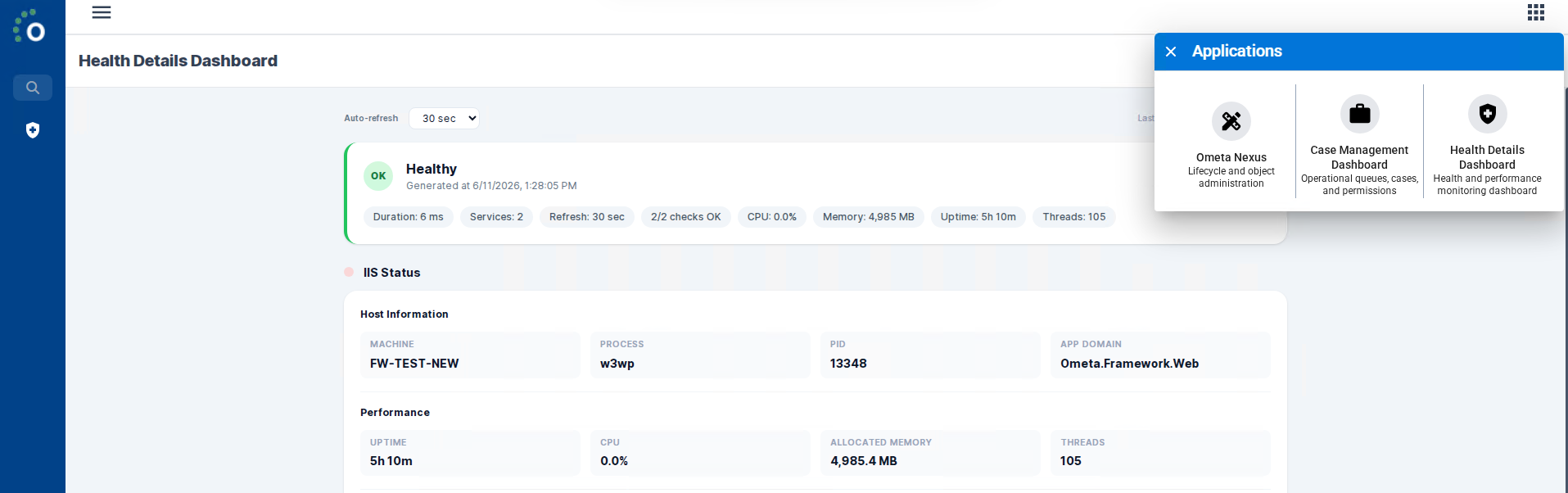
Health API & Dashboard
A new Health API and accompanying dashboard have been added to the framework. Administrators can use this to monitor the health and availability of the Ometa services at a glance, making it easier to diagnose issues and verify that the Ometas Framework is running correctly.
Refer to the documentation to set this up.
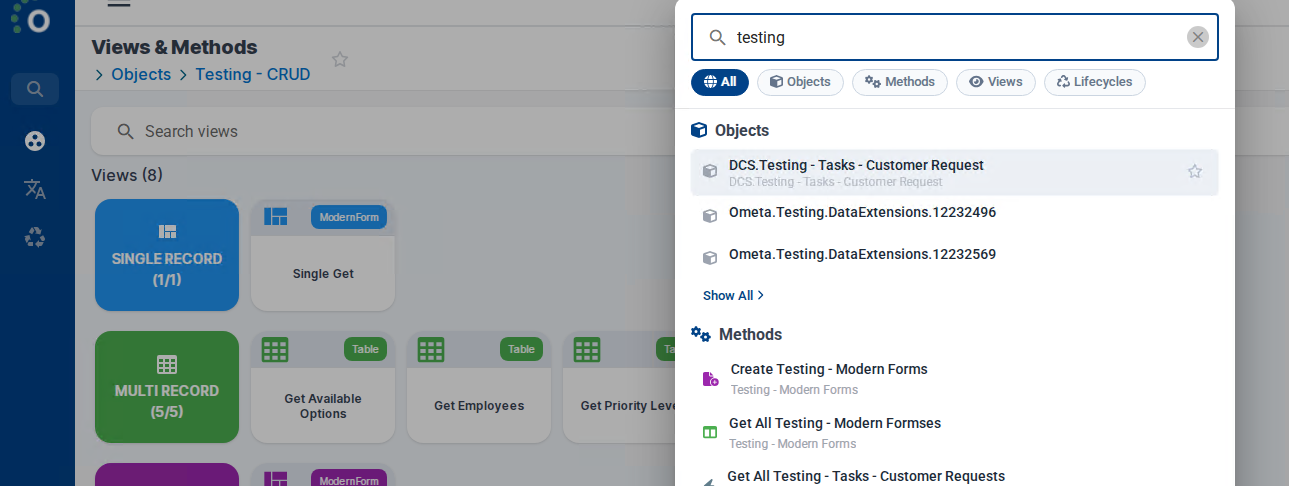
Ometa Nexus — Global Search
Ometa Nexus now features a Global Search window, allowing users to quickly search across all accessible data from a single search bar. This significantly speeds up navigation and finding records without having to open specific views first.
Press F3 or use the Global Search in the left menu.
Modern Forms — Horizontal Tab Indexes
Modern forms now support an optional horizontal tab layout. When enabled, tab indexes are rendered as horizontal tabs instead of the default vertical layout, giving administrators more flexibility in designing forms that suit their data entry workflows.

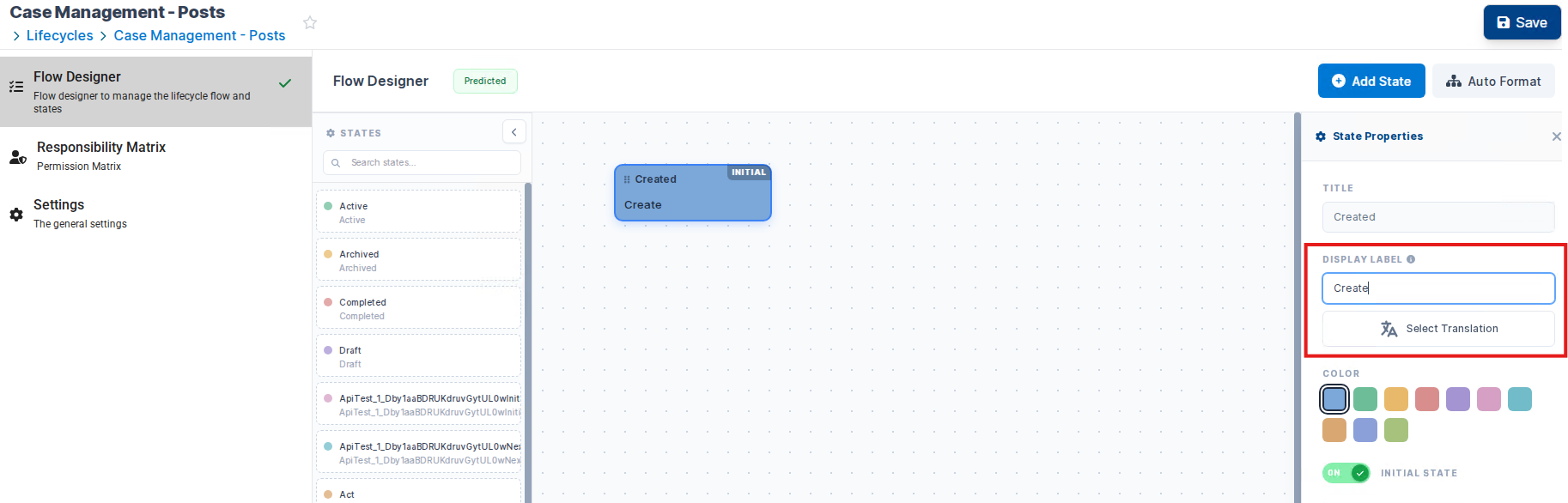
State Labels
States can now have labels assigned to them. This allows you to display a user-friendly, translatable name for each state in the lifecycle, improving clarity in the user interface.
Note
The Flow Designer in Ometa Nexus has been introduced with support for state label configuration. Going forward, configuration capabilities will be progressively added to Nexus as part of the platform transition away from the Ometa Business Connector. For features not yet available in Nexus, the Ometa Business Connector can still be used.
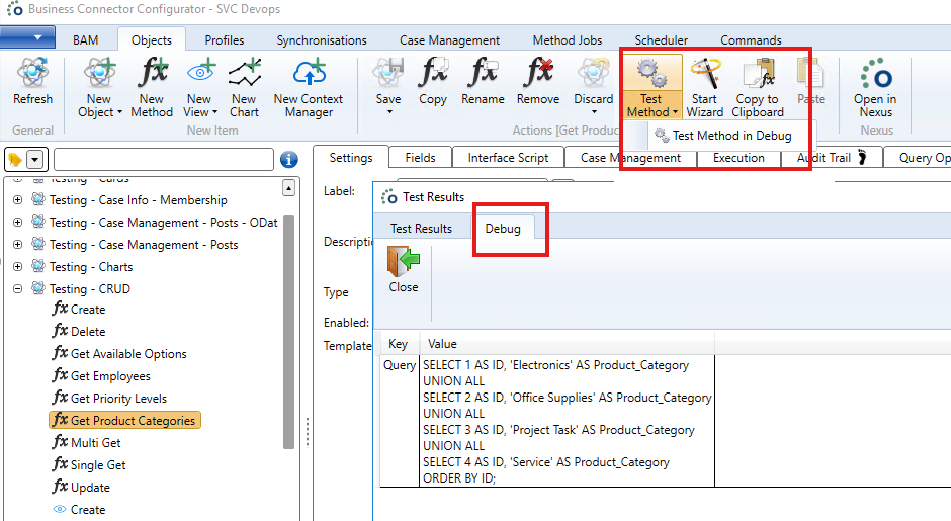
Method Debug Mode
It is now possible to execute ODBC, REST, OData and Web Service methods in debug mode. This provides detailed logging and diagnostics during method execution, making it significantly easier to troubleshoot integration issues without modifying the method configuration.
Job Execution History
The recording of job execution history has been improved. Job logs now capture more detailed information about each execution run, making it easier to review past job runs, identify failures, and analyze performance trends.
Refer to the documentation:
Data Extensions — Grouped By Fields
Output data extensions now support grouped by fields. This allows you to configure grouping on the output of data extensions. This is useful when the output data extension method requires input values to generate the additional data for merging with the main output.
Refer to the documentation.
Hot Reload Custom DLL
Custom DLLs loaded by the BCS_DLL4 process can now be hot-reloaded without restarting the service. When a new version of a DLL is deployed, the framework detects the change and loads the updated assembly automatically, reducing downtime during development and deployment cycles.
REST Interface — OPTIONS & HEAD Support
The Generic REST interface now supports OPTIONS and HEAD HTTP methods in addition to the existing GET, POST, PUT, PATCH and DELETE methods. Additionally, a new option has been added to include response headers in the method output, providing more control over REST-based integrations.
Performance Improvements
Case Management (DCS)
- Hash-Based Matching: We replaced full table scans with an indexed, hash-based URL matching system (
FindCaseByUrl). - Result: Searching through 1.4 million cases, which previously took ~5 seconds, is now instant.
Framework Caching
- Query Optimization: We significantly reduced the number of queries executed during an ADM "prepare" call.
- Efficiency: By leveraging new caching and checksum logic, the number of required queries has been reduced from 20 down to only 3 or 4 per call.
Method Cache (BCM)
- Optimized Retrieval & Clearing: The method cache in the Business Connector Manager has been optimized for faster retrieval and more efficient cache invalidation, reducing overhead when executing methods.
Case Creation
- Bulk Ensure: Case creation performance has been enhanced by implementing a bulk "ensure" mechanism. When creating multiple cases or cases with many properties, the framework now batches the required checks into fewer database operations.
Interface Script Caching
- Runtime Caching: Interface scripts are now cached at runtime using the configuration cache. This eliminates redundant script compilation on repeated executions, improving response times for interfaces that use scripting.
Bug Fixes
ADM & Modern Forms
- Fixed a browser crash that could occur when selecting multiple images in a media field.
- Fixed an issue where print height and sorting/filtering settings could break headers on other pages.
- Fixed inaccurate data returned by
CSL.multiRecord.getPageData()when page filters were empty. - Fixed an error when
CSL.multiRecord.selectdoes not find any matching data to select. - Update form now correctly listens to context setter info instead of the record.
Authority & Authentication
- Fixed an issue where iPhone users were unable to use Windows Login on newer iOS versions.
Cards
- Fixed toolbar button styling issues.
- Fixed an issue where real-time updates incorrectly replaced single record cards with data from a different card.
- The pager is now automatically hidden when pagination is not relevant (e.g., when all records fit on one page).
- Fixed an issue where the wrong item function was executed when "Show in menu" was enabled with multiple items.
Case Management (DCS)
- Fixed duplicate state tasks breaking the start conditions evaluation.
- State retrieval by name is now case-insensitive.
- Fixed a conversion error in
GetCaseContextwhen an invalid invariant value is used. - Enhanced stability by optimizing transaction logic during case creation.
- Fixed an issue with lazy loading upon save where property values were not set in the fallback column.
Document ADM
- Resolved a context token issue in breadcrumbs when the document ADM is empty.
- Fixed subsite and folder resolution for non-default languages in Graph-based Document ADM.
- Fixed an issue where condition sets were incorrectly seeded on extensions with no root condition.
Business Connector Services
- Fixed an issue in BCS REST where request content was already disposed in debug mode.
- Fixed overriding OData version for query option placeholders in interface scripts.
- Resolved an issue with multiple usernames and people fields on SharePoint update operations.
- Fixed a race condition in BCSL interface process connection acceptance.
- Added version checking to BCM to prevent clients with different version numbers from connecting.
- Improved OData
$filterquery translation. - Fixed duration values in OData Job Execution Log retrieval.
Transfer (Import/Export)
- Fixed import of disabled view functions.
- Real-time keys are now included as dependencies when exporting through the API.
- Improved export of virtual profiles.
- Fixed import of start conditions with nested expressions on existing state actions.
- Improved import validation of extensions on auto-generated lifecycle objects.
- Fixed compilation checking for export and resolved a selected extension field type mismatch issue.
- Fixed import of data editing for timelines.
Timeline
- Duplicate ID errors are now properly shown to the user.
- Fixed an issue where copy on timeline failed when an authorization policy was applied.
WPF Designer
- Fixed initialization of ViewContext for new views.
- Fixed rename object validation when using grouped actions.
- Prevented a rare issue with empty tabs in objects during visual tree rebuild.
- Fixed "Go to" buttons not working when a filter was applied on the objects list.
- Fixed an error when switching in the object tree with method retry settings.
- Improved critical error handling to prevent rare crashes during resource disposal.
Framework & Core
- Fixed an issue where data extensions would still execute after an error had occurred.
- Fixed the inability to create multiple providers of the same provider type.
- Fixed object XML file syncing to database after view type modification.
- Fixed various issues regarding user and group syncs via OData and group sync towards SharePoint.
- Fixed main method execution result not passing through to post-execution action methods.
- Fixed object renaming to correctly adapt object name references.
- Fixed issues in CORS policy setup, results pagination, DMS requests towards MinIO, and Object Reference errors in BCS OData/Generic REST.
- Added a no-cache header for
.htmlfile requests to prevent stale content after upgrades. - Flow designer states now correctly maintain full height.
Setup & Configuration
- Prevented overwriting of mail templates during setup.
- Improved reference tracking when copying timeline and gantt chart configurations.
Security
- Multiple security enhancements have been applied across the framework, including fixes to tasks, core framework, and authorization components.