Ometa Framework Provider Configuration
When a provider is configured on its owning platform, we can start using it within the Ometa Framework. To enable a provider, startup the WpfGUI application, click on the application menu and click on providers.
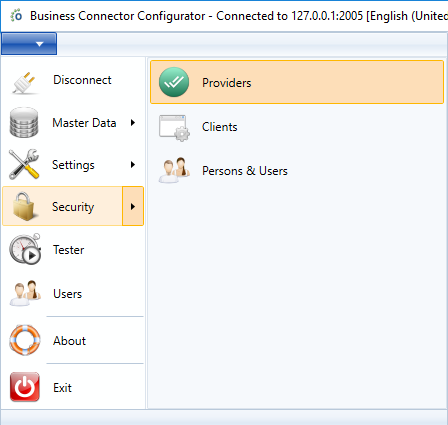
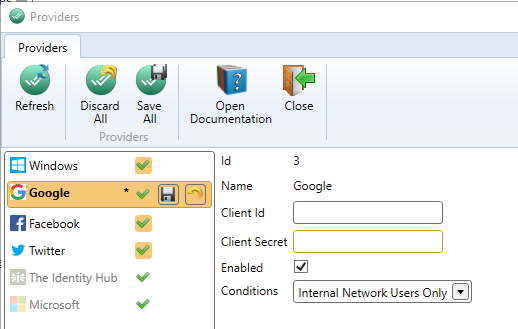
For each provider, you'll need to configure some parameters if you want to use them in the Ometa Framework. To obtain those parameters, please read the platform configuration article of the provider you wish to enable.
Tip
You can create multiple instances of the same provider type. For example, you might configure two Microsoft providers linked to different Azure applications, or multiple Google providers for different organizational accounts. Each instance is configured independently with its own client id, certificate/secret, and other settings.
The only exception is the Windows provider, which is limited to a single instance and cannot be removed.
Note
The Windows provider is an exception because a local AD does not support OAuth2.0. If you want to use the Windows provider, the only thing you need to do is enable it here and enable Windows authentication on the Authority Service. Read the Windows (AD) article for more information on how to do this.
The client id is assigned to your app when you configured it on its platform.
Microsoft
If you enable the Microsoft provider, you can configure some additional settings.
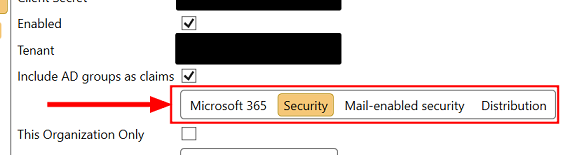
The Microsoft provider has the capability to include assigned AD groups in Microsoft Entra as claims during the login to the Ometa framework. This feature is enabled by default. If this is not desired behaviour or there are issues (due to lacking access rights or too many AD groups assigned), there are 2 options to change the AD groups retrieval, either by fully disabling the automatic loading or retrieve a limited set of AD groups for inclusion as claims:
Disable the automatic loading by unchecking the option Include AD groups as claims.

Filter AD groups to a limited set. In the example only Security AD groups will be added. Multiple selections are possible.
Important
If the Include AD groups as claims feature is enabled but no filter is selected, the Microsoft provider will always fall back to the loading of all AD groups with property SecurityEnabled set to True as that was the behaviour in previous framework versions.
Please note that different types of AD groups can have the property SecurityEnabled set to True, not only Security groups. For more information, consult the article Group types in Microsoft Entra ID and Microsoft Graph.
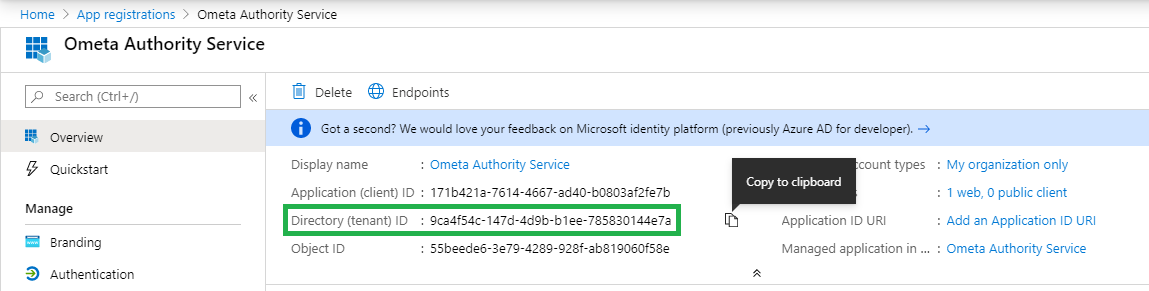
OpenID Connect
If you have an authentication provider which fully supports the OpenID Connect flow (e.g.: AD FS), you can create a provider for it. In this provider, you'll need to configure the client id, the client secret and the authority.
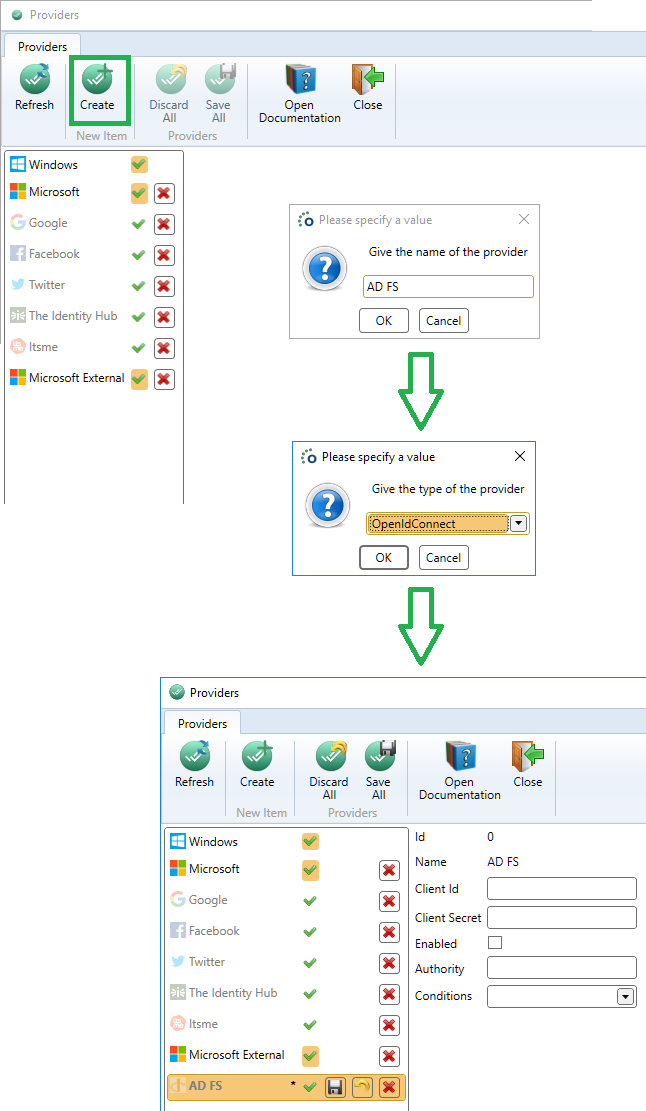
The client id is assigned to your app when you configured it on its platform.
End-user experience
Only enabled providers with filled-in client id, secret and other required properties will be shown on the providers screen of the user.

Note
If only one provider is enabled, the user will never see the screen and will immediately be redirected to the enabled provider.
Important
If you make changes to the client id or secret of one or more providers, you must restart the Authority Service for these changes to take effect. Enabling or disabling a provider is possible without restarting the Authority Service.
Claim Mappings
Each provider will return a set of claims containing information about the logged in user. It is possible to map the returned claims to other claims before an identity profile is created for that user in the Ometa Framework.
A perfect use case for this is to map claims containing role information to our adgroup claim which ends up in the identity.groups context and can be used in conditions to check for memberships.
So: claim mappings define how incoming claims from authentication providers are transformed before the identity profile is created inside the Ometa Framework.
Until a management UI is available, claim mappings must be configured directly in the database.
Tip
To know which claims your provider sends to the Ometa Framework, you can search for the informational log message Logged claims before mapping after a successful authentication took place.
Important
At this moment, claim mappings are only supported on providers using the OpenID Connect flow. These are:
- Microsoft
- ItsMe
- Extra OpenID Connect providers configured in the framework (e.g.: AD FS)
When are claim mappings applied?
Claim mappings are applied:
- After authentication succeeds
- Before the identity profile is created
- Before conditions are evaluated
This ensures that mapped claims are available throughout the framework, including:
identity.groups- condition sets
- authorization logic
ClaimMappings table
Claim mappings are stored in the ident.ClaimMappings table.
Each record defines one mapping rule that copies a claim from a source claim type to a target claim type.
Columns
| Column | Type | Description |
|---|---|---|
Id |
int | Primary key |
ProviderId |
int, nullable | Provider this mapping applies to. NULL means global (applies to all providers). |
SourceClaimType |
nvarchar | Claim type coming from the authentication provider |
TargetClaimType |
nvarchar | Claim type that will be added to the identity |
RemoveSourceClaim |
bit | Indicates whether the source claim should be removed after mapping |
OverwriteTargetClaim |
bit | Indicates whether existing target claims should be removed before adding new ones |
IsActive |
bit | Enables or disables the mapping |
CreatedOn / LastModified / ... |
datetime | Audit fields |
Global vs provider-specific mappings
Global mapping
A mapping with ProviderId = NULL applies to all providers.
Example: map a role claim for every provider.
INSERT INTO ClaimMappings
(
    ProviderId,
    SourceClaimType,
    TargetClaimType,
    RemoveSourceClaim,
    OverwriteTargetClaim,
    IsActive
)
VALUES
(
    NULL,
    'role',
    'adgroup',
    0,
    0,
    1
);
Provider-specific mapping
A mapping with a ProviderId only applies to that provider.
Example: map roles coming from an AD FS provider to adgroup.
INSERT INTO ClaimMappings
(
    ProviderId,
    SourceClaimType,
    TargetClaimType,
    RemoveSourceClaim,
    OverwriteTargetClaim,
    IsActive
)
VALUES
(
    3, -- ProviderId of AD FS
    'role',
    'adgroup',
    1,
    0,
    1
);
Multiple mappings for the same source claim
It is allowed to configure multiple mappings for the same source claim as long as the target claim differs.
Example: copy a role claim to two different targets.
INSERT INTO ClaimMappings
(ProviderId, SourceClaimType, TargetClaimType, RemoveSourceClaim, OverwriteTargetClaim, IsActive)
VALUES
(NULL, 'role', 'adgroup', 0, 0, 1);

INSERT INTO ClaimMappings
(ProviderId, SourceClaimType, TargetClaimType, RemoveSourceClaim, OverwriteTargetClaim, IsActive)
VALUES
(NULL, 'role', 'security.role', 0, 0, 1);
Removing source claims
If RemoveSourceClaim is set to 1, the source claim will be removed after all mappings have been applied.
This allows patterns such as:
- Copy a provider-specific claim to a framework-specific claim
- Remove the original provider claim to keep the identity clean
Example:
INSERT INTO ClaimMappings
(
    ProviderId,
    SourceClaimType,
    TargetClaimType,
    RemoveSourceClaim,
    OverwriteTargetClaim,
    IsActive
)
VALUES
(
    NULL,
    'role',
    'adgroup',
    1,
    0,
    1
);
Important
Certain reserved claim types (such as sub, iss, aud, etc.) will never be removed, even if RemoveSourceClaim is set to 1. A warning will be written to the logs when such a mapping is encountered.
Overwriting target claims
If OverwriteTargetClaim is set to 1, existing target claims will be removed before new ones are added.
This is useful when:
- Providers emit default claims you want to fully replace
- You want deterministic claim values
Example:
INSERT INTO ClaimMappings
(
    ProviderId,
    SourceClaimType,
    TargetClaimType,
    RemoveSourceClaim,
    OverwriteTargetClaim,
    IsActive
)
VALUES
(
    1,
    'role',
    'adgroup',
    1,
    1,
    1
);
Validation rules enforced by the framework
The framework enforces the following rules at runtime:
- A mapping where SourceClaimType equals TargetClaimType is ignored
- Inactive mappings (IsActive = 0) are ignored
- Reserved claims cannot be removed
- Duplicate target claims with the same value are not added
Warnings for invalid mappings are written to the logs.
Tip
Follow these best practices when configuring claim mappings:
- Prefer global mappings unless provider-specific behavior is required
- Avoid removing source claims unless there is a clear need
- Keep claim types consistent (case-insensitive but stored consistently)